Hi zusammen.
Kurz zur Info: Ich habe eine “neue” Kältebringer Trio-Klima-Split (vll. 4 Wochen). Ich habe jetzt nach weiterer Recherche den folgenden Thread (Midea branded AC’s with ESPhome (no cloud) - ESPHome - Home Assistant Community) gefunden, mit dem ich es geschafft habe den ESP per 4xJumper-Kabel direkt an den 4-Pin-Anschluss anzuschließen und zu steuern!
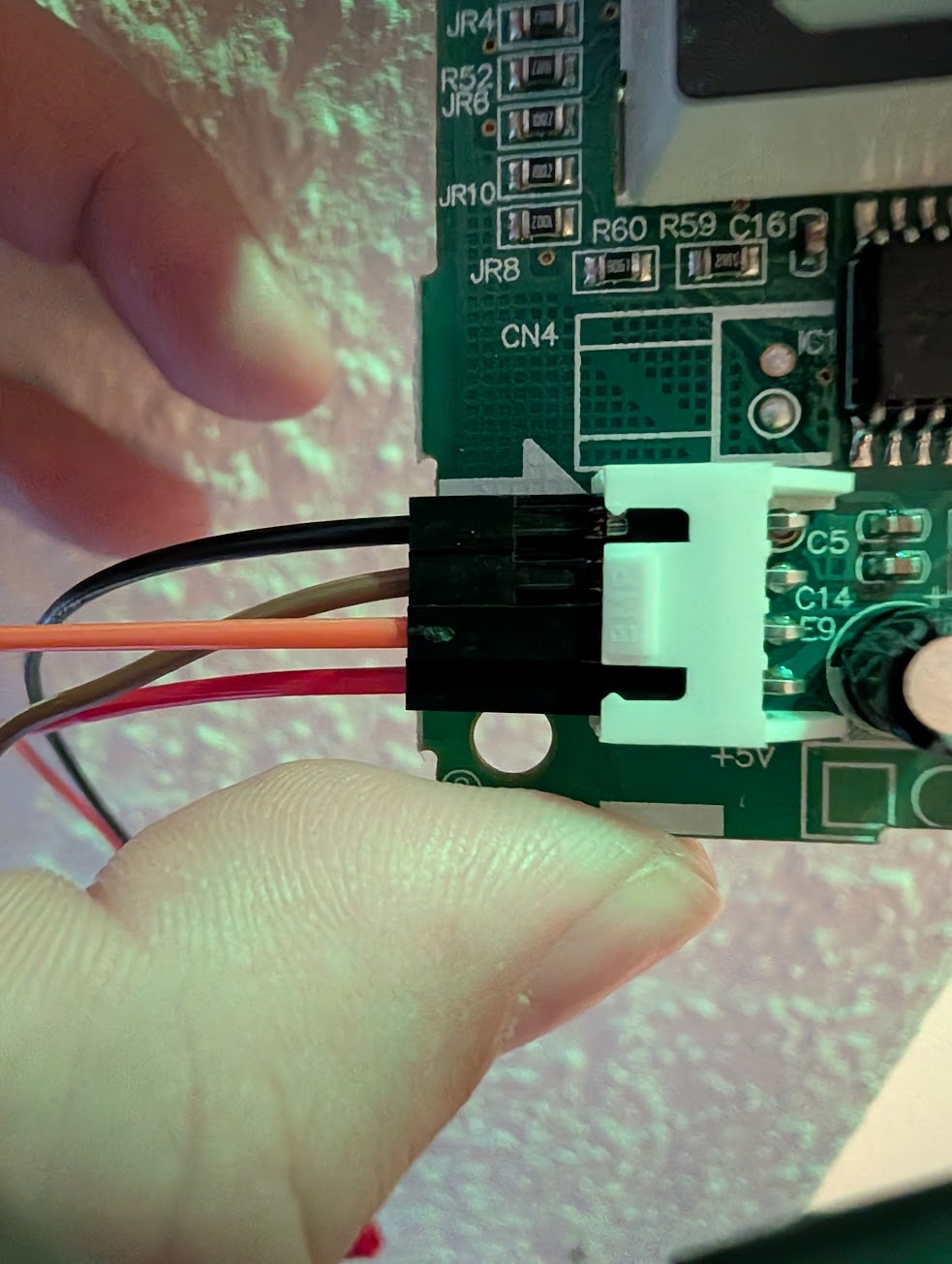
Jetzt muss ich das nurnoch sauber angelötet bekommen und dann sollte das laufen.
Danke für eure Hilfe und Gruß,
Aezaekiel
UPDATE auf Anfrage von @Traktorist:
Das hier ist meine funktionierende ESPHome Konfiguration (für meinen ESP8226 D1 Mini):
esphome:
  name: ${node_name}
  comment: ${friendly_node_name}

esp8266:
  board: esp01_1m

substitutions:
  node_name: ac-buero #unique name.
  node_id: ac_buero    #unique id.
  friendly_node_name: "AC Buero"

wifi:
  ssid: !secret wifi_ssid
  password: !secret wifi_password

# Enable fallback hotspot (captive portal) in case wifi connection fails
  ap:
    ssid: ${node_name} " FB"
    password: "TopSecretPassword"

captive_portal:

# Enable Home Assistant API
api:
  encryption:
    key: "key" # Optional in case set on HA esphome addon

# Enable Over The Air updates
ota:
  - platform: esphome
    password: "OTAKey"

# Disable logging
logger:
  baud_rate: 0
  logs:
    sensor: ERROR
    duty_cycle: ERROR
    binary_sensor: ERROR
    light: ERROR

# Optional, Enable Web server; start internal webserver so it can be used stand-alone
web_server:
  port: 80

# Optional, Sync time with Home Assistant.
time:
  - platform: homeassistant
    id: ${node_id}_homeassistant_time

# Binary Sensors.
binary_sensor:
  - platform: status
    name: ${friendly_node_name} Connection Status
    id: ${node_id}_connection_status

# Sensors.
sensor:
  - platform: uptime
    name: Uptime Sensor
    id: ${node_id}_uptime_sensor
    icon: mdi:clock-start
    update_interval: 60s
  - platform: wifi_signal
    name: ${friendly_node_name} WiFi Signal
    id: ${node_id}_wifi_signal
    update_interval: 60s
  - platform: template
    name: ${friendly_node_name} fan mode
    id: ${node_id}_fan_mode
    internal: true
    update_interval: 10s
    lambda: !lambda |-
      if (id(${node_id}_my_climate).fan_mode == 2)
      {
        if (id(${node_id}_select_fan_mode).state != "Auto")
        {
          auto call = id(${node_id}_select_fan_mode).make_call();
          call.set_option("Auto");
          call.perform();
        }
      }
      else if (id(${node_id}_my_climate).fan_mode == 3)
      {
        if (id(${node_id}_select_fan_mode).state != "Low")
        {
          auto call = id(${node_id}_select_fan_mode).make_call();
          call.set_option("Low");
          call.perform();
        }
      }
      else if (id(${node_id}_my_climate).fan_mode == 4)
      {
        if (id(${node_id}_select_fan_mode).state != "Medium")
        {
          auto call = id(${node_id}_select_fan_mode).make_call();
          call.set_option("Medium");
          call.perform();
        }
      }
      else if (id(${node_id}_my_climate).fan_mode == 5)
      {
        if (id(${node_id}_select_fan_mode).state != "High")
        {
          auto call = id(${node_id}_select_fan_mode).make_call();
          call.set_option("High");
          call.perform();
        }
      }
      return id(${node_id}_my_climate).fan_mode;

# Text Sensors.
text_sensor:
  - platform: version
    name: ${friendly_node_name} ESPHome Version
    id: ${node_id}_esphome_version
  - platform: wifi_info
    ip_address:
      name: ${friendly_node_name} IP Address
      id: ${node_id}_ip_address
      icon: mdi:ip-network

# Select.
select:
  - platform: template
    name: "Fan mode"
    id: ${node_id}_select_fan_mode
    icon: mdi:fan
    optimistic: true
    options:
      - Auto
      - Low
      - Medium
      - High
    on_value:
      then:
        - lambda: |-
            auto call = id(${node_id}_my_climate).make_call();
            call.set_fan_mode(x.c_str());
            call.perform();

# Switches.
switch:
  - platform: restart
    name: ${friendly_node_name} Restart
    id: ${node_id}_restart
    icon: "mdi:restart"
  - platform: shutdown
    name: ${friendly_node_name} Shutdown
    id: ${node_id}_shutdown
  - platform: safe_mode
    name: ${friendly_node_name} Restart (Safe Mode)"
    id: ${node_id}_safe_mode
  - platform: template
    name: ${friendly_node_name} Beeper
    icon: mdi:volume-source
    id: ${node_id}_beeper
    restore_mode: RESTORE_DEFAULT_OFF
    optimistic: true
    turn_on_action:
      midea_ac.beeper_on:
    turn_off_action:
      midea_ac.beeper_off:

# Define UART pinout
uart:
  tx_pin: 1
  rx_pin: 3
  baud_rate: 9600

climate:
  - platform: midea
    id: ${node_id}_my_climate   # Use a unique id
    name: ${node_name}          # Use a unique name

# Optional settings overrides.
    period:  2s                        # Optional
    timeout: 4s                       # Optional
    num_attempts: 3              # Optional
    visual:                              # Optional
      min_temperature: 17 °C    # min: 17
      max_temperature: 30 °C    # max: 30
      temperature_step: 0.5 °C  # min: 0.5

    #autoconf=true
    # All capabilities in the section below are detected when autoconf = true:
    supported_modes:
      - FAN_ONLY
      - HEAT_COOL
      - COOL
      - HEAT
      - DRY
    custom_fan_modes:
      - SILENT
      - TURBO
    supported_presets:  # All capabilities in this section detected by autoconf.
      - ECO
      - BOOST
      - SLEEP
    custom_presets:     # All capabilities in this section detected by autoconf.
      - FREEZE_PROTECTION
    supported_swing_modes:
      - VERTICAL
      - HORIZONTAL
      - BOTH
    outdoor_temperature:  # Optional. Create outdoor unit temperature sensor (may display incorrect values after long inactivity).
      name: "Temp"
    power_usage:          # Optional. Create power usage sensor (only for devices that support this feature).
      name: "Power"
    humidity_setpoint:    # Optional. Create indoor humidity sensor.
      name: "Humidity"`Vorformatierter Text`
Angeschlossen ist er wie folgt (am Board von Oben nach Unten):
| Kabel/Klemme | Anschluss am D1 Mini |
|---|---|
| SCHWARZ | GND |
| GRAU/BRAUN | TX |
| GELB/ORANGE | RX |
| ROT | 5v |
Vermutlich waren in meinem ersten Versuch TX und RX vertauscht oder die Konfiguration falsch.
Ich hoffe, das hilft dem Ein oder Anderen hier.