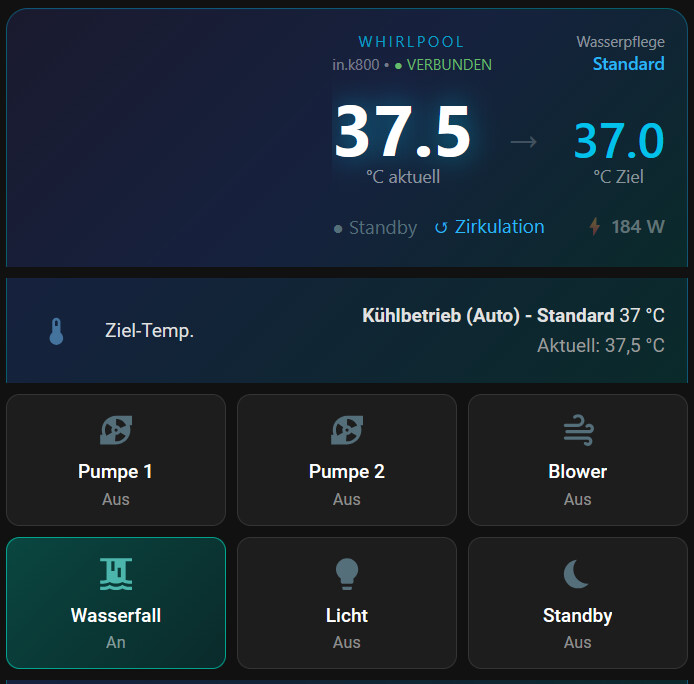
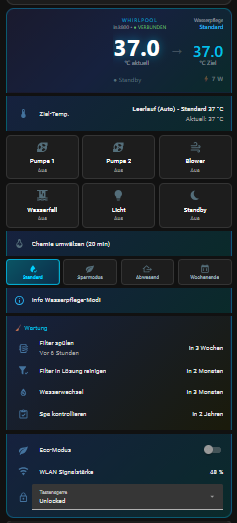
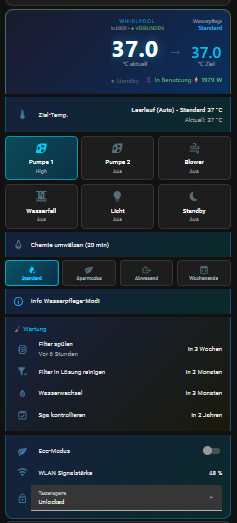
Ich habe mir von Claude und Gemini eine Karte für die Steuerung vom Whirlpool erstellen lassen und möchte euch den Code nicht vorenthalten. Die Karte kann bestimmt noch verbessert werden. Bei mir ist sie schon ein paar Wochen im Einsatz, aber sicher noch nicht optimal.
Anleitung + Code, von Gemini und Claude generiert
Features der Karte:
- Dynamische Farben: Die Karte ändert ihre Hintergrund- und Akzentfarben je nach Zustand (Rot beim Heizen, Hellblau beim Filtern, Grün/Türkis bei aktiver Benutzung, Dunkelblau im Standby).
- Zweistufige Pumpenanzeige: Liest den Status direkt aus dem Gecko-Sensor aus und zeigt an, ob die Pumpe auf “Low”, “High” oder “Aus” steht.
- Alles auf einen Blick: Ziel-Temperatur, aktueller Verbrauch (W), Wasserpflege-Modi und Wartungs-Intervalle direkt integriert.
- Sauberes Info-Menü: Erklärt (z.B. für Gäste) auf Knopfdruck in einem kleinen Popup, was die verschiedenen Wasserpflege-Modi bedeuten.
Hier sind ein paar Eindrücke, wie sich die Karte optisch anpasst:
 Was wird für diese Karte benötigt?
Damit die Karte funktioniert und das Design wie auf den Bildern aussieht, müssen folgende Voraussetzungen erfüllt sein:
- Gecko Integration: Dein Whirlpool muss natürlich über die offizielle Gecko Integration in Home Assistant eingebunden sein (z.B. über das in.touch 2 WLAN-Modul).
- HACS Frontend-Erweiterungen: Folgende Custom-Cards müssen installiert sein:
button-card (Für die komplexen Buttons und das dynamische Design)card-mod (Extrem wichtig: Wird genutzt, um Ränder zu entfernen, Farben zu überschreiben und die Karten nahtlos ineinander fließen zu lassen)
 Was muss angepasst werden? (Entitäten)
Ich habe bei mir alle Entitäten mit dem Präfix whirlpool_ versehen. Am einfachsten kopiert ihr den Code unten in einen Texteditor und nutzt die Suchen & Ersetzen-Funktion, um whirlpool_ durch euren Präfix (z.B. spa_ oder den von HA generierten Namen) zu ersetzen.
1. Standard Gecko-Entitäten:
Überprüft, ob diese Namen mit euren übereinstimmen:
- Temperatur:
sensor.whirlpool_current_temperature & sensor.whirlpool_real_target_temperature
- Sensoren:
binary_sensor.whirlpool_heating, binary_sensor.whirlpool_filter_status_clean, binary_sensor.whirlpool_spa_in_use, binary_sensor.whirlpool_circulating_pump, binary_sensor.whirlpool_ozone
- Status & Wartung:
sensor.whirlpool_status, select.whirlpool_watercare, select.whirlpool_lock_mode
- Buttons/Diagnose:
button.whirlpool_reconnect, sensor.whirlpool_error_s, sensor.whirlpool_rf_signal
2. Pumpen & Steuerung (Wichtig!):
Das Gecko-System hat oft eine Eigenheit: Eine Pumpe mit zwei Stufen (Low/High) wird über einen einzigen Schalter gesteuert. Deshalb trenne ich im Code der Kacheln zwischen Anzeige und Aktion:
- Zustand lesen (Anzeige): Die Karte fragt den echten Status-Sensor ab (
sensor.whirlpool_pump_1_state), damit korrekt “Low” oder “High” angezeigt wird.
- Aktion ausführen: Geklickt wird im Hintergrund aber die tatsächliche Entität eurer Pumpe.
 Stolperfalle
 switch vs. fan: Schaut in euren Entwicklerwerkzeugen → Zustände nach, wie eure Pumpen exakt heißen (oft pump vs. pumpe) und als was sie angelegt sind!
- Wenn eure Pumpe ein Schalter ist (z.B.
switch.whirlpool_pump_1), nutzt ihr im Code unter tap_action den Dienst switch.toggle.
- Wenn eure Pumpe zwei Stufen hat, legt die Gecko-Integration sie oft als Ventilator an (z.B.
fan.whirlpool_pump_1). Dann müsst ihr im Code bei perform_action unbedingt fan.toggle statt switch.toggle eintragen, sonst passiert beim Klicken nichts!
Das Gleiche gilt für den Blower (fan.whirlpool_blower) und den Wasserfall (fan.whirlpool_waterfall).
3. Eigene Hardware / Spezielle Skripte:
- Stromverbrauch: Ich nutze einen Shelly 3EM zur Leistungsmessung (
sensor.shellypro3em_whirlpool_total_active_power). Wenn ihr das nicht habt, könnt ihr die Zeilen für den Stromverbrauch einfach herauslöschen.
- Chemie-Skript: In der Mitte der Karte gibt es einen Button “Chemie umwälzen (20 min)”. Er ruft bei mir ein eigenes Skript auf (
script.whirlpool_chemie_umwalzen), das die Pumpen startet und nach 20 Minuten stoppt. Wer das nicht braucht, löscht einfach den Abschnitt - type: tile \n entity: script.whirlpool_chemie_umwalzen ... komplett aus dem Code.
 Anleitung zum Einbau
- Geht auf euer gewünschtes Home Assistant Dashboard.
- Klickt oben rechts auf das Stift-Symbol (Dashboard bearbeiten).
- Klickt auf “Karte hinzufügen”.
- Scrollt ganz nach unten und wählt “Manuell” (oder “Manual” in der YAML-Ansicht).
- Löscht den dort stehenden Code heraus.
- Kopiert den untenstehenden YAML-Code vollständig hinein.
- Speichert ab (Tipp: Ladet das Dashboard am PC einmal mit
Strg + F5 komplett neu, damit alle Styles von card-mod sauber übernommen werden).
Hier ist der komplette Code:
YAML
type: vertical-stack
cards:
- type: custom:button-card
entity: sensor.whirlpool_current_temperature
show_name: false
show_icon: false
show_state: false
styles:
card:
- background: |
[[[
const heating = states['binary_sensor.whirlpool_heating']?.state === 'on';
const filtering = states['binary_sensor.whirlpool_filter_status_clean']?.state === 'on';
const p1 = states['sensor.whirlpool_pump_1_state']?.state?.toLowerCase();
const p2 = states['sensor.whirlpool_pump_2_state']?.state?.toLowerCase();
const light = states['light.whirlpool_light']?.state === 'on';
const aktiv = !filtering && ((p1 && p1 !== 'off') || (p2 && p2 !== 'off') || light);
if (heating) return 'linear-gradient(135deg, #1a1a2e 0%, #16213e 40%, #4a1010 100%)';
if (aktiv) return 'linear-gradient(135deg, #1a1a2e 0%, #16213e 40%, #0a3060 100%)';
if (filtering) return 'linear-gradient(135deg, #1a1a2e 0%, #0d2040 40%, #0a2550 100%)';
return 'linear-gradient(135deg, #1a1a2e 0%, #16213e 50%, #0a2a2a 100%)';
]]]
- border-radius: 16px 16px 0 0
- border: |
[[[
const heating = states['binary_sensor.whirlpool_heating']?.state === 'on';
const filtering = states['binary_sensor.whirlpool_filter_status_clean']?.state === 'on';
const p1 = states['sensor.whirlpool_pump_1_state']?.state?.toLowerCase();
const p2 = states['sensor.whirlpool_pump_2_state']?.state?.toLowerCase();
const light = states['light.whirlpool_light']?.state === 'on';
const aktiv = !filtering && ((p1 && p1 !== 'off') || (p2 && p2 !== 'off') || light);
if (heating) return '1px solid rgba(239,83,80,0.6)';
if (aktiv) return '1px solid rgba(102,187,106,0.5)';
if (filtering) return '1px solid rgba(41,182,246,0.6)';
return '1px solid rgba(0,210,255,0.3)';
]]]
- border-bottom: none
- padding: 16px
- box-shadow: none
custom_fields:
display: |
[[[
const curr = states['sensor.whirlpool_current_temperature']?.state ?? '–';
const target = states['sensor.whirlpool_real_target_temperature']?.state ?? '–';
const heating = states['binary_sensor.whirlpool_heating']?.state === 'on';
const spa_in_use = states['binary_sensor.whirlpool_spa_in_use']?.state === 'on';
const circ = states['binary_sensor.whirlpool_circulating_pump']?.state === 'on';
const ozone = states['binary_sensor.whirlpool_ozone']?.state === 'on';
const status = states['sensor.whirlpool_status']?.state ?? '';
const connected = ['Connected','GeckoSpaState.IDLE','idle'].includes(status);
const mode = states['select.whirlpool_watercare']?.state ?? '–';
const p1 = states['sensor.whirlpool_pump_1_state']?.state?.toLowerCase();
const p2 = states['sensor.whirlpool_pump_2_state']?.state?.toLowerCase();
const light = states['light.whirlpool_light']?.state === 'on';
const filtering = states['binary_sensor.whirlpool_filter_status_clean']?.state === 'on';
const aktiv_genutzt = !filtering && ((p1 && p1 !== 'off') || (p2 && p2 !== 'off') || light);
const power = parseFloat(states['sensor.shellypro3em_whirlpool_total_active_power']?.state ?? 0);
const powerColor = heating ? '#ef5350' : filtering ? '#29b6f6' : aktiv_genutzt ? '#66bb6a' : 'rgba(255,255,255,0.35)';
const powerStr = isNaN(power) ? '– W' : Math.round(power) + ' W';
const heatingIcon = heating
? '<span style="color:#ef5350;font-size:18px;">🔥 Heizt</span>'
: '<span style="color:#546e7a;font-size:14px;">● Standby</span>';
const connIcon = connected
? '<span style="color:#66bb6a;font-size:11px;">● VERBUNDEN</span>'
: '<span style="color:#ef5350;font-size:11px;">⚠ OFFLINE</span>';
return `
<div style="font-family:system-ui,-apple-system,sans-serif;color:white;">
<div style="display:flex;justify-content:space-between;align-items:flex-start;margin-bottom:12px;">
<div>
<div style="font-size:11px;letter-spacing:2px;color:rgba(0,210,255,0.7);text-transform:uppercase;margin-bottom:2px;">Whirlpool</div>
<div style="font-size:11px;color:rgba(255,255,255,0.4);">in.k800 • ${connIcon}</div>
</div>
<div style="text-align:right;">
<div style="font-size:11px;color:rgba(255,255,255,0.5);">Wasserpflege</div>
<div style="font-size:13px;color:#29b6f6;font-weight:600;">${mode}</div>
</div>
</div>
<div style="display:flex;align-items:flex-end;justify-content:center;gap:24px;margin-bottom:16px;">
<div style="text-align:center;">
<div style="font-size:52px;font-weight:700;line-height:1;color:white;text-shadow:0 0 20px rgba(0,210,255,0.5);">${parseFloat(curr).toFixed(1)}</div>
<div style="font-size:13px;color:rgba(255,255,255,0.5);margin-top:2px;">°C aktuell</div>
</div>
<div style="font-size:28px;color:rgba(255,255,255,0.2);margin-bottom:18px;">→</div>
<div style="text-align:center;">
<div style="font-size:36px;font-weight:600;line-height:1;color:rgba(0,210,255,0.9);">${parseFloat(target).toFixed(1)}</div>
<div style="font-size:13px;color:rgba(255,255,255,0.5);margin-top:2px;">°C Ziel</div>
</div>
</div>
<div style="display:flex;justify-content:space-between;align-items:center;margin-bottom:4px;">
<div style="display:flex;gap:12px;align-items:center;">
<div>${heatingIcon}</div>
${circ ? '<span style="color:#29b6f6;font-size:14px;">↺ Zirkulation</span>' : ''}
${filtering ? '<span style="color:#29b6f6;font-size:14px;">⚙ Filtert</span>' : ''}
${ozone ? '<span style="color:#ab47bc;font-size:14px;">⚗ Ozon</span>' : ''}
${aktiv_genutzt ? '<span style="color:#66bb6a;font-size:14px;">👤 In Benutzung</span>' : ''}
</div>
<div style="font-size:14px;font-weight:600;color:${powerColor};display:flex;align-items:center;gap:2px;"><span>⚡</span><span>${powerStr}</span></div>
</div>
</div>
`;
]]]
card_mod:
style: |
ha-card { overflow: visible !important; }
- type: entities
show_header_toggle: false
card_mod:
style: |
ha-card {
background: linear-gradient(135deg, #16213e, #0a2a2a) !important;
border: 1px solid rgba(0,210,255,0.3) !important;
border-top: none !important;
border-bottom: none !important;
border-radius: 0 !important;
box-shadow: none !important;
}
state-card-climate .name,
hui-generic-entity-row .name {
overflow: visible !important;
white-space: normal !important;
}
ha-icon {
color: rgba(0,210,255,0.8) !important;
}
entities:
- entity: climate.whirlpool_heater
name: "Ziel-Temp."
icon: mdi:thermometer
- type: grid
columns: 3
square: false
card_mod:
style: |
ha-card {
background: linear-gradient(135deg, #16213e, #0a2a2a) !important;
border: 1px solid rgba(0,210,255,0.3) !important;
border-top: none !important;
border-bottom: none !important;
border-radius: 0 !important;
box-shadow: none !important;
padding: 8px !important;
}
cards:
- type: custom:button-card
entity: sensor.whirlpool_pump_1_state
name: P1
icon: mdi:pump
show_state: false
show_label: true
tap_action:
action: perform-action
perform_action: switch.toggle
target:
entity_id: switch.whirlpool_pump_1
label: >
[[[
if (!entity) return 'Aus';
const s = entity.state.toLowerCase();
if (['off', 'aus', 'unknown', 'unavailable'].includes(s)) return 'Aus';
if (s === 'hi' || s === 'high') return 'High';
if (s === 'lo' || s === 'low') return 'Low';
return 'An';
]]]
styles:
card:
- background: >
[[[
if (!entity) return 'rgba(255,255,255,0.05)';
const on = !['off', 'aus', 'unknown', 'unavailable'].includes(entity.state.toLowerCase());
return on ? 'linear-gradient(135deg, rgba(0,210,255,0.3), rgba(0,100,150,0.4))' : 'rgba(255,255,255,0.05)';
]]]
- border: >
[[[
if (!entity) return '1px solid rgba(255,255,255,0.1)';
const on = !['off', 'aus', 'unknown', 'unavailable'].includes(entity.state.toLowerCase());
return on ? '1px solid rgba(0,210,255,0.6)' : '1px solid rgba(255,255,255,0.1)';
]]]
- border-radius: 10px
- padding: 12px 4px
- box-shadow: none
icon:
- width: 28px
- color: >
[[[
if (!entity) return '#546e7a';
const on = !['off', 'aus', 'unknown', 'unavailable'].includes(entity.state.toLowerCase());
return on ? '#00d2ff' : '#546e7a';
]]]
name:
- font-size: 14px
- font-weight: 500
- color: white
- margin-top: 8px
label:
- font-size: 12px
- color: rgba(255,255,255,0.5)
- margin-top: 4px
- type: custom:button-card
entity: sensor.whirlpool_pump_2_state
name: P2
icon: mdi:pump
show_state: false
show_label: true
tap_action:
action: perform-action
perform_action: switch.toggle
target:
entity_id: switch.whirlpool_pump_2
label: >
[[[
if (!entity) return 'Aus';
const s = entity.state.toLowerCase();
if (['off', 'aus', 'unknown', 'unavailable'].includes(s)) return 'Aus';
if (s === 'hi' || s === 'high') return 'High';
if (s === 'lo' || s === 'low') return 'Low';
return 'An';
]]]
styles:
card:
- background: >
[[[
if (!entity) return 'rgba(255,255,255,0.05)';
const on = !['off', 'aus', 'unknown', 'unavailable'].includes(entity.state.toLowerCase());
return on ? 'linear-gradient(135deg, rgba(0,210,255,0.3), rgba(0,100,150,0.4))' : 'rgba(255,255,255,0.05)';
]]]
- border: >
[[[
if (!entity) return '1px solid rgba(255,255,255,0.1)';
const on = !['off', 'aus', 'unknown', 'unavailable'].includes(entity.state.toLowerCase());
return on ? '1px solid rgba(0,210,255,0.6)' : '1px solid rgba(255,255,255,0.1)';
]]]
- border-radius: 10px
- padding: 12px 4px
- box-shadow: none
icon:
- width: 28px
- color: >
[[[
if (!entity) return '#546e7a';
const on = !['off', 'aus', 'unknown', 'unavailable'].includes(entity.state.toLowerCase());
return on ? '#00d2ff' : '#546e7a';
]]]
name:
- font-size: 14px
- font-weight: 500
- color: white
- margin-top: 8px
label:
- font-size: 12px
- color: rgba(255,255,255,0.5)
- margin-top: 4px
- type: custom:button-card
entity: sensor.whirlpool_blower_state
name: Blower
icon: mdi:weather-windy
show_state: false
show_label: true
tap_action:
action: perform-action
perform_action: fan.toggle
target:
entity_id: fan.whirlpool_blower
label: >
[[[
if (!entity) return 'Aus';
const s = entity.state.toLowerCase();
if (['off', 'aus', 'unknown', 'unavailable'].includes(s)) return 'Aus';
return 'An';
]]]
styles:
card:
- background: >
[[[
if (!entity) return 'rgba(255,255,255,0.05)';
const on = !['off', 'aus', 'unknown', 'unavailable'].includes(entity.state.toLowerCase());
return on ? 'linear-gradient(135deg, rgba(103,58,183,0.4), rgba(60,30,120,0.4))' : 'rgba(255,255,255,0.05)';
]]]
- border: >
[[[
if (!entity) return '1px solid rgba(255,255,255,0.1)';
const on = !['off', 'aus', 'unknown', 'unavailable'].includes(entity.state.toLowerCase());
return on ? '1px solid rgba(149,117,205,0.7)' : '1px solid rgba(255,255,255,0.1)';
]]]
- border-radius: 10px
- padding: 12px 4px
- box-shadow: none
icon:
- width: 28px
- color: >
[[[
if (!entity) return '#546e7a';
const on = !['off', 'aus', 'unknown', 'unavailable'].includes(entity.state.toLowerCase());
return on ? '#ce93d8' : '#546e7a';
]]]
name:
- font-size: 14px
- font-weight: 500
- color: white
- margin-top: 8px
label:
- font-size: 12px
- color: rgba(255,255,255,0.5)
- margin-top: 4px
- type: custom:button-card
entity: sensor.whirlpool_waterfall_state
name: Wasserfall
icon: mdi:waterfall
show_state: false
show_label: true
tap_action:
action: perform-action
perform_action: fan.toggle
target:
entity_id: fan.whirlpool_waterfall
label: >
[[[
if (!entity) return 'Aus';
const s = entity.state.toLowerCase();
if (['off', 'aus', 'unknown', 'unavailable'].includes(s)) return 'Aus';
return 'An';
]]]
styles:
card:
- background: >
[[[
if (!entity) return 'rgba(255,255,255,0.05)';
const on = !['off', 'aus', 'unknown', 'unavailable'].includes(entity.state.toLowerCase());
return on ? 'linear-gradient(135deg, rgba(0,150,136,0.4), rgba(0,80,80,0.4))' : 'rgba(255,255,255,0.05)';
]]]
- border: >
[[[
if (!entity) return '1px solid rgba(255,255,255,0.1)';
const on = !['off', 'aus', 'unknown', 'unavailable'].includes(entity.state.toLowerCase());
return on ? '1px solid rgba(0,210,180,0.7)' : '1px solid rgba(255,255,255,0.1)';
]]]
- border-radius: 10px
- padding: 12px 4px
- box-shadow: none
icon:
- width: 28px
- color: >
[[[
if (!entity) return '#546e7a';
const on = !['off', 'aus', 'unknown', 'unavailable'].includes(entity.state.toLowerCase());
return on ? '#4db6ac' : '#546e7a';
]]]
name:
- font-size: 14px
- font-weight: 500
- color: white
- margin-top: 8px
label:
- font-size: 12px
- color: rgba(255,255,255,0.5)
- margin-top: 4px
- type: custom:button-card
entity: light.whirlpool_light
name: Licht
icon: mdi:lightbulb
show_state: false
show_label: true
tap_action:
action: toggle
label: >
[[[ return (entity && entity.state === 'on') ? 'An' : 'Aus'; ]]]
styles:
card:
- background: >
[[[ return (entity && entity.state === 'on') ? 'linear-gradient(135deg, rgba(255,193,7,0.3), rgba(150,100,0,0.3))' : 'rgba(255,255,255,0.05)'; ]]]
- border: >
[[[ return (entity && entity.state === 'on') ? '1px solid rgba(255,213,79,0.7)' : '1px solid rgba(255,255,255,0.1)'; ]]]
- border-radius: 10px
- padding: 12px 4px
- box-shadow: none
icon:
- width: 28px
- color: >
[[[ return (entity && entity.state === 'on') ? '#ffd54f' : '#546e7a'; ]]]
name:
- font-size: 14px
- font-weight: 500
- color: white
- margin-top: 8px
label:
- font-size: 12px
- color: rgba(255,255,255,0.5)
- margin-top: 4px
- type: custom:button-card
entity: switch.whirlpool_standby
name: Standby
icon: mdi:power-sleep
show_state: false
show_label: true
tap_action:
action: toggle
label: >
[[[ return (entity && entity.state === 'on') ? 'An' : 'Aus'; ]]]
styles:
card:
- background: >
[[[ return (entity && entity.state === 'on') ? 'linear-gradient(135deg, rgba(239,83,80,0.3), rgba(120,0,0,0.3))' : 'rgba(255,255,255,0.05)'; ]]]
- border: >
[[[ return (entity && entity.state === 'on') ? '1px solid rgba(239,83,80,0.7)' : '1px solid rgba(255,255,255,0.1)'; ]]]
- border-radius: 10px
- padding: 12px 4px
- box-shadow: none
icon:
- width: 28px
- color: >
[[[ return (entity && entity.state === 'on') ? '#ef5350' : '#546e7a'; ]]]
name:
- font-size: 14px
- font-weight: 500
- color: white
- margin-top: 8px
label:
- font-size: 12px
- color: rgba(255,255,255,0.5)
- margin-top: 4px
- type: tile
entity: script.whirlpool_chemie_umwalzen
name: Chemie umwälzen (20 min)
icon: mdi:flask-round-bottom
color: teal
vertical: false
hide_state: true
tap_action:
action: perform-action
perform_action: script.turn_on
target:
entity_id: script.whirlpool_chemie_umwalzen
confirmation:
text: P1 & P2 für 20 Minuten starten um Chemikalien zu verteilen?
card_mod:
style: |
ha-card {
{% set active = is_state('script.whirlpool_chemie_umwalzen', 'on') %}
background: {{ 'linear-gradient(135deg, rgba(0,150,136,0.4), rgba(0,80,80,0.4))' if active else 'linear-gradient(135deg, #16213e, #0a2a2a)' }} !important;
border: 1px solid {{ 'rgba(0,210,180,0.7)' if active else 'rgba(0,210,255,0.3)' }} !important;
border-top: none !important;
border-bottom: none !important;
border-radius: 0 !important;
box-shadow: none !important;
--tile-color: {{ '#4db6ac' if active else '#546e7a' }} !important;
}
- type: grid
columns: 4
square: false
card_mod:
style: |
ha-card {
background: linear-gradient(135deg, #16213e, #0a2a2a) !important;
border: 1px solid rgba(0,210,255,0.3) !important;
border-top: none !important;
border-bottom: none !important;
border-radius: 0 !important;
box-shadow: none !important;
padding: 8px 8px 4px 8px !important;
}
cards:
- type: custom:button-card
name: Standard
icon: mdi:water-check
tap_action:
action: call-service
service: select.select_option
service_data:
entity_id: select.whirlpool_watercare
option: Standard
styles:
card:
- background: >-
[[[ return states['select.whirlpool_watercare']?.state ===
'Standard' ?
'linear-gradient(135deg,rgba(0,210,255,0.35),rgba(0,100,180,0.35))'
: 'rgba(255,255,255,0.05)'; ]]]
- border: >-
[[[ return states['select.whirlpool_watercare']?.state ===
'Standard' ? '1px solid rgba(0,210,255,0.7)' : '1px solid
rgba(255,255,255,0.1)'; ]]]
- border-radius: 8px
- padding: 8px 4px
- box-shadow: none
name:
- font-size: 11px
- color: >-
[[[ return states['select.whirlpool_watercare']?.state ===
'Standard' ? '#00d2ff' : '#90a4ae'; ]]]
- font-weight: 600
icon:
- color: >-
[[[ return states['select.whirlpool_watercare']?.state ===
'Standard' ? '#00d2ff' : '#546e7a'; ]]]
- width: 22px
- type: custom:button-card
name: Sparmodus
icon: mdi:leaf
tap_action:
action: call-service
service: select.select_option
service_data:
entity_id: select.whirlpool_watercare
option: Economy
styles:
card:
- background: >-
[[[ return states['select.whirlpool_watercare']?.state ===
'Economy' ?
'linear-gradient(135deg,rgba(102,187,106,0.35),rgba(30,100,30,0.35))'
: 'rgba(255,255,255,0.05)'; ]]]
- border: >-
[[[ return states['select.whirlpool_watercare']?.state ===
'Economy' ? '1px solid rgba(102,187,106,0.7)' : '1px solid
rgba(255,255,255,0.1)'; ]]]
- border-radius: 8px
- padding: 8px 4px
- box-shadow: none
name:
- font-size: 11px
- color: >-
[[[ return states['select.whirlpool_watercare']?.state ===
'Economy' ? '#66bb6a' : '#90a4ae'; ]]]
- font-weight: 600
icon:
- color: >-
[[[ return states['select.whirlpool_watercare']?.state ===
'Economy' ? '#66bb6a' : '#546e7a'; ]]]
- width: 22px
- type: custom:button-card
name: Abwesend
icon: mdi:home-export-outline
tap_action:
action: call-service
service: select.select_option
service_data:
entity_id: select.whirlpool_watercare
option: Away
styles:
card:
- background: >-
[[[ return states['select.whirlpool_watercare']?.state ===
'Away' ?
'linear-gradient(135deg,rgba(255,167,38,0.35),rgba(150,80,0,0.35))'
: 'rgba(255,255,255,0.05)'; ]]]
- border: >-
[[[ return states['select.whirlpool_watercare']?.state ===
'Away' ? '1px solid rgba(255,167,38,0.7)' : '1px solid
rgba(255,255,255,0.1)'; ]]]
- border-radius: 8px
- padding: 8px 4px
- box-shadow: none
name:
- font-size: 11px
- color: >-
[[[ return states['select.whirlpool_watercare']?.state ===
'Away' ? '#ffa726' : '#90a4ae'; ]]]
- font-weight: 600
icon:
- color: >-
[[[ return states['select.whirlpool_watercare']?.state ===
'Away' ? '#ffa726' : '#546e7a'; ]]]
- width: 22px
- type: custom:button-card
name: Wochenende
icon: mdi:calendar-weekend
tap_action:
action: call-service
service: select.select_option
service_data:
entity_id: select.whirlpool_watercare
option: Weekend
styles:
card:
- background: >-
[[[ return states['select.whirlpool_watercare']?.state ===
'Weekend' ?
'linear-gradient(135deg,rgba(206,147,216,0.35),rgba(100,0,150,0.35))'
: 'rgba(255,255,255,0.05)'; ]]]
- border: >-
[[[ return states['select.whirlpool_watercare']?.state ===
'Weekend' ? '1px solid rgba(206,147,216,0.7)' : '1px solid
rgba(255,255,255,0.1)'; ]]]
- border-radius: 8px
- padding: 8px 4px
- box-shadow: none
name:
- font-size: 11px
- color: >-
[[[ return states['select.whirlpool_watercare']?.state ===
'Weekend' ? '#ce93d8' : '#90a4ae'; ]]]
- font-weight: 600
icon:
- color: >-
[[[ return states['select.whirlpool_watercare']?.state ===
'Weekend' ? '#ce93d8' : '#546e7a'; ]]]
- width: 22px
- type: tile
entity: select.whirlpool_watercare
name: Info Wasserpflege-Modi
icon: mdi:information-outline
color: info
vertical: false
hide_state: true
tap_action:
action: perform-action
perform_action: homeassistant.update_entity
target:
entity_id: select.whirlpool_watercare
confirmation:
text: "Wasserpflege-Modi:\n\n• Standard: Hält den Pool dauerhaft auf Wunschtemperatur.\n• Sparmodus: Heizt nur während der Filterzyklen (spart Strom).\n• Abwesend: Urlaubsmodus (nur Frostschutz und minimale Filterung).\n• Wochenende: Mo-Fr Sparmodus, Sa-So Standard-Modus.\n\nEco-Modus Schalter (unten):\n• Manueller Eingriff: Zwingt den Pool sofort in den Energiesparzustand."
card_mod:
style: |
ha-card {
background: linear-gradient(135deg, #16213e, #0a2a2a) !important;
border: 1px solid rgba(0,210,255,0.3) !important;
border-top: none !important;
border-bottom: none !important;
border-radius: 0 !important;
box-shadow: none !important;
--tile-color: #29b6f6 !important;
}
- type: entities
title: 🧹 Wartung
show_header_toggle: false
card_mod:
style: |
ha-card {
background: linear-gradient(135deg, #16213e, #1a1a0a) !important;
border: 1px solid rgba(0,210,255,0.3) !important;
border-top: none !important;
border-bottom: none !important;
border-radius: 0 !important;
box-shadow: none !important;
}
.card-header {
font-size: 14px !important;
color: rgba(0,210,255,0.8) !important;
}
entities:
- entity: sensor.whirlpool_rinse_filter_due
name: Filter spülen
icon: mdi:air-filter
secondary_info: last-updated
- entity: sensor.whirlpool_clean_filter_due
name: Filter in Lösung reinigen
icon: mdi:filter-check
- entity: sensor.whirlpool_change_water_due
name: Wasserwechsel
icon: mdi:water-sync
- entity: sensor.whirlpool_check_spa_due
name: Spa kontrollieren
icon: mdi:clipboard-check-outline
- type: conditional
conditions:
- condition: state
entity: sensor.whirlpool_status
state_not: Connected
- condition: state
entity: sensor.whirlpool_status
state_not: GeckoSpaState.IDLE
- condition: state
entity: sensor.whirlpool_status
state_not: idle
card:
type: entities
title: ⚠️ Diagnose
show_header_toggle: false
card_mod:
style: >
ha-card {
background: linear-gradient(135deg, rgba(120,0,0,0.6), rgba(60,0,0,0.8)) !important;
border: 1px solid rgba(239,83,80,0.6) !important;
border-top: none !important;
border-radius: 0 !important;
box-shadow: none !important;
}
.card-header {
color: #ef9a9a !important;
font-size: 14px !important;
}
entities:
- entity: sensor.whirlpool_status
name: Status
- entity: sensor.whirlpool_error_s
name: Fehlercode
- entity: sensor.whirlpool_rf_signal
name: WLAN Signal
- entity: button.whirlpool_reconnect
name: Neu verbinden
icon: mdi:wifi-refresh
- type: entities
show_header_toggle: false
card_mod:
style: |
ha-card {
background: linear-gradient(135deg, #16213e, #0a2a2a) !important;
border: 1px solid rgba(0,210,255,0.3) !important;
border-top: none !important;
border-radius: 0 0 16px 16px !important;
box-shadow: none !important;
}
entities:
- entity: switch.whirlpool_economy_mode
name: Eco-Modus
icon: mdi:leaf
- entity: sensor.whirlpool_rf_signal
name: WLAN Signalstärke
icon: mdi:wifi
- entity: select.whirlpool_lock_mode
name: Tastensperre
icon: mdi:lock-outline



 ( ich schreibe eigentlich nur damit es bei mir im Profil gespeichert ist ) . Da dies mein nächstes Projekt wird
 ) fertig mit der PV Anlage + Wallbox über EVCC .. ein mega Projekt ! ( Zuvor hatte ich es über mKaiser)

 by HarryP: Zusammenführung Doppelpost (bei Änderungen oder hinzufügen von Inhalten bitte die „Bearbeitungsfunktion“ anstatt „Antworten“ zu nutzen)