Diesen Bluprint hatte ich mir einmal selbst angelegt. Vielleicht hilft er dir ja weiter:
blueprint:
  name: TRV Extension 2.0
  author: Lars van Straelen
  description: 'Switches TRV/Climate to OFF/ON depending on a presence , schedule, open windows, partymode and wintermode.

  ** Version 2.0, 22.02.2024

'
  domain: automation
  #source_url:
  input:
    target_trv:
      name: TRV - Entity
      description: Which Thermostat is to be controlled (climate)
      selector:
        entity:
            domain: climate

    schedule_for_trv_on:
      name: Schedule
      description: Schedule when the heating should be on/activated/heat (schedule).
      selector:
        entity:
          domain: schedule

    monitor_window:
      name: Windows
      description: Windows/Door that has to be closes, when the heating should be on/activated/heat (door).
      selector:
        entity:
          device_class: door

    monitor_person:
      name: Person
      description: This person must be in the defined <Zone> for the Better Thermostat to be switched on (person).
      selector:
        entity:
          domain: person

    monitor_zone:
      name: Zone
      description: The defined person must be in this zone for the Better Thermostat to be switched on (zone).
      selector:
        entity:
          domain: zone

    partymode_switch:
      name: Partymode
      description: The Better Thermostat can be activated by a switch, regardless of presence or schedule. Select the input_boolean that signals whether party mode is active or inactive. (input_boolean).
      selector:
        entity:
          domain: input_boolean

    wintermode_switch:
      name: Wintermode
      description: The heating is only switched on when this parameter is active, i.e. in winter.
      selector:
        entity:
          domain: input_boolean

    aktiv_switch:
      name: Aktiv
      description: Parameter to switch off individual thermostats so that no heating is provided.
      selector:
        entity:
          domain: input_boolean

    partymode_duration:
      name: Duration for Partymode
      description: The duration of how long the <Partymode> should be active. After this period, the <Partymode> is automatically terminated again and the regulation is carried out according to presence and schedule.
      default:
        hours: 0
        minutes: 60
        seconds: 0
      selector:
        duration:

trigger:
  - platform: homeassistant
    event: start
  - platform: event
    event_type: automation_reloaded
  - platform: state
    entity_id: !input partymode_switch
    for: !input partymode_duration
    to: "on"
    id: DeactivatePartymode
  - platform: state
    entity_id:
      - !input monitor_window
  - platform: state
    entity_id:
      - !input partymode_switch
  - platform: state
    entity_id:
      - !input wintermode_switch
  - platform: state
    entity_id:
      - !input aktiv_switch
  - platform: state
    entity_id:
      - !input monitor_zone
  - platform: state
    entity_id:
      - !input schedule_for_trv_on
condition: []

action:
  - if:
      - condition: trigger
        id:
          - DeactivatePartymode
    then:
      - service: input_boolean.turn_off
        data: {}
        target:
          entity_id: !input partymode_switch
  - if:
      - condition: or
        conditions:
          - condition: and
            conditions:
              - condition: state
                entity_id: !input monitor_window
                state: "off"
              - condition: zone
                entity_id: !input monitor_person
                zone: !input monitor_zone
              - condition: state
                entity_id: !input schedule_for_trv_on
                state: "on"
          - condition: state
            entity_id: !input partymode_switch
            state: "on"
      - condition: state
        entity_id: !input wintermode_switch
        state: "on"
      - condition: state
        entity_id: !input aktiv_switch
        state: "on"
    then:
        - service: climate.set_hvac_mode
          target:
            entity_id: !input target_trv
          data:
            hvac_mode: 'heat'
    else:
      - service: climate.set_hvac_mode
        target:
          entity_id: !input target_trv
        data:
          hvac_mode: 'off'
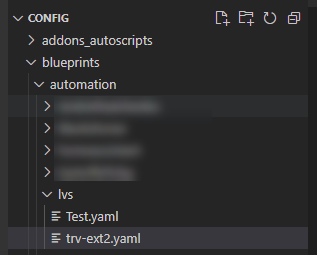
Einfach als Datei trv-ext2.yaml unter config/blueprint/[eigner ordnername, bei mir lvs] anlegen