Sorry, mein Fehler ich habe eine alte Lib noch dir gehabt. Jetzt sollte es mit Version 0.1.40 funktionieren.
Perfekt, jetzt läuft der Device Manager 
Allerdings läuft jetzt der USB300 nicht 
Ja cool - das ist zwar kurios (auch weil ich via terminal nach homematic/config/enocean gehen konnte) aber es klappt wenn ich wie du /config/ zusätzlich angeben oder die Datei direkt ins scheinbare “home” Verzeichnis kopiere aber den pfad als /config/ angebe.
Jetzt ist nur die Frage wie es weitergeht “auto teach in” scheint bei mir irgendwarum deaktiviert zu sein.
Overwrite use_dev_name_in_entity to FALSE
Starting EnOceanMQTT…
/usr/lib/python3.12/html/parser.py:171: XMLParsedAsHTMLWarning: It looks like you’re parsing an XML document using an HTML parser. If this really is an HTML document (maybe it’s XHTML?), you can ignore or filter this warning. If it’s XML, you should know that using an XML parser will be more reliable. To parse this document as XML, make sure you have the lxml package installed, and pass the keyword argument
features="xml"into the BeautifulSoup constructor.k = self.parse_starttag(i)
2024-12-29 20:26:48,741 INFO: Logging to file: /config/enoceanmqtt.log
2024-12-29 20:26:48,741 INFO: Loading config file /data/enoceanmqtt.conf
2024-12-29 20:26:48,770 INFO: Selected overlay : Home Assistant
2024-12-29 20:26:49,103 INFO: Mapping file correctly read: /app/enocean-mqtt/enoceanmqtt/overlays/homeassistant/mapping.yaml
2024-12-29 20:26:49,104 INFO: Device database /data/enoceanmqtt_db.json correctly read/created
2024-12-29 20:26:49,104 INFO: Authenticating: Mqtt-User
2024-12-29 20:26:49,109 INFO: SerialCommunicator started
2024-12-29 20:26:49,109 INFO: Auto Teach-in is disabled
2024-12-29 20:26:49,109 WARNING: Replacing Packet.optional with default value.
2024-12-29 20:26:49,114 INFO: Succesfully connected to MQTT broker.
2024-12-29 20:26:49,125 INFO: Device enoceanmqtt/Taster_ft55/AZFenster (UID: F60202_FEF7D88E_NONE / EEP: F6-02-02) added to device database
2024-12-29 20:26:49,134 INFO: Device enoceanmqtt/Taster_ft55/JonaZTuer (UID: F60202_FEF80C47_NONE / EEP: F6-02-02) added to device database
2024-12-29 20:26:49,143 INFO: Device enoceanmqtt/Taster_ft55/SZTuer (UID: F60202_FEF7F6D0_NONE / EEP: F6-02-02) added to device database
2024-12-29 20:26:49,151 INFO: Device enoceanmqtt/WindowSensor/Badezimmer (UID: D50001_0515B398_NONE / EEP: D5-00-01) added to device database
2024-12-29 20:26:49,160 INFO: Device enoceanmqtt/UPAktor/HausTuerMitte (UID: D20112_050A2E7E_NONE / EEP: D2-01-12) added to device database
2024-12-29 20:26:49,169 INFO: Device enoceanmqtt/UPAktor/NordPool (UID: D2010F_050A0F90_NONE / EEP: D2-01-0F) added to device database
2024-12-29 20:26:49,209 INFO: Sending packet
2024-12-29 20:26:49,310 INFO: got response packet: OK
2024-12-29 20:26:50,169 INFO: Waiting for device base ID
The devices are there if I take a look at the mqtt integration:
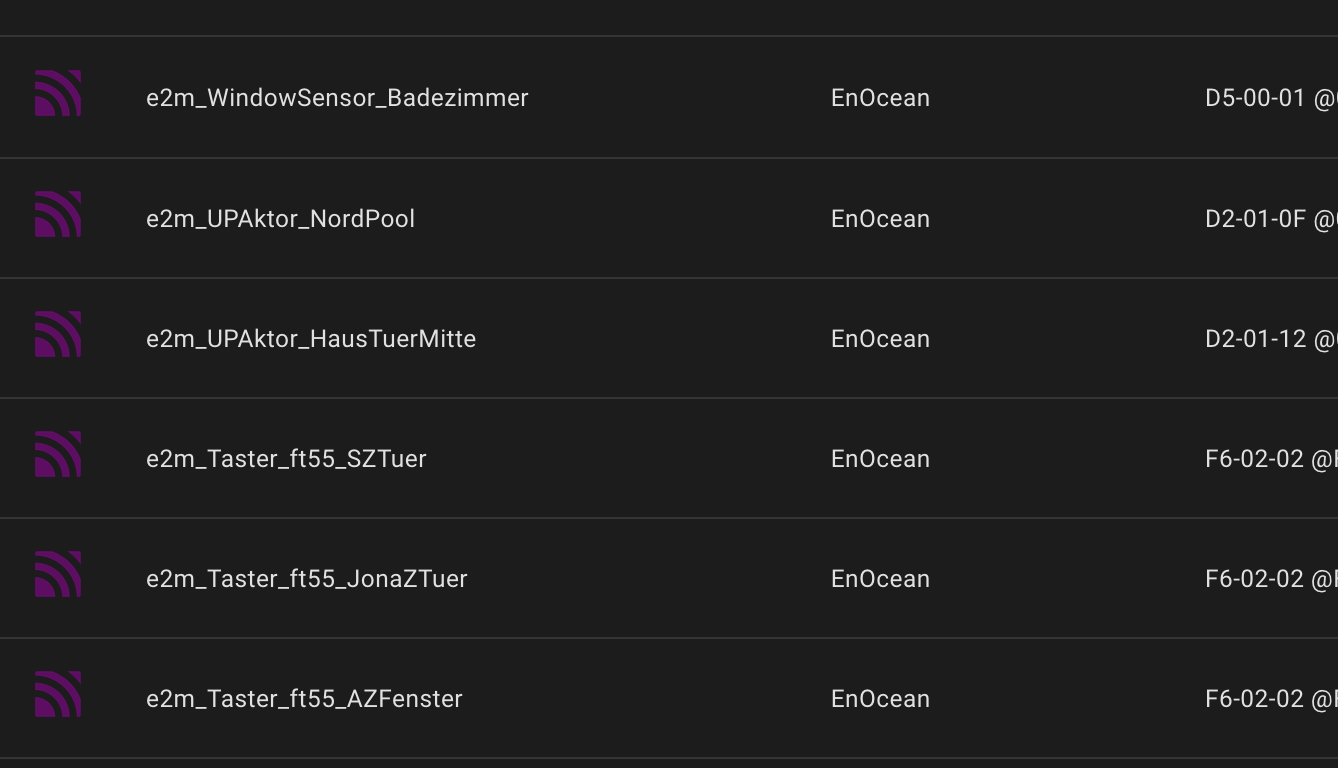
Aber die Unterputzschaltaktoren z.B. (das einzige was als aktor bedienbar sein sollte aus dem Urlaub) ist zunächst nicht bedienbar.

Stati sind unbekannt und können scheinbar auch nicht ausgelesen werden und beim drücken auf an oder aus passiert scheinbar nichts.
Hallo @sise,
was für einen Fehler oder Verhalten hast du denn mit dem USB300?
Wenn du auf Detect Serial Ports klickst und dann Gateway Type ESP3 Gateway auswählst, bekommst du dann einen COM Port angezeigt?
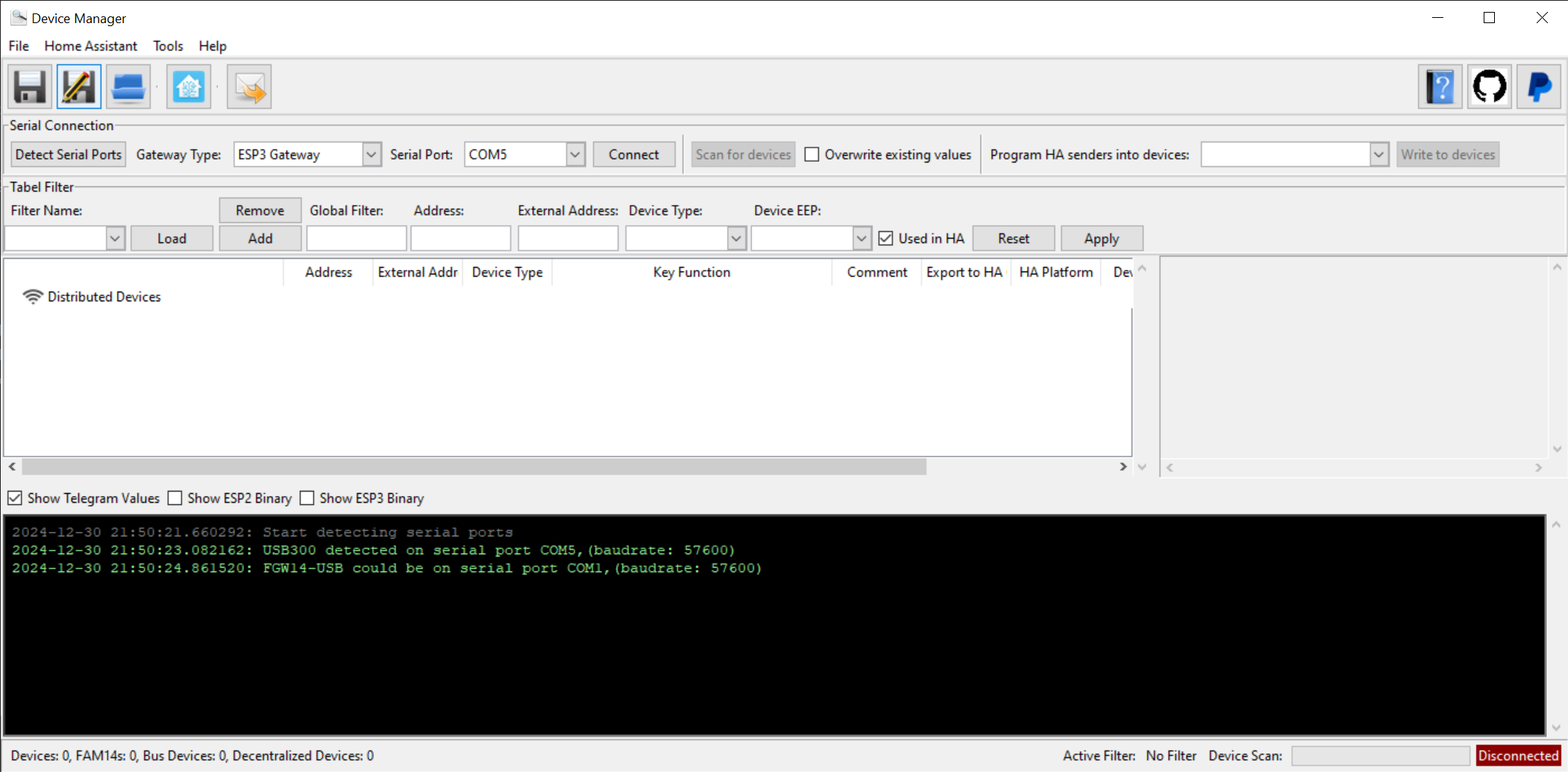
Nach dem Verbinden erscheint er in der Liste als ESP3 Gateway. Wenn du auf das Gerät klickst und auf der rechten Seite Device Type auswählst kannst du ein USB300 daraus machen. (Inhaltlich und funktional bleibt es das gleiche)
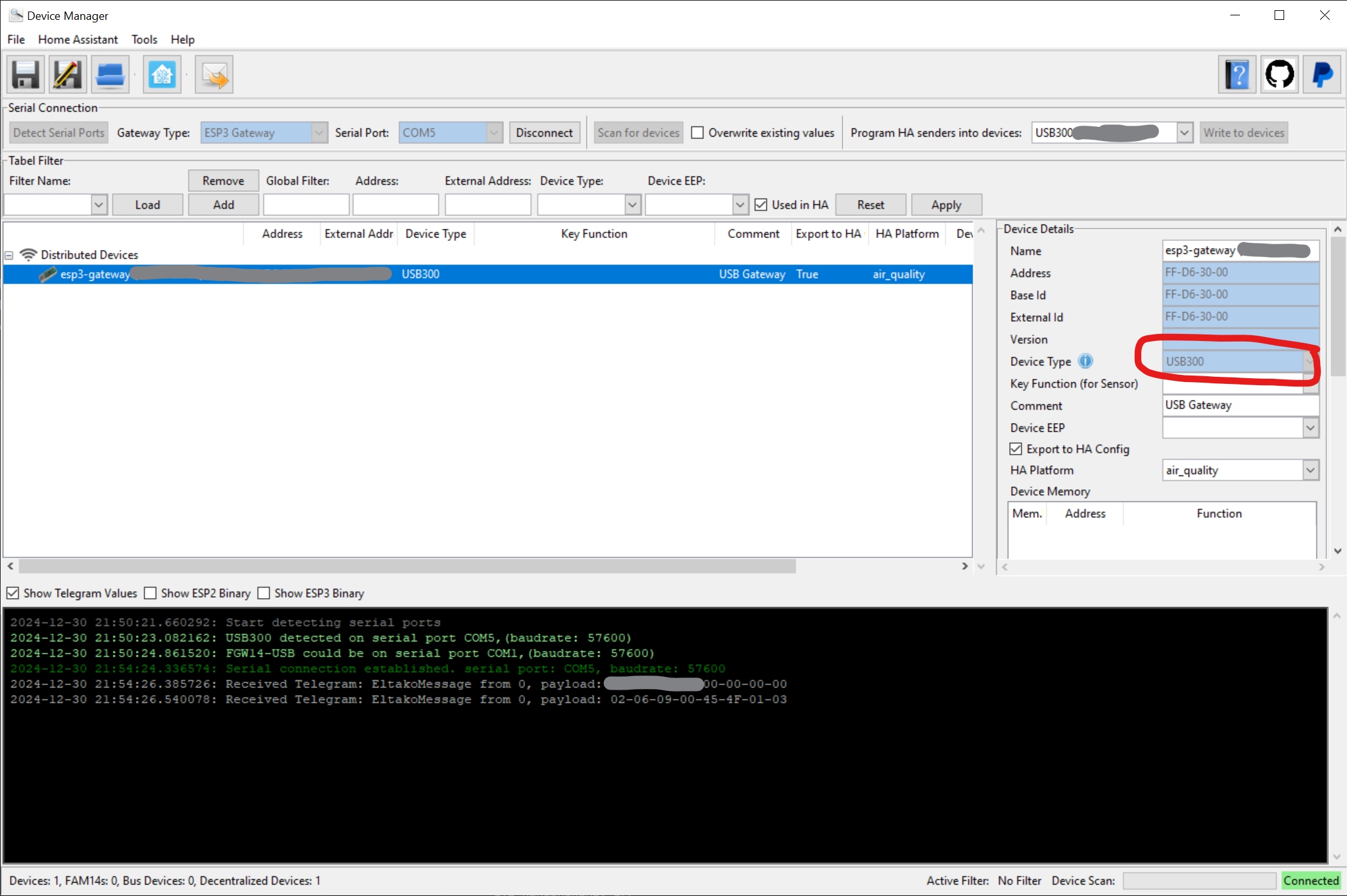
Falls der COM Port nicht erkannt wird kannst du zum Beispiel mit mode auf der CMD alle COM Ports listen lassen und dem ihn als Freitext unter ESP3 Gateway eintragen.
Hallo @philipp14,
Nein, das Feld bleibt leer.
Es ist COM5

Wenn ich in dem Fall COM5 eintrage, bleibt der Button Connect ausgegraut.
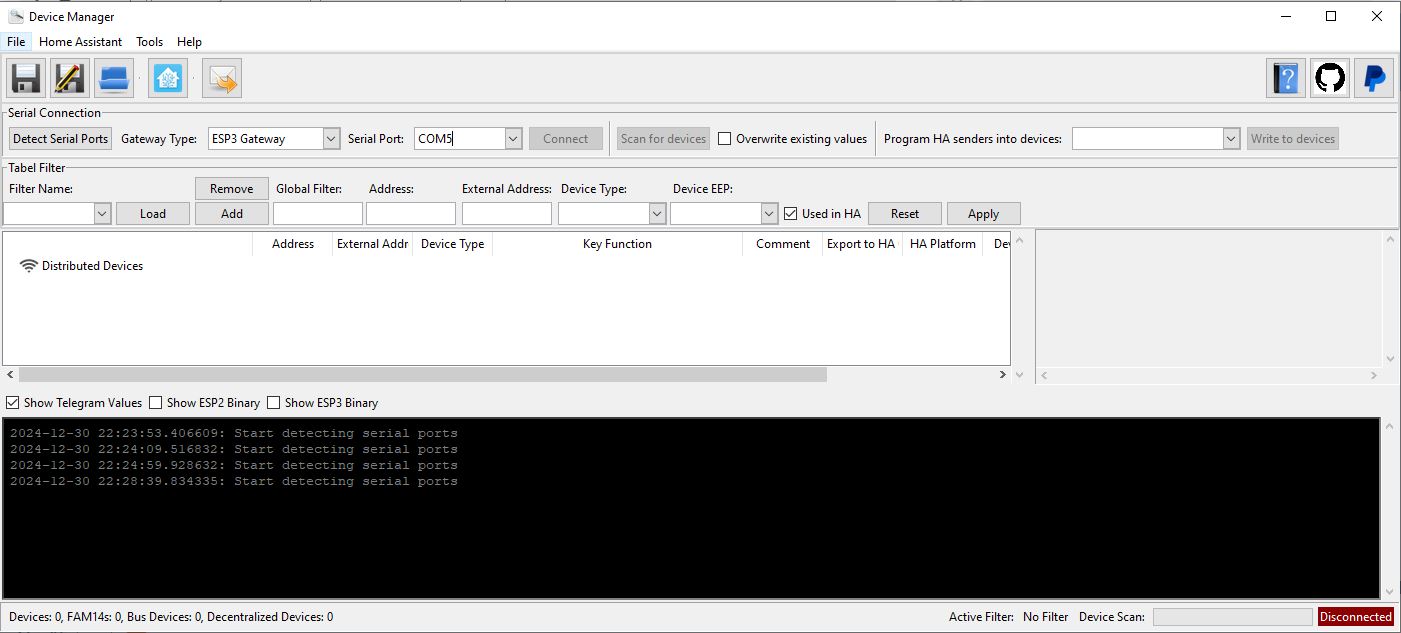
Da wird die Kommunikation gestoppt:

Warum kann ich mir leider nicht erklären.
Beste Grüße
Also mein Problem ist glaube ich - dass die NodOn UP Schaltaktoren angelernt werden müssen (die sind bislang angelernt gewesen an FHEM mit dem USB300). Anders als bei Zwave sind die enocean aber scheinbar nicht weiter mit dem USB-Stick gekoppelt sondern eher mit der hinterlagerten Station.
Also ggf. müsste ich die jetzt resetten um diese dann an EnoceanMQTT Anlernen zu können.
Sind aber eben UP Aktoren und an den Taster am Gerät kommt man nicht mal so eben.
Laut Handbuch wäre koppeln auch digital über eine Zentrale Startbar. Weiß aber nicht wie und bekomme es nicht hin. Das aktivieren von “learn” im enoceanMQTT alleine bewirkt erstmals nichts.
Dreimal die Schalter schalten die zumindest an einem der Module sind hilft auch nicht.>
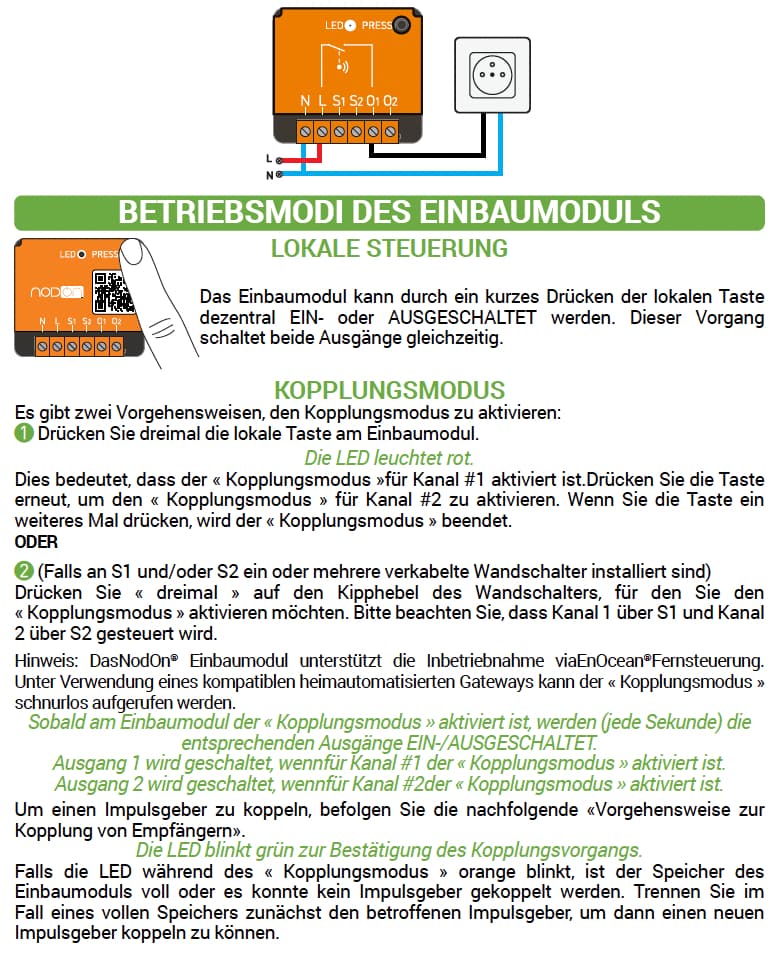
BETRIEBSMODI DES EINBAUMODULS
LOKALE STEUERUNG
Das Einbaumodul kann durch ein kurzes Drücken der lokalen Taste
dezentral EIN- oder AUSGESCHALTET werden. Dieser Vorgang
schaltet beide Ausgänge gleichzeitig.
KOPPLUNGSMODUS
Es gibt zwei Vorgehensweisen, den Kopplungsmodus zu aktivieren:
1 Drücken Sie dreimal die lokale Taste am Einbaumodul.
Die LED leuchtet rot.
Dies bedeutet, dass der « Kopplungsmodus »für Kanal #1 aktiviert ist.Drücken Sie die Taste
erneut, um den « Kopplungsmodus » für Kanal #2 zu aktivieren. Wenn Sie die Taste ein
weiteres Mal drücken, wird der « Kopplungsmodus » beendet.
ODER
2 (Falls an S1 und/oder S2 ein oder mehrere verkabelte Wandschalter installiert sind)
Drücken Sie « dreimal » auf den Kipphebel des Wandschalters, für den Sie den
« Kopplungsmodus » aktivieren möchten. Bitte beachten Sie, dass Kanal 1 über S1 und Kanal
2 über S2 gesteuert wird.
Hinweis: DasNodOn® Einbaumodul unterstützt die Inbetriebnahme viaEnOcean®Fernsteuerung.
Unter Verwendung eines kompatiblen heimautomatisierten Gateways kann der « Kopplungsmodus »
schnurlos aufgerufen werden.
Sobald am Einbaumodul der « Kopplungsmodus » aktiviert ist, werden (jede Sekunde) die
entsprechenden Ausgänge EIN-/AUSGESCHALTET.
Ausgang 1 wird geschaltet, wennfür Kanal #1 der « Kopplungsmodus » aktiviert ist.
Ausgang 2 wird geschaltet, wennfür Kanal #2der « Kopplungsmodus » aktiviert ist.
Um einen Impulsgeber zu koppeln, befolgen Sie die nachfolgende «Vorgehensweise zur
Kopplung von Empfängern».
Die LED blinkt grün zur Bestätigung des Kopplungsvorgangs.
Falls die LED während des « Kopplungsmodus » orange blinkt, ist der Speicher des
Einbaumoduls voll oder es konnte kein Impulsgeber gekoppelt werden. Trennen Sie im
Fall eines vollen Speichers zunächst den betroffenen Impulsgeber, um dann einen neuen
Impulsgeber koppeln zu können.
Ergänzender Hinweis: Wenn ich über die Hardware-Schalter schalte wird das im HA korrekt angezeigt das etwas an oder aus ist. Aber aus HA Schalten geht halt nicht.
EDIT: Den einen habe ich jetzt geschafft anzulernen 3x an/aus je kanal hat nichti geholfen aber vielleicht 10x … das hat dann dazu geführt das an/aus/an/aus x-fach von selbst ging NACH dem offenbar der kopplungsmodus aktiviert war. Parallel war “learn” von enoceanmqtt an. Nun kann dieser aktor auch via HA geschaltet werden.
Weil das keine normalne schalter sind bastel ich mir dafür noch ein helfer oder wie würdet ihr das machen (also jedenfalls fürs dashboard) für sonstige automamik Schaltungen und so benötigt man das ja nicht.
Hallo @philipp14,
ich konnte mir noch etwas Zeit nehmen. Nach Neuinstallation meiner Treiber erkennt der Device Manager nun den USB300 scheinbar erst, scheitert dann aber an einer neuen Meldung. Liegt diese Meldung auch am USB300 der “Port-Treiber” oder am Device Manager?
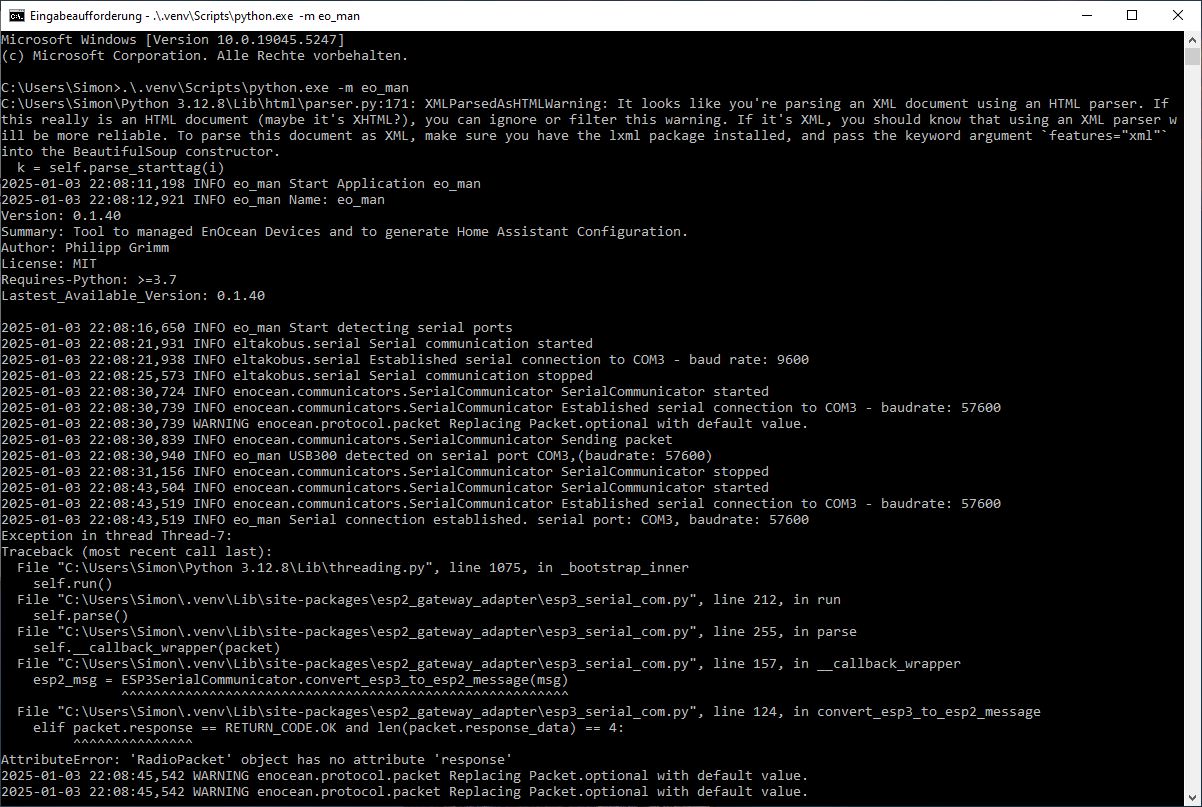
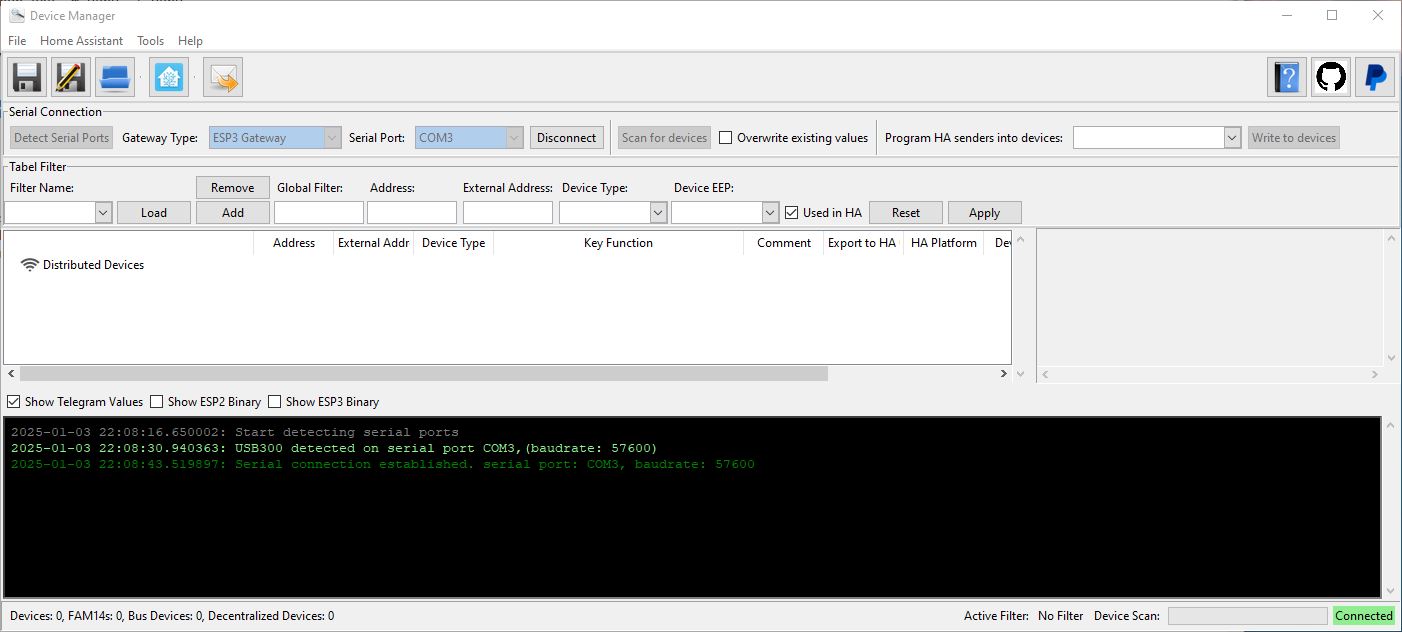
Schönes Wochenende und danke für deine Hilfe! 
EDIT:
Mit Version 0.1.37 klappt bisher alles
Also stimmt mit Version 0.1.40 irgendwas nicht.
Hi @philipp14
Super cool das Du das kannst und “mal eben” eine Integration programmierst.
Schon mal übrlegt ob Du Dich nciht an enocean Mqtt beteiligen willst?
Gebündelte Kraft ggf. besser und so kommen mehr Nutzer in den Genuss Deiner Programmierkentnisse. Oder? Man kann ja leider nur eine eoncean integration nutzen und nicht x gleichzeitig.
Was mich in dem Zusammenhang auch immer wieder wundert (vielleicht verstehe ich es nicht oder falsch) - FHEM, HA und Co sind alle opensource oder? Müsste es dann nicht möglich sein die bereits seit Jahren guten enocean, homematic usw. integrationen aus FHEM z.B. übernehmen zu könnnen ohne komplett alles neu erfinden zu müssen?
Beste Grüße
Sammy
Ist das so? Ich nutze zumindest verschiedene Quellen, einmal den USB 300 und einmal die PioTek EnO2HA. Ich nutze da das Beste aus beiden Welten. Mit einem weiteren Stick sollte doch auch eine 3. Integration (Sinn oder Unsinn mal dahingestellt) möglich sein…
1 „Gefällt mir“
Hallo zusammen,
mit meiner Integration könnt ihr mehrere Gateway verwenden. Theoretisch könnt ihr auch mehrere EnOcean Integrationen parallel betreiben aber ein Gateway immer nur in einer Integration. Allerdings gibt es einen Konflikt zwischen der EnOcean - Home Assistant Integration und GitHub - grimmpp/home-assistant-eltako: Integration for Eltako 14 series in Home Assistant . Das liegt daran dass bei die gleiche Library verwenden aber in unterschiedlichen Versionen und nur eine installiert werden kann. …
Bzgl. der Widerverwendbarkeit von Code aus anderen Hausautomatisierungen:
Die anderen, die ich mir angeschaut habe sind in anderen Programmiersprachen geschrieben und die SW Architektur ist anders wie in HA. D.h. man kann sich die Logik anschauen aber das wars eigentlich.
Danke für diesen Post!
Ich habe jetzt die Version von Kijimuna in den Add-on Store geladen.
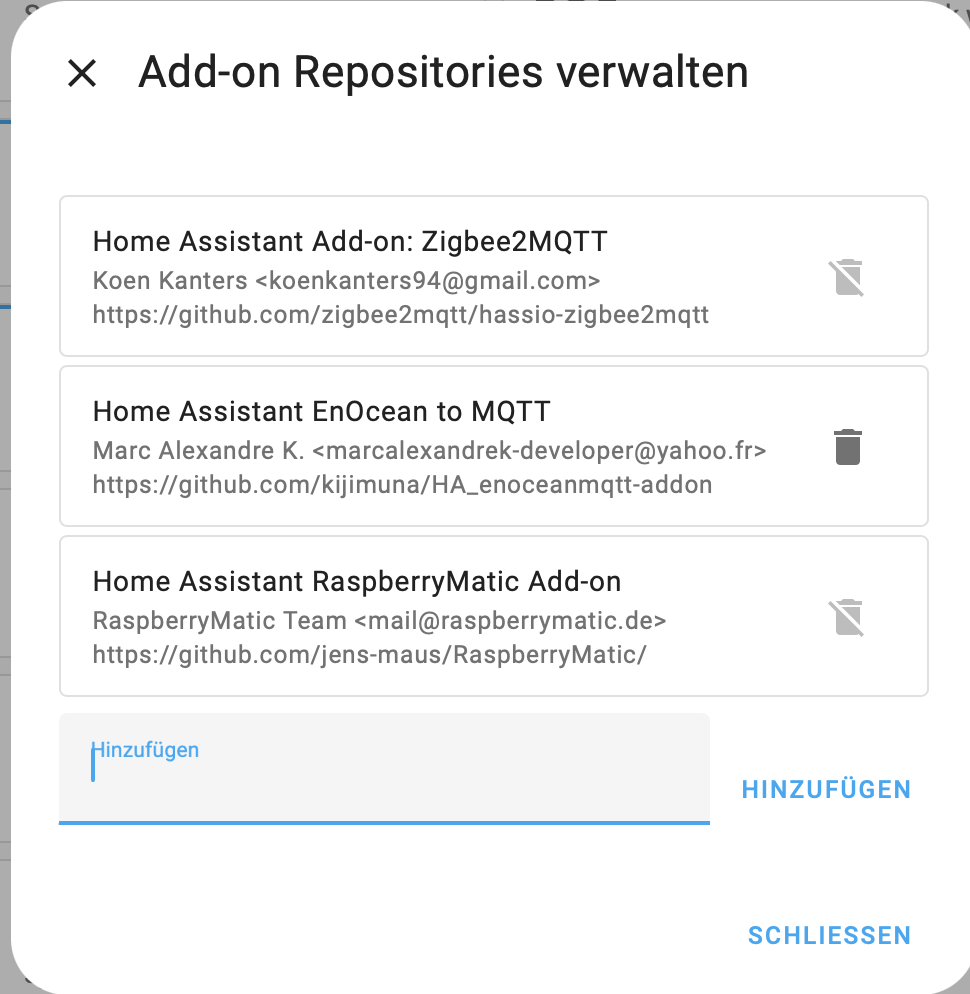
und dann wollte ich das Add-on installieren.
the command '/bin/ash -o pipefail -c apk add --no-cache python3 py3-pip git && python3 -m venv /app/venv && . /app/venv/bin/activate && python3 -m pip install --upgrade pip && pip3 install pyyaml && pip3 install tinydb && pip3 install setuptools && pip3 install paho-mqtt==1.6.1 && pip3 install git+https://github.com/mak-gitdev/enocean.git && git clone -b master --single-branch --depth 1 https://github.com/embyt/enocean-mqtt.git && cd enocean-mqtt && python3 setup.py develop && cd .. && if [ "${BUILD_VERSION}" = "head" ]; then echo "Installing from repository head" && git clone -b develop --single-branch --depth 1 https://github.com/mak-gitdev/HA_enoceanmqtt.git ; else if [ -z "${BUILD_VERSION##*.*.*}" ]; then echo "Installing development version ${BUILD_VERSION%-*}" ; else echo "Installing stable version ${BUILD_VERSION%-*}" ; fi; wget -nv -O "/app.tar.gz" "https://github.com/mak-gitdev/HA_enoceanmqtt/archive/refs/tags/${BUILD_VERSION%-*}.tar.gz" && echo "Extracting /app.tar.gz" && tar xzf "/app.tar.gz" && rm "/app.tar.gz" && mv -v "HA_enoceanmqtt-${BUILD_VERSION%-*}" HA_enoceanmqtt ; fi; cp -rf HA_enoceanmqtt/enoceanmqtt enocean-mqtt && rm -rf HA_enoceanmqtt' returned a non-zero code: 1```

Das ist die gleiche Fehlermeldung wie bei der "Originalversion"

Was läuft falsch?
Wie kann ich die Reste "rückstandsfrei" löschen?Hi @jungergeo !
Ich weißnicht ob die Version noch geht. Ist viel passiert. Ich bin auf der Version unterwegs, da diese gepflegt wird und auch weiter entwickelt wird. Bin selber mit dabei, wenn möglich.
Probier mal.Hoffe es liegt daran.
Danke StevG!
Ich habe die Version von ChristopheD geladen und versucht sie zu installieren -dann bekomme ich folgende Fehlermeldung:
Add-on konnte nicht installiert werden
Docker build failed for f93730fa/aarch64-addon-ha_enoceanmqtt_aseracorp:0.1.37 (exit code 1). Build output: #0 building with "default" instance using docker driver #1 [internal] load build definition from Dockerfile #1 transferring dockerfile: 932B done #1 WARN: InvalidDefaultArgInFrom: Default value for ARG $BUILD_FROM results in empty or invalid base image name (line 2) #1 DONE 0.1s #2 [internal] load metadata for ghcr.io/home-assistant/aarch64-base:latest #2 DONE 0.2s #3 [internal] load .dockerignore #3 transferring context: 2B done #3 DONE 0.0s #4 [1/6] FROM ghcr.io/home-assistant/aarch64-base:latest@sha256:d4475e17f1ad0fac9c80797235a2a1afcc026c75fbb389533bcb2dc3e7172569 #4 DONE 0.0s #5 [internal] load build context #5 transferring context: 5.47kB done #5 DONE 0.0s #6 [2/6] WORKDIR /app #6 CACHED #7 [3/6] COPY requirements.txt . #7 CACHED #8 [4/6] RUN apk add --no-cache python3 py3-pip git && python3 -m venv /app/venv && . /app/venv/bin/activate && python3 -m pip install --upgrade pip && pip3 install -r requirements.txt && pip3 install git+https://github.com/ChristopheHD/enocean.git && git clone -b master --single-branch --depth 1 https://github.com/embyt/enocean-mqtt.git && cd enocean-mqtt && python3 setup.py develop && cd .. && echo "Installing from repository head" && git clone -b develop --single-branch --depth 1 https://github.com/ChristopheHD/HA_enoceanmqtt.git ; cp -rf ./HA_enoceanmqtt/enoceanmqtt enocean-mqtt && rm -rf ./HA_enoceanmqtt #8 0.404 fetch https://dl-cdn.alpinelinux.org/alpine/v3.22/main/aarch64/APKINDEX.tar.gz #8 0.744 fetch https://dl-cdn.alpinelinux.org/alpine/v3.22/community/aarch64/APKINDEX.tar.gz #8 2.089 (1/22) Installing libexpat (2.7.1-r0) #8 2.110 (2/22) Installing pcre2 (10.43-r1) #8 2.153 (3/22) Installing git (2.49.1-r0) #8 2.519 (4/22) Installing git-init-template (2.49.1-r0) #8 2.535 (5/22) Installing libbz2 (1.0.8-r6) #8 2.551 (6/22) Installing libffi (3.4.8-r0) #8 2.566 (7/22) Installing gdbm (1.24-r0) #8 2.586 (8/22) Installing mpdecimal (4.0.1-r0) #8 2.615 (9/22) Installing libpanelw (6.5_p20250503-r0) #8 2.627 (10/22) Installing sqlite-libs (3.49.2-r0) #8 2.722 (11/22) Installing python3 (3.12.11-r0) #8 3.613 (12/22) Installing python3-pycache-pyc0 (3.12.11-r0) #8 4.088 (13/22) Installing pyc (3.12.11-r0) #8 4.088 (14/22) Installing py3-setuptools-pyc (80.9.0-r0) #8 4.332 (15/22) Installing py3-pip-pyc (25.1.1-r0) #8 4.626 (16/22) Installing py3-parsing (3.2.3-r0) #8 4.661 (17/22) Installing py3-parsing-pyc (3.2.3-r0) #8 4.702 (18/22) Installing py3-packaging-pyc (25.0-r0) #8 4.736 (19/22) Installing python3-pyc (3.12.11-r0) #8 4.736 (20/22) Installing py3-packaging (25.0-r0) #8 4.767 (21/22) Installing py3-setuptools (80.9.0-r0) #8 5.000 (22/22) Installing py3-pip (25.1.1-r0) #8 5.270 Executing busybox-1.37.0-r18.trigger #8 5.295 OK: 95 MiB in 72 packages #8 21.91 Looking in indexes: https://pypi.org/simple, https://wheels.home-assistant.io/musllinux-index/ #8 21.91 Requirement already satisfied: pip in ./venv/lib/python3.12/site-packages (25.0.1) #8 22.29 Collecting pip #8 22.39 Downloading pip-25.1.1-py3-none-any.whl.metadata (3.6 kB) #8 22.42 Downloading pip-25.1.1-py3-none-any.whl (1.8 MB) #8 22.61 ━━━━━━━━━━━━━━━━━━━━━━━━━━━━━━━━━━━━━━━━ 1.8/1.8 MB 11.5 MB/s eta 0:00:00 #8 22.68 Installing collected packages: pip #8 22.69 Attempting uninstall: pip #8 22.70 Found existing installation: pip 25.0.1 #8 22.91 Uninstalling pip-25.0.1: #8 22.94 Successfully uninstalled pip-25.0.1 #8 28.62 Successfully installed pip-25.1.1 #8 30.49 Looking in indexes: https://pypi.org/simple, https://wheels.home-assistant.io/musllinux-index/ #8 31.63 Collecting setuptools (from -r requirements.txt (line 1)) #8 31.67 Downloading https://wheels.home-assistant.io/musllinux-index/setuptools-80.9.0-py3-none-any.whl (1.2 MB) #8 31.79 ━━━━━━━━━━━━━━━━━━━━━━━━━━━━━━━━━━━━━━━━ 1.2/1.2 MB 11.6 MB/s eta 0:00:00 #8 32.11 Collecting pyyaml==6.0.2 (from -r requirements.txt (line 2)) #8 32.16 Downloading https://wheels.home-assistant.io/musllinux-index/PyYAML-6.0.2-cp312-cp312-musllinux_1_2_aarch64.whl (181 kB) #8 32.30 Collecting tinydb==4.8.2 (from -r requirements.txt (line 3)) #8 32.41 Downloading tinydb-4.8.2-py3-none-any.whl.metadata (6.7 kB) #8 32.45 Downloading tinydb-4.8.2-py3-none-any.whl (24 kB) #8 32.53 Installing collected packages: tinydb, setuptools, pyyaml #8 37.70 #8 37.71 Successfully installed pyyaml-6.0.2 setuptools-80.9.0 tinydb-4.8.2 #8 39.62 Looking in indexes: https://pypi.org/simple, https://wheels.home-assistant.io/musllinux-index/ #8 39.62 Collecting git+https://github.com/ChristopheHD/enocean.git #8 39.63 Cloning https://github.com/ChristopheHD/enocean.git to /tmp/pip-req-build-kdiodvp4 #8 39.63 Running command git clone --filter=blob:none --quiet https://github.com/ChristopheHD/enocean.git /tmp/pip-req-build-kdiodvp4 #8 53.13 fatal: unable to access 'https://github.com/ChristopheHD/enocean.git/': Could not resolve host: github.com #8 53.18 fatal: could not fetch 4edd7b1a20b22580a1c3904475db255e9f77717a from promisor remote #8 53.18 warning: Clone succeeded, but checkout failed. #8 53.18 You can inspect what was checked out with 'git status' #8 53.18 and retry with 'git restore --source=HEAD :/' #8 53.18 #8 53.21 error: subprocess-exited-with-error #8 53.21 #8 53.21 × git clone --filter=blob:none --quiet https://github.com/ChristopheHD/enocean.git /tmp/pip-req-build-kdiodvp4 did not run successfully. #8 53.21 │ exit code: 128 #8 53.21 ╰─> See above for output. #8 53.21 #8 53.21 note: This error originates from a subprocess, and is likely not a problem with pip. #8 53.21 error: subprocess-exited-with-error #8 53.21 #8 53.21 × git clone --filter=blob:none --quiet https://github.com/ChristopheHD/enocean.git /tmp/pip-req-build-kdiodvp4 did not run successfully. #8 53.21 │ exit code: 128 #8 53.21 ╰─> See above for output. #8 53.21 #8 53.21 note: This error originates from a subprocess, and is likely not a problem with pip. #8 53.45 cp: can't stat './HA_enoceanmqtt/enoceanmqtt': No such file or directory #8 ERROR: process "/bin/ash -o pipefail -c apk add --no-cache python3 py3-pip git && python3 -m venv /app/venv && . /app/venv/bin/activate && python3 -m pip install --upgrade pip && pip3 install -r requirements.txt && pip3 install git+https://github.com/ChristopheHD/enocean.git && git clone -b master --single-branch --depth 1 https://github.com/embyt/enocean-mqtt.git && cd enocean-mqtt && python3 setup.py develop && cd .. && echo \"Installing from repository head\" && git clone -b develop --single-branch --depth 1 https://github.com/ChristopheHD/HA_enoceanmqtt.git ; cp -rf ./HA_enoceanmqtt/enoceanmqtt enocean-mqtt && rm -rf ./HA_enoceanmqtt" did not complete successfully: exit code: 1 ------ > [4/6] RUN apk add --no-cache python3 py3-pip git && python3 -m venv /app/venv && . /app/venv/bin/activate && python3 -m pip install --upgrade pip && pip3 install -r requirements.txt && pip3 install git+https://github.com/ChristopheHD/enocean.git && git clone -b master --single-branch --depth 1 https://github.com/embyt/enocean-mqtt.git && cd enocean-mqtt && python3 setup.py develop && cd .. && echo "Installing from repository head" && git clone -b develop --single-branch --depth 1 https://github.com/ChristopheHD/HA_enoceanmqtt.git ; cp -rf ./HA_enoceanmqtt/enoceanmqtt enocean-mqtt && rm -rf ./HA_enoceanmqtt: 53.21 53.21 note: This error originates from a subprocess, and is likely not a problem with pip. 53.21 error: subprocess-exited-with-error 53.21 53.21 × git clone --filter=blob:none --quiet https://github.com/ChristopheHD/enocean.git /tmp/pip-req-build-kdiodvp4 did not run successfully. 53.21 │ exit code: 128 53.21 ╰─> See above for output. 53.21 53.21 note: This error originates from a subprocess, and is likely not a problem with pip. 53.45 cp: can't stat './HA_enoceanmqtt/enoceanmqtt': No such file or directory ------ e[33m1 warning found (use docker --debug to expand): e[0m - InvalidDefaultArgInFrom: Default value for ARG $BUILD_FROM results in empty or invalid base image name (line 2) Dockerfile:9 -------------------- 8 | COPY requirements.txt . 9 | >>> RUN apk add --no-cache python3 py3-pip git && \ 10 | >>> python3 -m venv /app/venv && \ 11 | >>> . /app/venv/bin/activate && \ 12 | >>> python3 -m pip install --upgrade pip && \ 13 | >>> pip3 install -r requirements.txt && \ 14 | >>> pip3 install git+https://github.com/ChristopheHD/enocean.git && \ 15 | >>> git clone -b master --single-branch --depth 1 https://github.com/embyt/enocean-mqtt.git && \ 16 | >>> cd enocean-mqtt && python3 setup.py develop && cd .. && \ 17 | >>> echo "Installing from repository head" && \ 18 | >>> git clone -b develop --single-branch --depth 1 https://github.com/ChristopheHD/HA_enoceanmqtt.git ; \ 19 | >>> cp -rf ./HA_enoceanmqtt/enoceanmqtt enocean-mqtt && \ 20 | >>> rm -rf ./HA_enoceanmqtt 21 | -------------------- ERROR: failed to solve: process "/bin/ash -o pipefail -c apk add --no-cache python3 py3-pip git && python3 -m venv /app/venv && . /app/venv/bin/activate && python3 -m pip install --upgrade pip && pip3 install -r requirements.txt && pip3 install git+https://github.com/ChristopheHD/enocean.git && git clone -b master --single-branch --depth 1 https://github.com/embyt/enocean-mqtt.git && cd enocean-mqtt && python3 setup.py develop && cd .. && echo \"Installing from repository head\" && git clone -b develop --single-branch --depth 1 https://github.com/ChristopheHD/HA_enoceanmqtt.git ; cp -rf ./HA_enoceanmqtt/enoceanmqtt enocean-mqtt && rm -rf ./HA_enoceanmqtt" did not complete successfully: exit code: 1
Was läuft jetzt falsch.
Grüße Georg
 by HarryP: Code-/Logzeilen formatiert (bitte immer in </> einbinden)
Schau dir mal das Issue an.
Klingt nach deinem Problem. Da steht auch etwas, wie man das lösen kann.
Hast du HA als natvie System oder anderweitig aufgesetzt?
Danke Stev,
ich habe die DNS Server geändert und konnte das HA_enoceanmqtt installieren. Die Konfiguration habe ich entsprechend geändert.
Beim Starten des Addons geschieht folgendes - siehe Protokoll:
s6-rc: info: service s6rc-oneshot-runner: starting
s6-rc: info: service s6rc-oneshot-runner successfully started
s6-rc: info: service fix-attrs: starting
s6-rc: info: service fix-attrs successfully started
s6-rc: info: service legacy-cont-init: starting
s6-rc: info: service legacy-cont-init successfully started
s6-rc: info: service legacy-services: starting
s6-rc: info: service legacy-services successfully started
Preparing to start...
Retrieved devices file: /config/enoceanmqtt/enoceanmqtt.devices
EnOcean key port  = /dev/ttyUSB1
Overwrite use_dev_name_in_entity to FALSE
Starting EnOceanMQTT...
/app/venv/lib/python3.12/site-packages/enocean/protocol/eep.py:25: XMLParsedAsHTMLWarning: It looks like you're using an HTML parser to parse an XML document.
Assuming this really is an XML document, what you're doing might work, but you should know that using an XML parser will be more reliable. To parse this document as XML, make sure you have the Python package 'lxml' installed, and pass the keyword argument `features="xml"` into the BeautifulSoup constructor.
If you want or need to use an HTML parser on this document, you can make this warning go away by filtering it. To do that, run this code before calling the BeautifulSoup constructor:
    from bs4 import XMLParsedAsHTMLWarning
    import warnings
    warnings.filterwarnings("ignore", category=XMLParsedAsHTMLWarning)
  self.soup = BeautifulSoup(xml_file.read(), "html.parser")
2025-07-13 11:04:34,719 INFO: Logging to file: /config/enoceanmqtt02.log
2025-07-13 11:04:34,719 INFO: Loading config file /data/enoceanmqtt.conf
Traceback (most recent call last):
  File "/app/venv/bin/enoceanmqtt", line 8, in <module>
    sys.exit(main())
             ^^^^^^
  File "/app/enocean-mqtt/enoceanmqtt/enoceanmqtt.py", line 110, in main
    sensors, global_config = load_config_file(conf['config'])
                             ^^^^^^^^^^^^^^^^^^^^^^^^^^^^^^^^
  File "/app/enocean-mqtt/enoceanmqtt/enoceanmqtt.py", line 47, in load_config_file
    if not config_parser.read(conf_file):
           ^^^^^^^^^^^^^^^^^^^^^^^^^^^^^
  File "/usr/lib/python3.12/configparser.py", line 684, in read
    self._read(fp, filename)
  File "/usr/lib/python3.12/configparser.py", line 1049, in _read
    raise DuplicateSectionError(sectname, fpname,
configparser.DuplicateSectionError: While reading from '/data/enoceanmqtt.conf' [line 100]: section 'HSA0_Garten02' already exists
s6-rc: info: service legacy-services: stopping
s6-rc: info: service legacy-services successfully stopped
s6-rc: info: service legacy-cont-init: stopping
s6-rc: info: service legacy-cont-init successfully stopped
s6-rc: info: service fix-attrs: stopping
s6-rc: info: service fix-attrs successfully stopped
s6-rc: info: service s6rc-oneshot-runner: stopping
s6-rc: info: service s6rc-oneshot-runner successfully stopped
Das Addon wird permanent neu gestartet und gestoppt.
Ich habe keine Idee, was jetzt noch schief läuft.
Danke für deine Hilfe.
Georg
 by tarag: Log in
 vorformatierten Text </> formatiert
Kannst du mal einen Screenshot deiner Konfiguration hier posten und deine enoceanmqtt.devices?
Hast du das Release oder das Next Rrlease geladen?
Danke Stev!
hier ist meine Konfiguration als yaml:
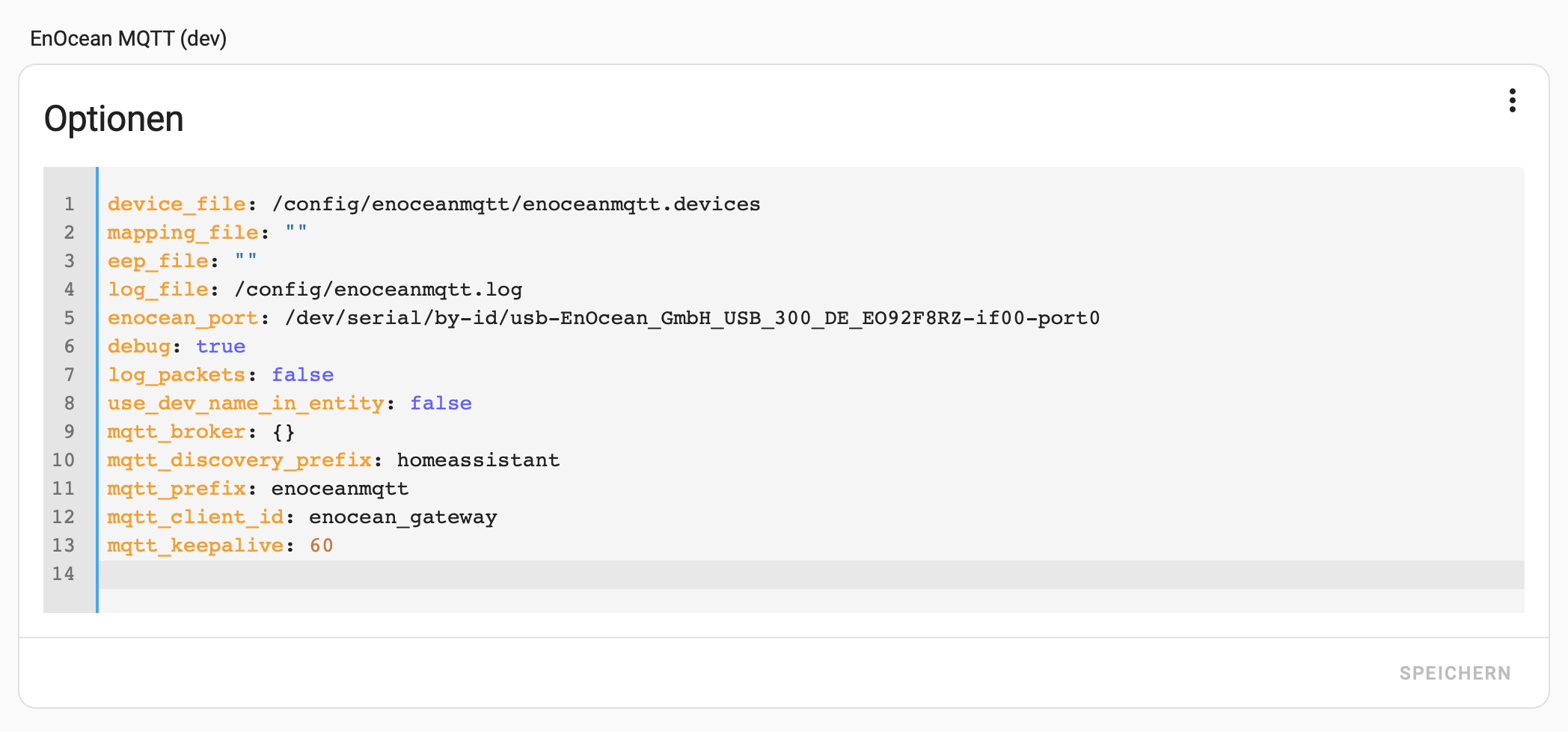
und die enoceanmqtt.devices
[Schalter_Arbeitszimmer]
address         = 0x002CFECE
rorg            = 0xF6
func            = 0x02
type            = 0x01

[ft55_eingang/wohnzimmer]
address         = 0xFEF33730
rorg            = 0xF6
func            = 0x02
type            = 0x01

[SF0501_Arbeitszimmer] - Hoppe Fenstergriff
address       = 0x0022E0D6
rorg            = 0xF6
func            = 0x10
type            = 0x00

[SF0502_Arbeitszimmer] - Hoppe Fenstergriff
address       = 0x01824FDA
rorg            = 0xF6
func            = 0x10
type            = 0x00

[SF11_Küche] - Hoppe Fenstergriff
address       = 0x01A93E7D
rorg            = 0xF6
func            = 0x10
type            = 0x00

[SF12_Esszimmer] - Hoppe Fenstergriff
address       = 0x01824E50
rorg            = 0xF6
func            = 0x10
type            = 0x00

# Eltako FHD60SB
[HSA0_Garten01]
address      	= 0x018642DE
rorg            = 0xA5
func            = 0x06
type            = 0x03

[HSA0_Garten02]
address      	= 0x018642DE
rorg            = 0xA5
func            = 0x38
type            = 0x08

[HSA0_Garten03]
address      	= 0x018642DE
rorg            = 0xA5
func            = 0x06
type            = 0x01


# Eltako MS
[WSA0_Garten01]
address         = 0x01A2b1AD
rorg            = 0xA5
func            = 0x13
type            = 0x01

[WSA0_Garten0]
address      	= 0x01A2B1AD
rorg            = 0xA5
func            = 0x13
type            = 0x02

[WSA0_Garten03]
address         = 0x01A2B1AD
rorg            = 0xD2
func            = 0x14
type            = 0x40

[TÖ04_Georg]
address         = 0xFEF15B3E
rorg            = 0xF6
func            = 0x02
type            = 0x01

# Eltako FHD60SB
[HSA0_Garten02]
address         = 0x018642DE
rorg            = 0xA5
func            = 0x38
type            = 0x08
Das Release
Grüße Georg
 by HarryP: Code-/Logzeilen formatiert (bitte immer in </> einbinden)
Die Config sieht auf den ersten Blick erstmal i.O. aus.
Hier mal meine.
Ansonsten würde ich bei den Devices erstmal mit einem Device starten. Am besten einem Hoppe.
enocean_port: /dev/serial/by-id/usb-EnOcean_GmbH_EnOcean_USB_300_DB_FT1ZI7ND-if00-port0
enocean_tcp: ""
device_file: /config/enocean/enoceanmqtt.devices
mapping_file: ""
eep_file: ""
log_file: /config/enocean/enoceanmqtt.log
debug: true
log_packets: false
use_dev_name_in_entity: false
mqtt_broker: {}
mqtt_discovery_prefix: homeassistant
mqtt_prefix: enoceanmqtt
mqtt_client_id: enocean_gateway
mqtt_keepalive: 60
#Hoppe Fenstergriff
[SF0501_Arbeitszimmer]
address = 0x0022E0D6
rorg = 0xF6
func = 0x10
type = 0x00
Auf Zeichen wie Ö etc. solltest du verzichten.
Hallo Stev,
ich habe jetzt alle Einträge bis auf den Hoppe Fenstergriff entfernt.
Neu gestartet - gleiche Fehlermeldung wie oben, enoceanmqtt startet nicht.
Dann leere enoceanmqtt.devices - jetzt startet enoceanmqtt mit folgendem Protokoll:
s6-rc: info: service s6rc-oneshot-runner successfully started*
*s6-rc: info: service fix-attrs: starting*
*s6-rc: info: service fix-attrs successfully started*
*s6-rc: info: service legacy-cont-init: starting*
*s6-rc: info: service legacy-cont-init successfully started*
*s6-rc: info: service legacy-services: starting*
*s6-rc: info: service legacy-services successfully started*
*Preparing to start...*
*Retrieved devices file: /config/enoceanmqtt/enoceanmqtt.devices*
*Overwrite use_dev_name_in_entity to FALSE*
*Starting EnOceanMQTT...*
*/app/venv/lib/python3.12/site-packages/enocean/protocol/eep.py:25: XMLParsedAsHTMLWarning: It looks like you're using an HTML parser to parse an XML document.*
*Assuming this really is an XML document, what you're doing might work, but you should know that using an XML parser will be more reliable. To parse this document as XML, make sure you have the Python package 'lxml' installed, and pass the keyword argument `features="xml"` into the BeautifulSoup constructor.*
*If you want or need to use an HTML parser on this document, you can make this warning go away by filtering it. To do that, run this code before calling the BeautifulSoup constructor:*
*from bs4 import XMLParsedAsHTMLWarning*
*import warnings*
*warnings.filterwarnings("ignore", category=XMLParsedAsHTMLWarning)*
*self.soup = BeautifulSoup(xml_file.read(), "html.parser")*
*2025-07-15 09:42:50,766 INFO: Logging to file: /config/enoceanmqtt.log*
*2025-07-15 09:42:50,767 INFO: Loading config file /data/enoceanmqtt.conf*
*2025-07-15 09:42:50,767 DEBUG: Global config: {'enocean_port': '/dev/ttyUSB1', 'log_packets': 'false', 'overlay': 'HA', 'db_file': '/data/enoceanmqtt_db.json', 'mapping_file': '', 'ha_dev_name_in_entity': 'False', 'mqtt_discovery_prefix': 'homeassistant/', 'mqtt_host': 'core-mosquitto', 'mqtt_port': '1883', 'mqtt_client_id': 'enocean_gateway', 'mqtt_keepalive': '60', 'mqtt_prefix': 'enoceanmqtt/', 'mqtt_user': 'addons', 'mqtt_pwd': '*****', 'mqtt_debug': 'true'}*
*2025-07-15 09:42:50,828 INFO: Selected overlay : Home Assistant*
*2025-07-15 09:42:51,596 INFO: Mapping file correctly read: /app/enocean-mqtt/enoceanmqtt/overlays/homeassistant/mapping.yaml*
*2025-07-15 09:42:51,597 INFO: Device database /data/enoceanmqtt_db.json correctly read/created*
*2025-07-15 09:42:51,597 INFO: Authenticating: addons*
*2025-07-15 09:42:51,598 DEBUG: Connecting to host core-mosquitto, port 1883, keepalive 60*
*2025-07-15 09:42:51,603 DEBUG: Sending CONNECT (u1, p1, wr0, wq0, wf0, c1, k60) client_id=b'enocean_gateway'*
*2025-07-15 09:42:51,608 INFO: SerialCommunicator started*
*2025-07-15 09:42:51,608 INFO: Auto Teach-in is disabled*
*2025-07-15 09:42:51,609 WARNING: Replacing Packet.optional with default value.*
*2025-07-15 09:42:51,709 INFO: Sending packet*
*2025-07-15 09:42:51,709 DEBUG: 0x05 ['0x8'] [] OrderedDict()*
*2025-07-15 09:42:51,809 DEBUG: 0x02 ['0x0', '0xff', '0xcf', '0x20', '0x0'] ['0xa'] OrderedDict()*
*2025-07-15 09:42:51,810 INFO: got response packet: OK*
*2025-07-15 09:42:51,862 DEBUG: Received CONNACK (0, 0)*
*2025-07-15 09:42:51,862 INFO: Succesfully connected to MQTT broker.*
*2025-07-15 09:42:51,862 DEBUG: List of remaining UIDS: []*
*2025-07-15 09:42:51,863 DEBUG: Sending PUBLISH (d0, q0, r1, m1), 'b'homeassistant/switch/enoceanmqtt_learn_FFCF2000/config'', ... (374 bytes)*
*2025-07-15 09:42:51,863 DEBUG: Sending SUBSCRIBE (d0, m2) [(b'enoceanmqtt/__system/learn/req/#', 0)]*
*2025-07-15 09:42:51,863 DEBUG: Sending PUBLISH (d0, q0, r1, m3), 'b'enoceanmqtt/__system/learn'', ... (3 bytes)*
*2025-07-15 09:42:51,866 DEBUG: Received SUBACK*
*2025-07-15 09:43:51,929 DEBUG: Sending PINGREQ*
*2025-07-15 09:43:51,929 DEBUG: Received PINGRESP*
*2025-07-15 09:44:51,991 DEBUG: Sending PINGREQ*
*2025-07-15 09:44:51,992 DEBUG: Received PINGRESP*
*2025-07-15 09:45:52,055 DEBUG: Sending PINGREQ*
*2025-07-15 09:45:52,056 DEBUG: Received PINGRESP*
*2025-07-15 09:46:52,116 DEBUG: Sending PINGREQ*
*2025-07-15 09:46:52,117 DEBUG: Received PINGRESP*
*2025-07-15 09:46:54,854 DEBUG: 05:99:8D:16->FF:FF:FF:FF (-71 dBm): 0x01 ['0xd5', '0x8', '0x5', '0x99', '0x8d', '0x16', '0x0'] ['0x0', '0xff', '0xff', '0xff', '0xff', '0x47', '0x0'] OrderedDict()*
*2025-07-15 09:46:54,855 INFO: unknown sensor: 05:99:8D:16*
*2025-07-15 09:47:52,177 DEBUG: Sending PINGREQ*
*2025-07-15 09:47:52,178 DEBUG: Received PINGRES*
Dann enoceanmqtt.devices wieder mit dem Hoppe Fenstergriff, das eep lautet F61000 gefüllt und neu gestartet. Jetzt startet enoceanmqtt.
Folgendes Protokoll:
*... analog oben ...*
*2025-07-15 09:56:20,886 DEBUG: 00:22:E0:D6->FF:FF:FF:FF (-42 dBm): 0x01 ['0xf6', '0xc0', '0x0', '0x22', '0xe0', '0xd6', '0x20'] ['0x0', '0xff', '0xff', '0xff', '0xff', '0x2a', '0x0'] OrderedDict()*
*2025-07-15 09:56:20,886 WARNING: message not interpretable: enoceanmqtt/SF0501_Arbeitszimmer*
*2025-07-15 09:56:21,734 DEBUG: 00:22:E0:D6->FF:FF:FF:FF (-45 dBm): 0x01 ['0xf6', '0xf0', '0x0', '0x22', '0xe0', '0xd6', '0x20'] ['0x0', '0xff', '0xff', '0xff', '0xff', '0x2d', '0x0'] OrderedDict()*
*2025-07-15 09:56:21,734 WARNING: message not interpretable: enoceanmqtt/SF0501_Arbeitszimmer*
*2025-07-15 09:56:22,394 DEBUG: Sending PINGREQ*
*2025-07-15 09:56:22,395 DEBUG: Received PINGRESP*
*2025-07-15 09:56:28,390 DEBUG: 00:22:E0:D6->FF:FF:FF:FF (-44 dBm): 0x01 ['0xf6', '0xe0', '0x0', '0x22', '0xe0', '0xd6', '0x20'] ['0x0', '0xff', '0xff', '0xff', '0xff', '0x2c', '0x0'] OrderedDict()*
*2025-07-15 09:56:28,391 WARNING: message not interpretable: enoceanmqtt/SF0501_Arbeitszimmer*
*2025-07-15 09:56:33,318 DEBUG: 00:22:E0:D6->FF:FF:FF:FF (-44 dBm): 0x01 ['0xf6', '0xd0', '0x0', '0x22', '0xe0', '0xd6', '0x20'] ['0x0', '0xff', '0xff', '0xff', '0xff', '0x2c', '0x0'] OrderedDict()*
*025-07-15 09:56:33,319 WARNING: message not interpretable: enoceanmqtt/SF0501_Arbeitszimmer*
*...*
Das Protokoll zeigt weitere Einträge von einem Wettersensor und einem Helligkeitssensor, die aber nicht im enoceanmqtt.devices definiert sind.
Fazit bis hierher:
enoceanmqtt läuft und empfängt Daten - die Daten können aber nicht interpretiert werden.
Grüße Georg
by HarryP: Post formatiert
Hi Georg,
bin gerade etwas Landunter. Ich hoffe am Wochenende mir das mal genauer anschauen zu können.
Heute ist eine neuer Variante released worden. Kannst du die mal nutzen? Die wird nicht lokal gebaut. Da gab es in der Vergangenheit Schwierigkeiten.