Hallo zusammen,
seit ich mich mit Home Assistant beschäftige schaue ich auch fleißig die ganzen Videos von Simon. Bisher bin ich immer an Ziel gekommen, doch nun habe ich meine ersten Probleme und hoffe auf Hilfe.
Bisher hatte ich keine Homematic und auch keine HomematicIP Geräte, auch keine CCU.
Ich habe den HmIP-RFUSB Stick von ELV gekauft, zusammengebaut und alles nach den Infos aus Simons Video installiert. Hat bis hier hin auch super funktioniert und der Stick wurde als Gerät erkannt.
Ich habe nun im ganz Haus neue Wandthermostate verbaut (HmIP-BWTH), diese funktionieren auch einwandfrei, aber ich kann die Geräte nicht an die RaspberryMatic anlernen.
Kann mir hier jemand noch einen Tipp geben?
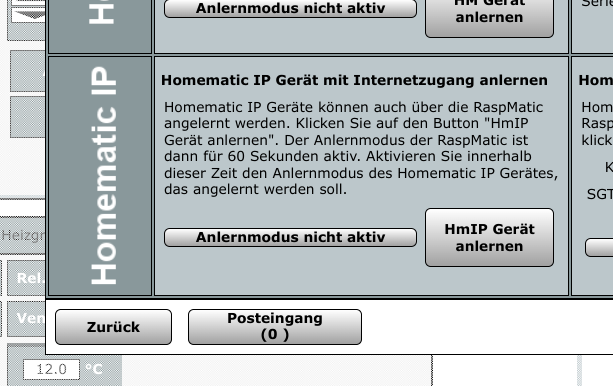
Habe beide Varianten versucht, HomematicIP Gerät mit und ohne Internetzugang anlernen.
Der DutyCycle steht bie 1% und Carrier Sense bei 0%
Anbei auch noch das Protokoll aus dem AddOn
Identifying host system: Dell Inc. 096JG8 (oci), OK
Initializing RTC Clock: onboard, OK
Running sysctl: OK
Checking for Factory Reset: not required
Checking for Backup Restore: not required
Running seedrng: OK
Initializing System: OK
Setup ca-certificates: OK
Starting logging: OK
Init onboard LEDs: init, OK
Starting iptables: OK
Starting network: eth0: link up, fixed, firewall, inet up, 172.30.33.1, OK
Identifying Homematic RF-Hardware: ....HmRF: HMIP-RFUSB/eQ-3 HmIP-RFUSB@usb-0000:00:14.0-4, HmIP: HMIP-RFUSB/eQ-3 HmIP-RFUSB@usb-0000:00:14.0-4, OK
Updating Homematic RF-Hardware: HMIP-RFUSB: 4.4.18, not necessary, OK
Starting hs485dLoader: disabled
Starting xinetd: OK
Starting eq3configd: OK
Starting lighttpd: OK
Starting ser2net: disabled
Starting ssdpd: OK
Starting ha-proxy: OK
Starting NUT services: disabled
Initializing Third-Party Addons: OK
Starting LGWFirmwareUpdate: ...OK
Setting LAN Gateway keys: OK
Starting hs485d: disabled
Starting multimacd: .......OK
Starting rfd: .OK
Starting HMIPServer: ........OK
Starting ReGaHss: .OK
Starting CloudMatic: OK
Starting NeoServer: OK
Starting Third-Party Addons: OK
Starting crond: OK
Setup onboard LEDs: booted, OK
Finished Boot: 3.75.7.20240601 (raspmatic_oci_amd64)
Setup onboard LEDs: shutdown, OK
Stopping crond: OK
Stopping Third-Party Addons: OK
Stopping NeoServer: OK
Stopping ReGaHss: ....OK
Stopping HMIPServer: OK
Stopping rfd: OK
Stopping multimacd: OK
Stopping hs485d: OK
Stopping NUT services: OK
Stopping ha-proxy: OK
Stopping sshd: OK
Stopping ssdpd: OK
Shutting down ser2net: OK
Stopping lighttpd: OK
Stopping eq3configd: OK
Stopping xinetd: OK
Stopping network: eth0: link down, OK
Stopping iptables: OK
Stopping logging: OK
Cleaning up System: OK
Running seedrng: OK
Cleaning up RTC Clock: OK
Unmounting /data from /usr/local (Home Assistant Add-On): OK

The system is going down NOW!

Sent SIGTERM to all processes

Sent SIGKILL to all processes

Requesting system reboot
Mounting /data as /usr/local (Home Assistant Add-On): OK
Identifying host system: Dell Inc. 096JG8 (oci), OK
Initializing RTC Clock: onboard, OK
Running sysctl: OK
Checking for Factory Reset: not required
Checking for Backup Restore: not required
Running seedrng: OK
Initializing System: OK
Setup ca-certificates: OK
Starting logging: OK
Init onboard LEDs: init, OK
Starting iptables: OK
Starting network: eth0: link up, fixed, firewall, inet up, 172.30.33.1, OK
Identifying Homematic RF-Hardware: ....HmRF: HMIP-RFUSB/eQ-3 HmIP-RFUSB@usb-0000:00:14.0-4, HmIP: HMIP-RFUSB/eQ-3 HmIP-RFUSB@usb-0000:00:14.0-4, OK
Updating Homematic RF-Hardware: HMIP-RFUSB: 4.4.18, not necessary, OK
Starting hs485dLoader: disabled
Starting xinetd: OK
Starting eq3configd: OK
Starting lighttpd: OK
Starting ser2net: disabled
Starting ssdpd: OK
Starting ha-proxy: OK
Starting NUT services: disabled
Initializing Third-Party Addons: OK
Starting LGWFirmwareUpdate: ...OK
Setting LAN Gateway keys: OK
Starting hs485d: disabled
Starting multimacd: .......OK
Starting rfd: .OK
Starting HMIPServer: ........OK
Starting ReGaHss: .OK
Starting CloudMatic: OK
Starting NeoServer: OK
Starting Third-Party Addons: OK
Starting crond: OK
Setup onboard LEDs: booted, OK
Finished Boot: 3.75.7.20240601 (raspmatic_oci_amd64)
 .
.