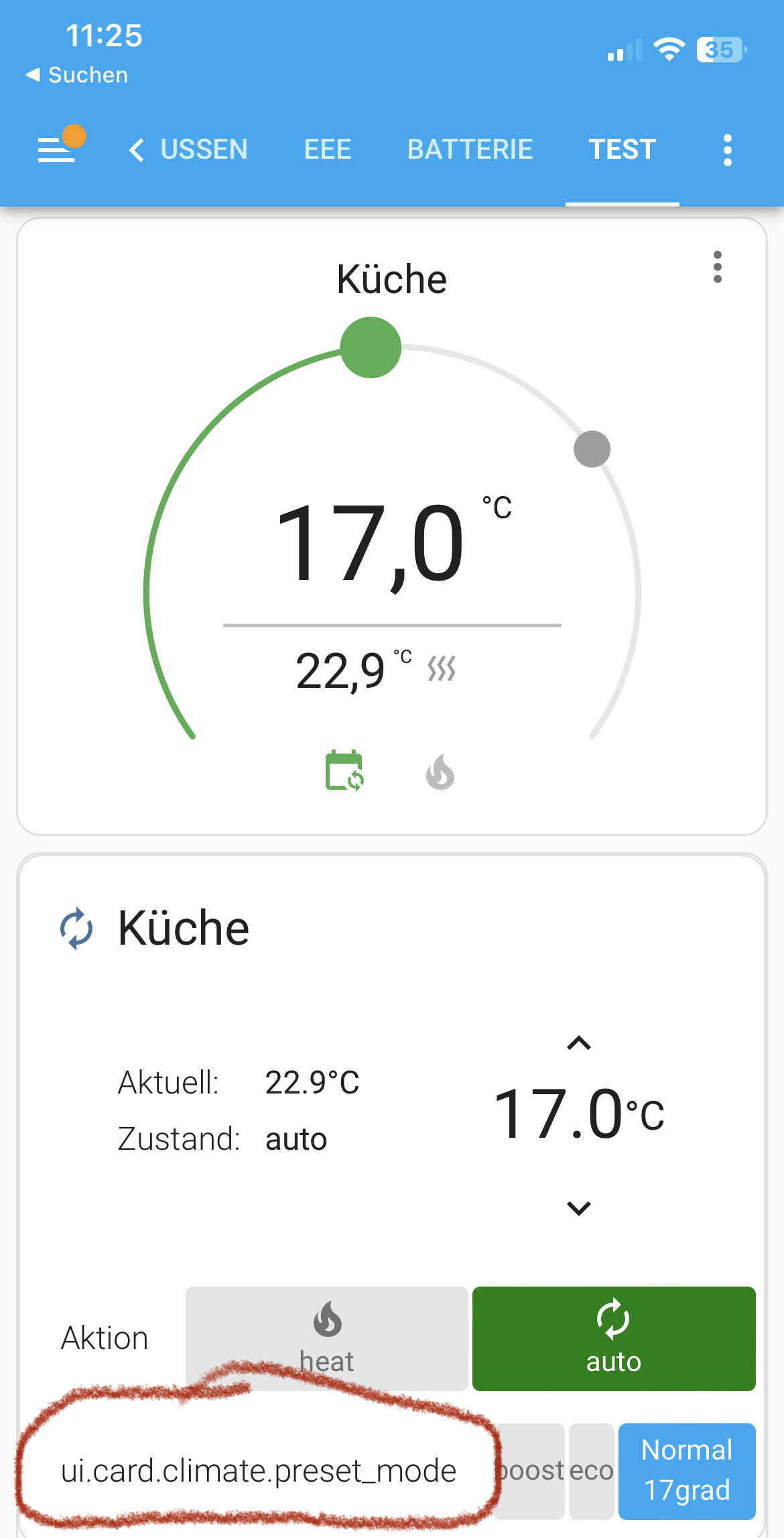
Hallo,
ich habe die super Anleitung für die Thermostat Karten genutzt. Leider bekomme ich nicht das Wort Vorstellung angezeigt sondern ui.card.climate.preset_Mode siehe Foto.
Jemand eine Idee ?
Hallo,
ich habe die super Anleitung für die Thermostat Karten genutzt. Leider bekomme ich nicht das Wort Vorstellung angezeigt sondern ui.card.climate.preset_Mode siehe Foto.
Jemand eine Idee ?
cards:
Das ist aber nicht der Code von der unteren Karte aus dem Screenshot.
Und könntest du, wenn du hier Code-Beispiele postest, diese entsprechend formatieren? Das wäre super. Code einfügen, markieren und dann Strg+E. Danke.
Jetzt das ganze Foto der Karte. Zum Code Einfügen bin ich zu Blöd. Bekomme es hoffentlich gleich hin.
cards:
  - cards:
      - cards:
          - entity: climate.kuche
            name: Küche
            type: custom:simple-thermostat
          - entity: climate.bad_unten
            name: Heizung Wohnzimmer
            type: custom:simple-thermostat
          - entity: climate.wohnzimmer
            name: Heizung Schlafzimmer
            type: custom:simple-thermostat
          - entity: climate.schlafzimmer
            name: Heizung Bad
            type: custom:simple-thermostat
        type: custom:swipe-card
    type: horizontal-stack
  - cards:
      - align_state: center
        entities:
          - color: '#DAF7A6'
            entity: sensor.temperatur_wohnbereich_mittelwert
            index: 0
            name: Wohnzimmer
          - color: '#A7C7E7'
            entity: sensor.heizung_bad_actual_temperature
            index: 1
            name: Bad
          - color: '#FFC300'
            entity: sensor.heizung_schlafzimmer_actual_temperature
            index: 2
            name: Schlafzimmer
        type: custom:mini-graph-card
    type: horizontal-stack
type: custom:vertical-stack-in-card
Versuch mal das:
cards:
  - cards:
      - cards:
          - entity: climate.kuche
            name: Küche
            type: custom:simple-thermostat
            control:
              hvac:
                _name: Aktion
              preset:
                _name: Voreinstellung
          - entity: climate.bad_unten
            name: Heizung Wohnzimmer
            type: custom:simple-thermostat
            control:
              hvac:
                _name: Aktion
              preset:
                _name: Voreinstellung
          - entity: climate.wohnzimmer
            name: Heizung Schlafzimmer
            type: custom:simple-thermostat
            control:
              hvac:
                _name: Aktion
              preset:
                _name: Voreinstellung
          - entity: climate.schlafzimmer
            name: Heizung Bad
            type: custom:simple-thermostat
            control:
              hvac:
                _name: Aktion
              preset:
                _name: Voreinstellung
        type: custom:swipe-card
    type: horizontal-stack
  - cards:
      - align_state: center
        entities:
          - color: '#DAF7A6'
            entity: sensor.temperatur_wohnbereich_mittelwert
            index: 0
            name: Wohnzimmer
          - color: '#A7C7E7'
            entity: sensor.heizung_bad_actual_temperature
            index: 1
            name: Bad
          - color: '#FFC300'
            entity: sensor.heizung_schlafzimmer_actual_temperature
            index: 2
            name: Schlafzimmer
        type: custom:mini-graph-card
    type: horizontal-stack
type: custom:vertical-stack-in-card
Also ich habe das gleiche Problem.
Bin neu in HA und bekomme das YAML nicht umgestellt.
Der Name wird als der konfigurierte entitätsname angezeigt, nicht als der, der in der yaml steht und ei dem Modus steht: ui.card.climate.operation
YAML:
type: custom:vertical-stack-in-cardcards:
Mit den Beispielen direkt im Simpla Thermostat geht bei mir gar nicht.
Da kommt nur Konfigurationsfehler
Edit:
Habe es hin bekommen mit:
havc:
_name: Modus