Nirum
2. März 2026 um 15:05
1
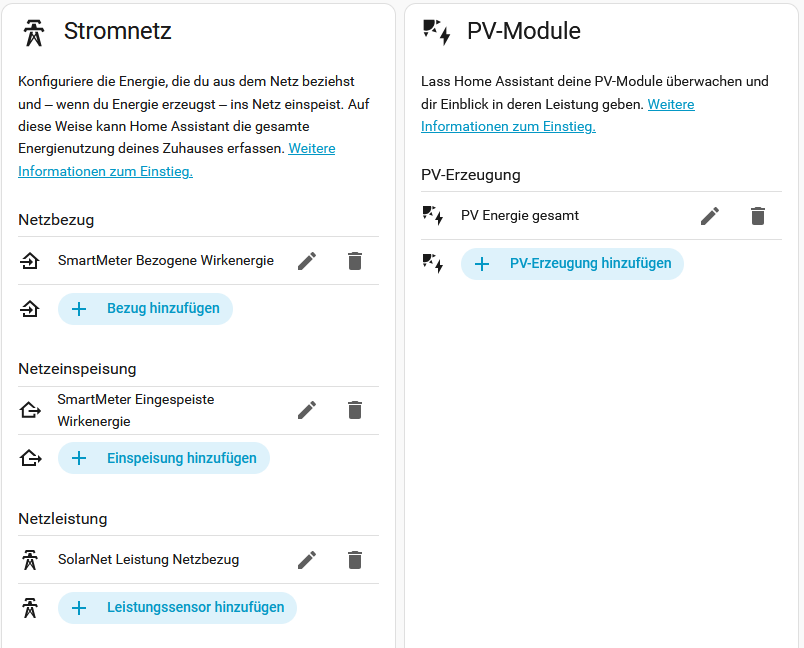
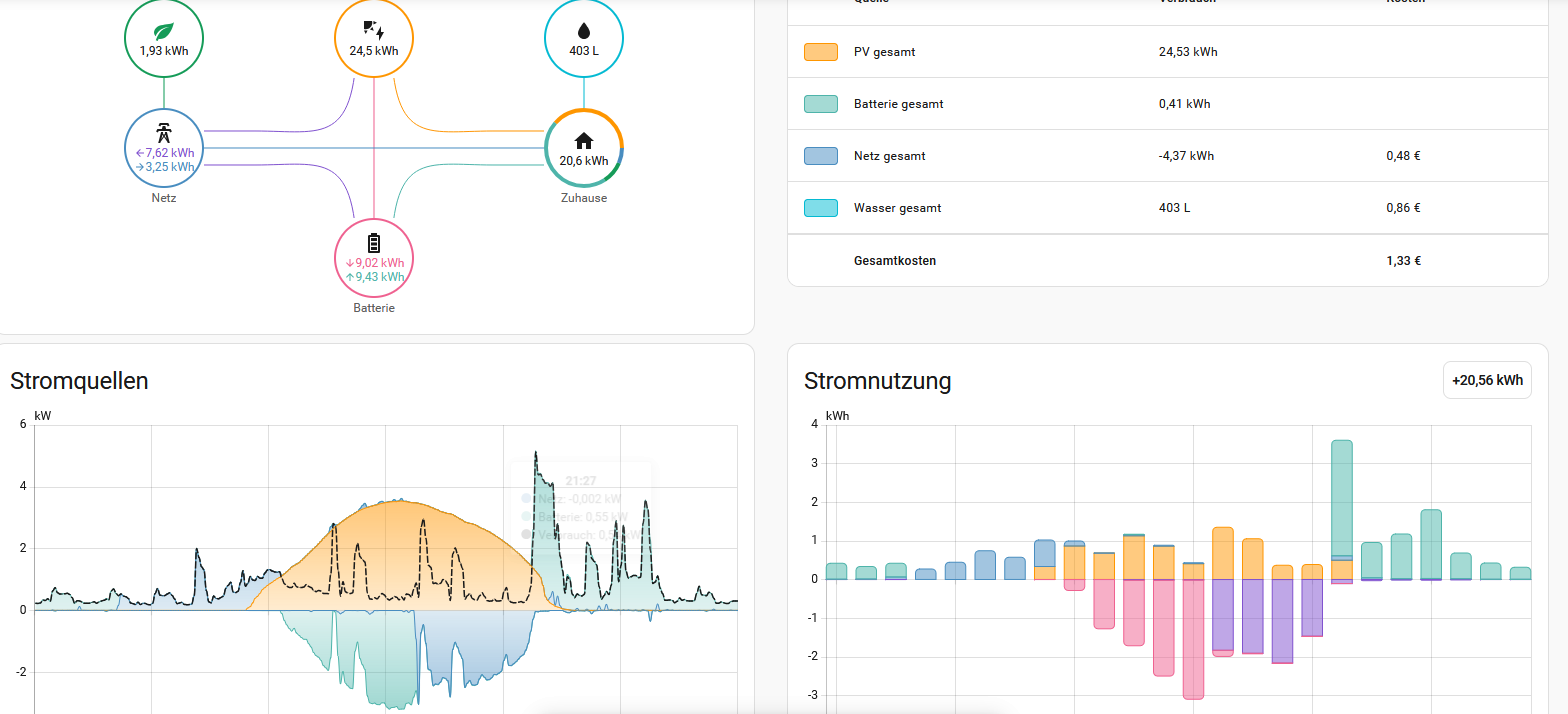
kann mir jemand auf die Sprünge helfen, wo genau das Problem liegt. Mein Google-Fu lässt mich hier gerade im Stich.
Alle (Summen) Werte sind soweit korrekt.. Die Einspeisung wird auch korrekt im “Stromnutzung”-Diagramm angezeigt.
Nirum
3. März 2026 um 09:50
2
Das Problem konnte endlich gelöst werden:
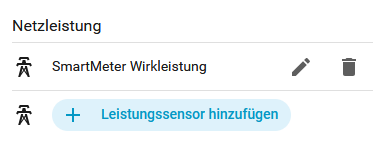
Die Netzleistung muss positive und negative Werte haben, damit es korrekt dargestellt wird. Der “SolarNet Netzbezug” hat nur positive Werte des Netzbezugs. Mit der “SmartMeter Wirkleistung” ist alles korrekt:
Dieser GitHub Issue hat mich auf die Lösung gebracht:
offen 12:31PM - 30 Jan 26 UTC
geschlossen 07:42AM - 05 Feb 26 UTC
### Checklist
- [x] I have updated to the latest available Home Assistant versi… on.
- [x] I have cleared the cache of my browser.
- [x] I have tried a different browser to see if it is related to my browser.
- [x] I have tried reproducing the issue in [safe mode](https://www.home-assistant.io/blog/2023/11/01/release-202311/#restarting-into-safe-mode) to rule out problems with unsupported custom resources.
### Describe the issue you are experiencing
Environment:
- Home Assistant Core: 2026.01.x
- Frontend: 2026.01.x
- Installation: [Supervised / Container / OS / Core]
- Browser: [Name + Version], OS: [Win/macOS/Linux]
- Timezone: Europe/Berlin
Summary:
The Energy "Power sources" (Stromquellen) panel shows PV and battery power correctly,
but **omits grid export power entirely**, resulting in the white "Consumption" line ≈ PV,
even during clear export conditions. At the same time, the Energy "Usage" (Stromnutzung)
panel correctly shows negative Energy to grid (kWh). So the energy balance is correct,
but the live power flow graph is missing the grid export leg.
Actual:
- Energy usage: shows negative "Energy to grid" (e.g., −6.01 kWh from 12:00–13:00) ✔
- Power sources: shows PV ≈ 7.47 kW, Battery ≈ 0 kW, and Consumption ≈ 7.46 kW.
**No export is rendered**, although export power is present and positive in my split sensors.
Observed data at the same timestamp:
- `sensor.grid_export_power`: 3500 W
- `sensor.grid_import_power`: 0 W
- Energy Usage panel: shows negative Energy to grid (kWh) for that hour ✔
- Power Sources panel: does not show export, Consumption ≈ PV (wrong)
Screenshots:
- Power sources panel (missing export)
- Energy usage panel (shows negative Energy to grid)
- Energy settings tiles (Grid power import/export configured)
- Developer Tools -> States for the two power sensors
<img width="408" height="329" alt="Image" src="https://github.com/user-attachments/assets/84972519-1af4-4b86-a5db-ac99d5d10804" />
<img width="359" height="335" alt="Image" src="https://github.com/user-attachments/assets/36e59020-419c-47c0-900f-d5f536052a11" />
<img width="1534" height="596" alt="Image" src="https://github.com/user-attachments/assets/2f82ec8f-656f-48a6-99e5-ab1064d98ee5" />
<img width="1332" height="856" alt="Image" src="https://github.com/user-attachments/assets/7595e749-9588-4b0e-b412-1a3783c25be7" />
UPDATE:
Same result also with the "total Watt-hours exported" sensor
<img width="377" height="336" alt="Image" src="https://github.com/user-attachments/assets/8cb4a7bc-7d68-497a-a123-48f09e93ff37" />
As you can see both sensors generate the same amount of content.
<img width="1990" height="995" alt="Image" src="https://github.com/user-attachments/assets/a737c7be-9846-4855-a170-13e74549b102" />
### Describe the behavior you expected
When Grid export is present (Export power > 0), the Power sources graph should display a negative/under‑zero area for export (or the dedicated export series), matching the Energy usage panel.
### Steps to reproduce the issue
1. Provide two power sensors from a grid meter (KSEM):
- (For import you can use a existing "import" grid sensor.)
- `sensor.grid_export_power` -> `{{ max(-(states('sensor.ksem_ac_meter_watts') | float(0)), 0) }}`
- ALTERNATE: You can use the sensor: "Ksem ac_meter Total Watt-hours Exported"
(unit: W, device_class: power, state_class: measurement)
2. In Energy settings:
- Grid power -> set Import = (your working IMPORT sensor), Export = `sensor.grid_export_power`
- Energy to grid total (kWh) configured and working
- Energy from grid total (kWh) configured and working
3. During clear export (import=0 W, export > 1 kW), open the Energy dashboard.
<img width="564" height="878" alt="Image" src="https://github.com/user-attachments/assets/c5c777ee-94e6-4331-a4ad-ccd7978bb344" />
<img width="1643" height="523" alt="Image" src="https://github.com/user-attachments/assets/654c811b-fd8c-49bc-8a33-dcf27d58f4a4" />
### What version of Home Assistant Core has the issue?
2026.1.3
### What was the last working version of Home Assistant Core?
_No response_
### In which browser are you experiencing the issue?
Google Chrome 133.0.6943.99
### Which operating system are you using to run this browser?
Windows 11
### State of relevant entities
```txt
```
### Problem-relevant frontend configuration
```yaml
```
### JavaScript errors shown in your browser console/inspector
```txt
```
### Additional information
- PV and battery power render correctly.
- Export/import kWh totals and compensation are correct => not a Recorder/statistics issue.
- This looks like a rendering/series handling problem of the power flow when export is present.
- Reproducible with KSEM meter; inverter power is not used to avoid unreliable values.