Schau mal hier rein:
Wenn der T10 die neue API nutzt, sollte der “freeClean” Befehl funtionieren.
Dann legst du Küche und Esszimmer mit den gewünschen Settings pro Raum in der App als Szenarioreinigung an und ziehst dir die CQID aus dem Debug Log.
Alternativ, wenn er die beiden Räume einfach mit den Standardsettings reinigen soll, kannst du auch bei freeclean einfach alle Räume auflisten (“1,1;1,4”) je nach Raumnummern.
Die Buttons fürs Dashboard kannst du dir easy per KI bauen lassen, bei mir sieht das so aus:
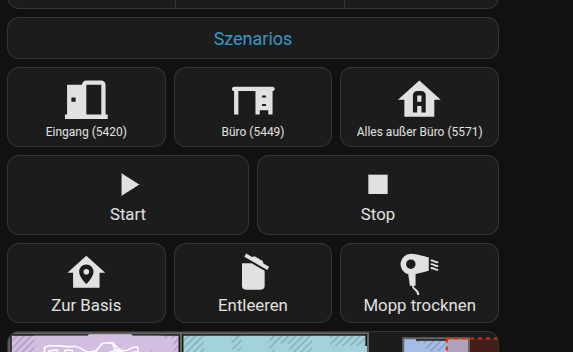
type: custom:button-card
            color: auto-no-temperature
            name: Szenarios
            styles:
              card:
                - font-size: 18px
                - height: 30px
              name:
                - color: var(--primary-color)
          - type: horizontal-stack
            cards:
              - type: custom:button-card
                icon: mdi:door-open
                name: Eingang (5420)
                tap_action:
                  action: call-service
                  service: vacuum.send_command
                  service_data:
                    entity_id: vacuum.t30cgen2
                    command: clean_V2
                    params:
                      act: start
                      content:
                        type: qcClean
                        value: '5420'
                styles:
                  card:
                    - font-size: 12px
                    - height: 80px
              - type: custom:button-card
                icon: mdi:desk
                name: Büro (5449)
                tap_action:
                  action: call-service
                  service: vacuum.send_command
                  service_data:
                    entity_id: vacuum.t30cgen2
                    command: clean_V2
                    params:
                      act: start
                      content:
                        type: qcClean
                        value: '5449'
                styles:
                  card:
                    - font-size: 12px
                    - height: 80px
              - type: custom:button-card
                icon: mdi:home-floor-a
                name: Alles außer Büro (5571)
                tap_action:
                  action: call-service
                  service: vacuum.send_command
                  service_data:
                    entity_id: vacuum.t30cgen2
                    command: clean_V2
                    params:
                      act: start
                      content:
                        type: qcClean
                        value: '5571'
                styles:
                  card:
                    - font-size: 12px
                    - height: 80px