Waschmaschine smart machen - Anzeige an/aus im Dashboard

Good morning!

Ich stecke noch in den Kinderschuhen beim HA und habe bisher nur sachen aus Simon’s Video 1:1 nachgemacht. Aber jetzt habe ich doch mal eine Frage, die vom Video abweicht:

Waschmaschine smart machen mit Home Assistant für unter 10 Euro

Im Video zeigt er, wie ich Benachrichtigungen einstelle, wenn die Wäasche fertig ist. Ich würde für’s erste gerne im Dashboard einzeigen lassen, ob die Waschmaschine läuft oder steht. Später mal als Benachrichtigungen oder so, aber soweit bin ich noch nicht.

Das müsste dann ein Helfer sein, der dann zwei Textzustände haben kann, oder?

Ich bin gespannt - jedenfalls machts super Spaß, HA mit den Videos von Simon zu lernen!
Christoph

Ja genau, hab zwar diese Video nicht gesehen, aber du brauchst einen Helfer vom Typ boolean der dann zb Waschmaschine_läuft heisst.

Im Dashboard kannst du dir dann einfach diese Entität anzeigen lassen, oder auch mal mit diesem Beispiel rumspielen, das ist ein Mushroom Template card:

show_name: false
show_icon: true
show_state: false
type: custom:mushroom-template-card
entity: input_boolean.waschmaschine_lauft
icon: mdi:washing-machine
icon_color: |-
  {% if is_state(config.entity,'on') %}
    green
  {% else %}
    grey
  {% endif %}
primary: Waschmaschine
card_mod:
  style:
    mushroom-shape-icon: |
      ha-state-icon {
        animation: {{ 'shake 400ms ease-in-out infinite, drum 2s ease infinite' if is_state(config.entity, 'on') else 'none' }};
        transform-origin: 50% 110%;
      }
       @keyframes shake {
         0%, 100% { transform: translate(0, 0) rotate(0); }
         20%  { transform: translate(0.4px, -0.4px) rotate(-4deg); }
         40%  { transform: translate(-0.4px, 0.4px) rotate(4deg); }
         60%  { transform: translate(0.4px, 0.4px) rotate(-4deg); }
         80%  { transform: translate(-0.4px, -0.4px) rotate(4deg); }
       }
       @keyframes drum {
         20%  { clip-path: polygon(0 0, 0 100%, 35% 100%, 34% 68%, 60% 41%, 71% 56%, 65% 74%, 47% 79%, 32% 69%, 35% 100%, 100% 100%, 100% 0); }
       }

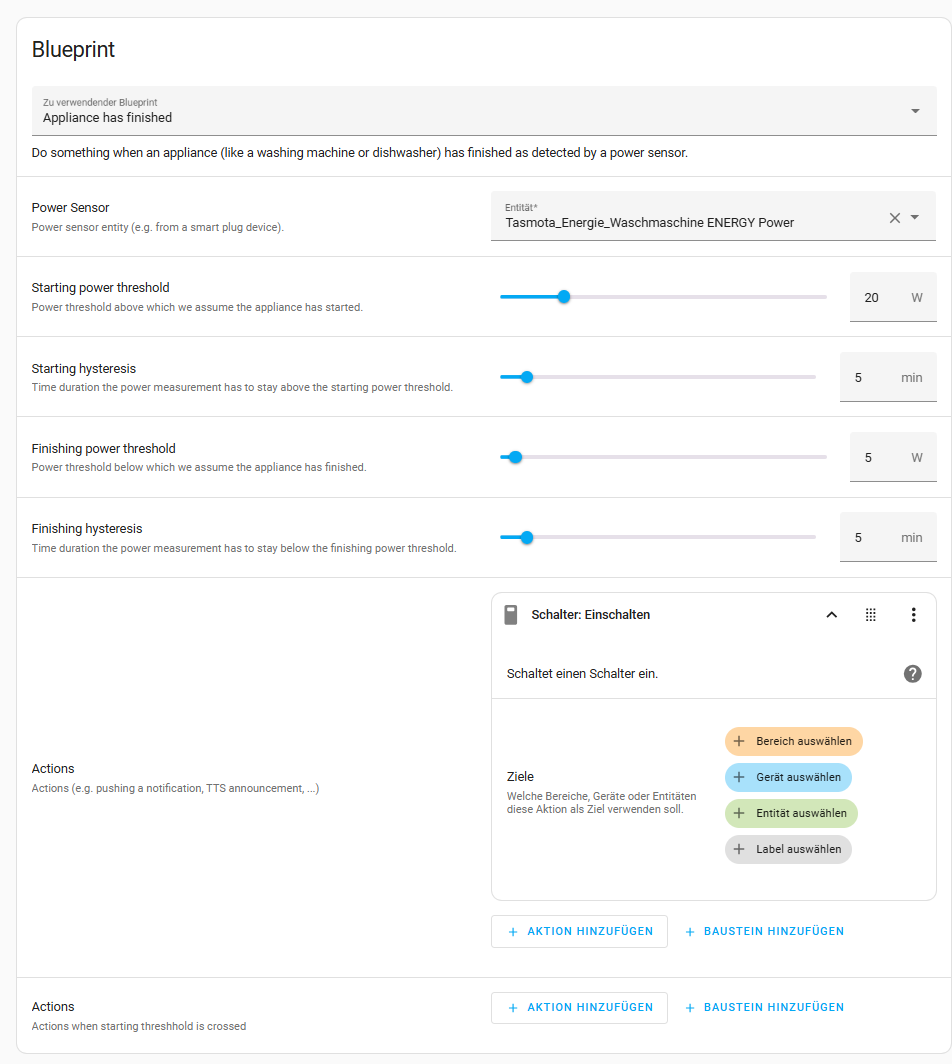
Wenn du dann mal zum “Später” kommst, kann ich Dir folgenden Blueprint ans Herz legen - funktioniert bei mir für Waschmaschine und Trockner seit Monate super.

Den Status beider Geräte lasse ich auch im Dashbord über eine custom:mushroom-template-card anzeigen - dazu nutze ich dann pro Maschine einen Helfer, welcher durch den oben genannten Blueprint ein / ausgeschaltet wird.

image

type: custom:mushroom-template-card
primary: >+
  {% if is_state('input_boolean.waschmaschine_aktiv', 'off') and
  is_state('input_boolean.trockner_aktiv', 'off')%}
    Beides aus
  {% endif%}

  {% if is_state('input_boolean.waschmaschine_aktiv', 'on') %}

  Waschmaschine läuft

  {% endif %}{% if is_state('input_boolean.trockner_aktiv', 'on') %}

  {% if is_state('input_boolean.waschmaschine_aktiv', 'on') %}
   und 
  {% endif %}

  Trockner läuft

  {% endif %}

secondary: >
  {% set last_changed = states.input_boolean.waschmaschine_aktiv.last_changed
  %}{% if last_changed %}Waschen: {{ states('counter.waschen_anzahl_durchlaufe')
  }}x - {{ last_changed.timestamp() | timestamp_custom('%H:%M') }} Uhr{% endif
  %}{% set last_changed = states.input_boolean.trockner_aktiv.last_changed %}{%
  if last_changed %} / Trocknen: {{ states('counter.trocknen_anzahl_durchlaufe')
  }}x - {{ last_changed.timestamp() | timestamp_custom('%H:%M') }} Uhr{% endif
  %}
icon: >-
  {% if is_state('input_boolean.waschmaschine_aktiv', 'on') or
  is_state('input_boolean.trockner_aktiv', 'on')%}
    mdi:washing-machine
  {% else %}
    mdi:washing-machine-off
  {% endif%}
icon_color: >-
  {% if is_state('input_boolean.waschmaschine_aktiv', 'on') or
  is_state('input_boolean.trockner_aktiv', 'on')%}
    orange
  {% else %}
    darkgray
  {% endif%}
badge_icon: ""
badge_color: ""
fill_container: false
multiline_secondary: true
tap_action:
  action: more-info
layout_options:
  grid_columns: 4
  grid_rows: auto
hold_action:
  action: none
double_tap_action:
  action: none

Die Automation zur Meldung inkl. Handling des Helfers zur Visualisierung

alias: "Meldung: Waschmaschine ist fertig"
description: ""
use_blueprint:
  path: Blackshome/appliance-notifications.yaml
  input:
    power_sensor: sensor.plg_waschmaschine_power
    include_end_notify: enable_end_notify_options
    end_notify_device:
      - 64f5f6764ac092ddd864c6914b12e900
      - f8c0be3fead4c1196c818e42168fbe33
      - 39fa89b4ffc147d7e94451994abf254a
    end_appliance_power: 3
    end_time_delay: 2
    end_message_title: Waschen
    end_message: "Die Waschmaschine hat gesprochen: Wäsche ist bereit zum Trocknen!"
    end_custom_actions:
      - metadata: {}
        data:
          message: Wäsche ist fertig!
          title: Waschen
        action: notify.persistent_notification
      - action: input_boolean.turn_off
        metadata: {}
        data: {}
        target:
          entity_id: input_boolean.waschmaschine_aktiv
    power_consumption_sensor: sensor.plg_waschmaschine_energy
    end_message_kwh: "Verbrauch: "
    end_message_cost: "Kosten: €"
    cost_per_kwh: input_number.waschen_kosten_pro_kwh
    start_power_consumption: input_number.waschen_start_zahler
    end_power_consumption: input_number.waschen_end_zahler
    include_power_tracking: enable_power_tracking_and_cost
    include_start_notify: enable_start_notify_options
    start_notify_device:
      - 64f5f6764ac092ddd864c6914b12e900
    start_title: Waschen
    start_message: Los geht's
    include_custom_actions:
      - enable_end_custom_actions
      - enable_start_custom_actions
    include_time: time_disabled
    start_custom_actions:
      - action: input_boolean.turn_on
        metadata: {}
        data: {}
        target:
          entity_id: input_boolean.waschmaschine_aktiv
      - action: counter.increment
        metadata: {}
        data: {}
        target:
          entity_id: counter.waschen_anzahl_durchlaufe
    end_reminder_notification: enable_reminder_notification
    end_reminder_notification_message: Denkt daran, die Wäsche jetzt umzuladen.
    end_reminder_notification_time_delay: 5
    end_reminder_notification_max_count: 3
    include_duration_tracking: enable_duration_tracking
    end_message_duration_tracking: "Laufzeit: "
    include_watchdog: enable_watchdog
    watchdog_timeframe:
      hours: 3
      minutes: 0
      seconds: 0

Gruß, Lars

Bei Helfer erstellen finde ich kein boolean - gibts da eine Bezeichnung auf deutsch?

input_boolean nennt sich auf Deutsch Schalter.

Ich habe einen Schalter angelegt, aber wo finde ich den? in keinen der Einträgen!

Findest du bei den Entitäten.

Du musst unter dem Punkt “aktion hinzufügen” auf “helfer” gehen und dann auf “Boolsche eingabe” und dann “einschalten”

ach soooo, es gibt einen Unterpunkt “helfer” - okay, das war’s! DankeDanke!

Ich hätte eher den Weg über Entitäten gewählt und dann nach input_boolean gesucht.

Hallo,

ich habe es aktuell so, dass wenn die Waschmaschine aktiv ist, das Icon gelb wird und wackelt:

cards:
  - type: custom:mushroom-template-card
    entity: switch.p_k_wr_wm
    icon: mdi:washing-machine
    icon_color: |-
      {% if is_state(config.entity,'on') %}
        yellow
      {% else %}
        cyan
      {% endif %}
    primary: ""
    layout: vertical
    fill_container: true
    multiline_secondary: false
    tap_action:
      action: none
    double_tap_action:
      action: toggle
    card_mod:
      style:
        mushroom-shape-icon: |
          ha-state-icon {
            animation: {{ 'shake 400ms ease-in-out infinite, drum 2s ease infinite' if is_state(config.entity, 'on') else 'none' }};
            transform-origin: 50% 110%;
          }
           @keyframes shake {
             0%, 100% { transform: translate(0, 0) rotate(0); }
             20%  { transform: translate(0.4px, -0.4px) rotate(-4deg); }
             40%  { transform: translate(-0.4px, 0.4px) rotate(4deg); }
             60%  { transform: translate(0.4px, 0.4px) rotate(-4deg); }
             80%  { transform: translate(-0.4px, -0.4px) rotate(4deg); }
           }
           @keyframes drum {
             20%  { clip-path: polygon(0 0, 0 100%, 35% 100%, 34% 68%, 60% 41%, 71% 56%, 65% 74%, 47% 79%, 32% 69%, 35% 100%, 100% 100%, 100% 0); }
           }

Wie bekomme ich es hin, dass es nur wackelt, wenn die Leistung (sensor.p_k_wr_wm_leistung) > x ist?

Ich habe jetzt auch noch einen Tür/Fenstersensor (binary_sensor.tf_k_wr_wm) verbaut. Kann ich diesen Zustand auch noch durch das Ändern des Icons anzeigen lassen?
Danke.