Mukusch
12. November 2025 um 07:27
1
Hallo in die Runde.
Ich bin dabei mich so langsam in Home Assistant einzuwachsen und erstelle mir grad das/ die ersten Dashboards.
Ich hätte jetzt gern eine Anzeige auf dem Dashboard, ob es Updates gibt. Eine Liste mit auto-entities das habe ich schonmal hinbekommen, aber für das Hauptboard ist die doch etwas lang. Wie kann ich mir jetzt einen Helfer erstellen, der mir sagt “es sind xx Updates verfügbar” und mit Klick dann auf die Liste springt. oder das Symbol/ Schrift je nach Zustand grün oder gelb eingefärbt wird.
Ich hoffe, ich konnte mein Problem halbwegs verständlich darstellen.
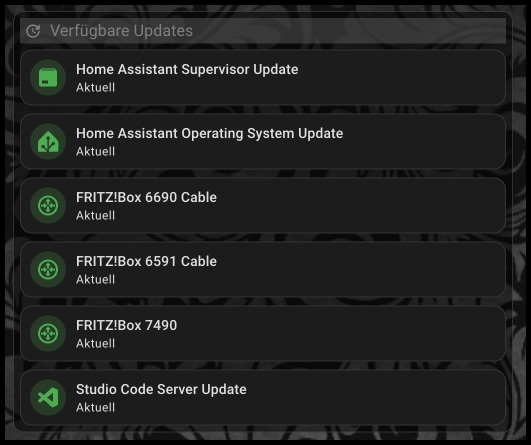
Meinst Du so?
Mit den MUSHROOM Karten (aus HACS) geht das recht einfach.
type: custom:mushroom-update-card
Mukusch
12. November 2025 um 07:56
3
Hallo Roberto,
na fast. Mir reicht es eigentlich, wenn ich, ich nenn es mal eine “Summencard” , habe.
Wenn ich dann da raufgehe dann würde mich dann die Ansicht schon gefallen.
maxe
12. November 2025 um 08:26
4
Mukusch:
“Summencard”
Dafür könntest du dir einen eigenen Template-Sensor über die Helfer anlegen:
{{ states.update
| selectattr('state','eq','on')
| list
| count }}
Der gibt dir dann die Anzahl an Updates aus.
Mukusch
12. November 2025 um 08:42
5
Ich glaub, jetzt bin auf dem richtigen Weg.
Wenn ich ihm jetzt noch beigebogen bekomme, dass er bei >0 das icon einfärben soll, dann hab ichs.
Kann man im Code-Editor Wenn dann Bedingungen einbauen?
maxe
12. November 2025 um 08:43
6
Zeig doch mal den Code deiner Card.
Ich hab es mit der Bubble.Card mal so nachgebaut:
type: custom:bubble-card
card_type: button
button_type: state
entity: sensor.abfrage_updates
styles: |
  .bubble-button-background {
    opacity: 1 !important;
    background-color: ${state >= '1' ? 'red' : 'Lightgreen'} !important;
  }
grid_options:
  columns: 6
  rows: auto
maxe
12. November 2025 um 08:55
8
Aber so färbt sich die Card doch schon entsprechend ein.
Ja, wenn kein Update vorliegt grün, ab einem Update rot.
maxe
12. November 2025 um 08:58
10
Also alle “Probleme” beseitigt ?
Mukusch
12. November 2025 um 09:11
11
Super. Vielen Dank für die schnelle Hilfe.
Vielleicht eine blöde Frage: Aber wo kommt der her?
Hat Maxe als Template Sensor Helfer empfohlen, 9 Mails höher.
1 „Gefällt mir“
Mukusch
12. November 2025 um 10:59
14
Das mit dem Sensor klappt soweit.
mit der Farbe will es noch nicht so.
Hier ist mal mein Code.
type: custom:mushroom-entity-card
entity: sensor.updates
icon: mdi:cog
name: Updates
card_mod:
  style: |
    ha-card {
      {% if ( states('sensor.updates') , float(0) = 0 ) %}
        --card-mod-icon-color: green;
      {% elif ( states('sensor.updates') , float(0) <> 0 ) %}
        --card-mod-icon-color: red;
      {% endif %}
    }
Er will aber ums verrecken nicht grün werden.
maxe
12. November 2025 um 11:24
15
da ist auch einiges falsch, wo hast du die styles her?
card_mod:
  style: |
    ha-card {
      {% if ( states('sensor.updates') | float(0) == 0 ) %}
        --card-mod-icon-color: green;
      {% else %}
        --card-mod-icon-color: red;
      {% endif %}
    }
Mukusch
12. November 2025 um 12:10
16
Ich habe versucht etwas passendes zu finden und mir schien die Syntax recht logisch.
Aber Danke, jetzt klappt es.