Hallo Leute,
Vorab muss ich sagen, dass ich mich erst seit kurzen mir Home Assistent beschäftige.
Ich suche eine Lösung wie ich auf einem Dashboard ein Radio Stream starten kann.
Mit den Beispielen die ich im Forum gefunden habe, komme ich noch nicht so recht klar.
Hat jemand ein simples Beispiel um einen Radio Stream zu starten?
Danke
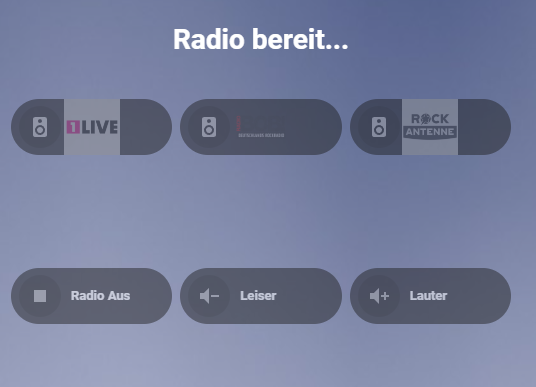
Alter Thread, aber der erste der bei der Suche auftaucht. Ich hatte ebenfalls dieses Problem und habe es hinbekommen. Ich teile meine yaml gerne und nen Screen wie es aussieht. Hab das Thema aber beendet, weil das Projekt so doch nicht umsetzbar war.
Funktion ist aber gegeben und vllt kann es jemand gebrauchen oder ich selber auch irgendwann wieder.
type: vertical-stack
cards:

* type: markdown
  content: >

  #  {{ state_attr(‘media_player.browser_mod_97a0eeee_a3be0e45’,

  ‘media_title’) | default(‘Radio bereit…’, true) }}

  <center> {{ state_attr('media_player.browser_mod_97a0eeee_a3be0e45',
    'media_artist') | default('', true) }} </center>
  entity: media_player.browser_mod_97a0eeee_a3be0e45
  card_mod:
    style: |
      ha-card {
        background: transparent !important;
        border: none !important;
        box-shadow: none !important;
      }


* type: grid
  columns: 3
  square: true
  cards:

  * type: custom:bubble-card
    card_type: button
    name: 1Live
    entity: media_player.browser_mod_97a0eeee_a3be0e45
    show_name: false
    styles: |
    .bubble-button-background {
    background-image: url(“/local/radio/einslive.png”) !important;
    background-size: contain !important;
    background-repeat: no-repeat !important;
    background-position: center !important;
    }
    tap_action:
    action: call-service
    service: media_player.play_media
    target:
    entity_id: media_player.browser_mod_97a0eeee_a3be0e45
    data:
    media_content_id: >-
    https://wdr-1live-live.icecast.wdr.de/wdr/1live/live/mp3/128/stream.mp3
    media_content_type: audio/mpeg
  * type: custom:bubble-card
    card_type: button
    name: Radio Bob
    entity: media_player.browser_mod_97a0eeee_a3be0e45
    show_name: false
    styles: |
    .bubble-button-background {
    background-image: url(“/local/radio/radiobob.png”) !important;
    background-size: contain !important;
    background-repeat: no-repeat !important;
    background-position: center !important;
    }
    tap_action:
    action: call-service
    service: media_player.play_media
    target:
    entity_id: media_player.browser_mod_97a0eeee_a3be0e45
    data:
    media_content_id: >-
    http://streams.radiobob.de/bob-bestofrock/mp3-192/streams.radiobob.de/
    media_content_type: audio/mpeg
  * type: custom:bubble-card
    card_type: button
    name: Rock Antenne
    entity: media_player.browser_mod_97a0eeee_a3be0e45
    show_name: false
    styles: |
    .bubble-button-background {
    background-image: url(“/local/radio/rockantenne.png”) !important;
    background-size: contain !important;
    background-repeat: no-repeat !important;
    background-position: center !important;
    }
    tap_action:
    action: call-service
    service: media_player.play_media
    target:
    entity_id: media_player.browser_mod_97a0eeee_a3be0e45
    data:
    media_content_id: https://stream.rockantenne.de/rockantenne/stream/mp3
    media_content_type: audio/mpeg
  * type: custom:bubble-card
    card_type: button
    name: Radio Aus
    icon: mdi:stop
    entity: media_player.browser_mod_97a0eeee_a3be0e45
    tap_action:
    action: call-service
    service: media_player.media_stop
    target:
    entity_id: media_player.browser_mod_97a0eeee_a3be0e45
  * type: custom:bubble-card
    card_type: button
    name: Leiser
    icon: mdi:volume-minus
    entity: media_player.browser_mod_97a0eeee_a3be0e45
    tap_action:
    action: call-service
    service: media_player.volume_down
    target:
    entity_id: media_player.browser_mod_97a0eeee_a3be0e45
  * type: custom:bubble-card
    card_type: button
    name: Lauter
    icon: mdi:volume-plus
    entity: media_player.browser_mod_97a0eeee_a3be0e45
    tap_action:
    action: call-service
    service: media_player.volume_up
    target:
    entity_id: media_player.browser_mod_97a0eeee_a3be0e45
 by HarryP: Code-/Logzeilen formatiert (bitte immer in </> einbinden)
s.a.: (Neues Update & Features - Hier in der Community 🫶)