samuix
20. März 2026 um 09:18
1
Hallo,
ich habe mir ein eigenes Dashboard für meine Energie erstellt, sie beinhaltet die Card custom:energy-flow-card-plus. Nach einem Homeassistant Update erscheint nun:
Wird geladen …
Make sure you have the Energy Integration setup and a Date Selector in this View or set
energy_date_selection: false
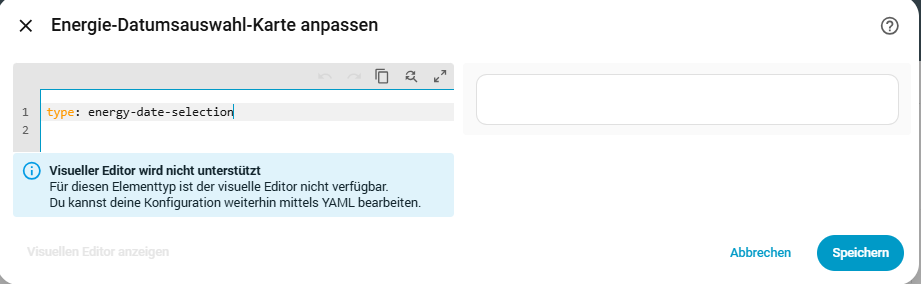
Ich versuche nun die energy-date-selection Card durch hinzufügen einer manuellen Card vom type: energy-date-selection zu erstellen. Leider ist diese komplett leer (siehe Bild). Was kann ich tuen?
Viel Dank
samuix
23. März 2026 um 08:05
2
Hallo,
ich bin einen Schritt weiter. Wenn ich folgendes ergänze:
collection_key: energy_1
dann erscheint die Datumsauswahl, funktioniert auch mit dem default collection_key.
Leider übernimmt die energy-flow-card-plus diesen Wert nicht. Es bleibt die Ausschrift:
Wird geladen …
Make sure you have the Energy Integration setup and a Date Selector in this View or set

energy_date_selection: false
Was kann ich tun? Vielen Dank
Vielleicht mal CTRL-F5 im Browser drücken?
mh6210
24. März 2026 um 05:07
4
(Beitrag vom Verfasser gelöscht)
samuix
24. März 2026 um 07:55
5
Vielen Dank für die Antwort, leider hilft das auch nicht. Irgendetwas hat sich anscheinend “verklemmt”. Ohne collection_key zeigt er nichts an, obwohl der Parameter nur optional ist. Der Selektor funktioniert im Energie Dashboard.
Kopier mal folgendes in eine neue leere Karte in irgend einem Dashboard
PS: du musst allerdings entweder das veraltete CARD_MOD oder besser UIX (findest du in HACS) installiert haben.
Quelle: Custom Energy dashboard and floating date/time selection field - #15 by zillion42 - Energy - Home Assistant Community
type: energy-date-selection
card_mod:
  style:
    hui-energy-period-selector$:
      ha-date-range-picker$:
        date-range-picker$: |
          /* 1. THE POPUP (Opens upwards) */
          .daterangepicker {
            top: auto !important;
            bottom: 75px !important;
            margin-top: 0 !important;
            transform-origin: bottom center !important;
          }
          /* Flip the arrows */
          .daterangepicker:before {
            border-top: 7px solid var(--divider-color, #ccc) !important;
            border-bottom: none !important;
            bottom: -7px !important;
            top: auto !important;
          }
          .daterangepicker:after {
            border-top: 6px solid var(--card-background-color) !important;
            border-bottom: none !important;
            bottom: -6px !important;
            top: auto !important;
          }
      .: |
        /* 2. ALIGNMENT (Fixes flexbox collapse and huge empty gaps) */
        .content {
          justify-content: center !important;
          gap: 10px !important;
        }
        /* Remove flex-grow from the date to prevent it pushing arrows away */
        .date-range {
          flex: 0 1 auto !important;
          margin: 0 !important;
        }
    .: |
      ha-card {
        /* 3. THE FLOATING BAR (Desktop Base) */
        position: fixed !important;
        bottom: 30px !important;
        z-index: 9000 !important;

        /* Dynamic centering (Sidebar-aware for desktop) */
        left: var(--mdc-drawer-width, 0px) !important;
        right: 0 !important;
        margin-left: auto !important;
        margin-right: auto !important;

        /* Fix hitboxes */
        pointer-events: auto !important;

        /* THE TRICK: Force 600px width so the HA Javascript keeps ALL icons (arrows + 'Now') */
        width: 600px !important;
        height: 48px !important;
        padding: 0 15px !important;
        box-sizing: border-box !important;

        /* Visuals */
        background: rgba(25, 25, 25, 0.95) !important;
        backdrop-filter: blur(15px) !important;
        box-shadow: 0px 10px 40px rgba(0,0,0,0.8) !important;
        border-radius: 30px !important;
        border: 1px solid rgba(255, 255, 255, 0.15) !important;

        /* Text contrast fixes */
        --primary-text-color: white !important;
        --secondary-text-color: white !important;
        --mdc-icon-color: white !important;
        --mdc-theme-text-primary-on-background: white !important;
      }

      /* 4. THE MOBILE HACK (Scaling brute-force) */
      @media (max-width: 500px) {
        ha-card {
          /* Reset sidebar logic and hard-center using oldschool negative margin */
          right: auto !important;
          left: 50% !important;
          margin-left: -300px !important; /* Exactly half of the 600px width */

          /* Shrink the 600px card to 360px (600 * 0.6) for mobile screens */
          transform: scale(0.6) !important;
          transform-origin: bottom center !important;
        }
      }

      /* Hide the host element in the grid layout without breaking it */
      :host {
        position: absolute !important;
        width: 100% !important;
        height: 0 !important;
        pointer-events: none !important;
      }
samuix
24. März 2026 um 11:53
7
Super, vielen Dank, das hat funktioniert.
Ich habe nur noch die folgende Anpassung vorgenommen:
--mdc-theme-text-primary-on-background: grey !important;
Damit wird der Auswahltext beim Kalender sichtbar.
samuix
2. April 2026 um 13:26
8
Ich habe heute das neue Core Update (2026.4.0) eingespielt, danach habe ich wieder das gleiche Fehlerbild bei der energy-flow-card-plus wie am Anfang, obwohl die energy-date-selection weiterhin funktioniert,
samuix
7. April 2026 um 08:48
9
Hallo,
ich habe gerade gesehen es gibt dazu bereits eine Fehlermeldung:
https://github.com/flixlix/energy-flow-card-plus/issues/184