Hallo
Der Code dazu sieht so aus:
# Abfall
- platform: waste_collection_schedule
  name: Restmuell
  details_format: "upcoming"
  value_template: "{% if value.daysTo == 0 %} Heute{% elif value.daysTo == 1 %} Morgen{% else %} in {{value.daysTo}} Tagen{% endif %}"
  types:
    - rest

- platform: waste_collection_schedule
  name: GelberSack
  details_format: "upcoming"
  value_template: "{% if value.daysTo == 0 %} Heute{% elif value.daysTo == 1 %} Morgen{% else %} in {{value.daysTo}} Tagen{% endif %}"
  types:
    - gelbersack
Das ganze steht in der sensors_yaml
Danke für eure Hilfe
1 „Gefällt mir“
SvePu
30. April 2023 um 12:49
2
Das HACS Addon Lovelace Auto Entities könnte da behilflich sein.
Hast du Interesse an so etwas ?
Wau
Danke
@bimbo009 ich hätte auch grosses Interesse an deiner Variante
1 „Gefällt mir“
Schaut hier mal rein da hab ich das schon mal gepostet.
Hallo zusammen,
ich habe den Abfallkalender der AWB Köln in HA über die Integration waste_collection_schedule übernommen. Das hat zunächst einmal mit Hilfe des Videos von Simon prima geklappt.
Folgendes "Problem" habe ich bisher nicht lösen können:
1. Die von der AWB gelieferten Bezeichnungen finde ich nicht so toll (grey für Restmüll, blue für Papier etc) und würde die im Kalender und im Dashboard gerne anpassen.
2. Ich habe "eigene" farbige Mülltonnen als png-Dateien im www/icons Ordner a…
@SvePu
type: custom:auto-entities
card:
  type: entities
title: Abfallkalender
show_header_toggle: false
entities:
  - entity: sensor.gelbersack
    name: Gelber Sack
  - entity: sensor.restmuell
    name: Restmüll
auto_entities:
  sort:
    method: state
    reverse: false
    ignore_case: true
    attribute: entity_id
Das wird richtig angezeigt! Bis auf den Titel: der wird gar nicht angezeigt.
type: horizontal-stack
cards:
  - type: vertical-stack
    cards:
      - type: custom:digital-clock
      - type: horizontal-stack
        cards:
          - show_name: true
            show_icon: true
            type: button
            tap_action:
              action: toggle
            entity: input_boolean.alles_aus
            name: Alles AUS
            show_state: true
          - show_name: true
            show_icon: true
            type: button
            tap_action:
              action: toggle
            entity: switch.remote_garage_gartenlicht1
            name: Gartenlicht
            show_state: true
            icon: mdi:floor-lamp
          - show_name: true
            show_icon: true
            type: button
            tap_action:
              action: toggle
            entity: input_boolean.remote_garage_besuch
            name: Besuch
            show_state: true
      - type: horizontal-stack
        cards:
          - show_name: true
            show_icon: true
            type: button
            tap_action:
              action: toggle
            entity: input_boolean.whirly_licht
            name: Whirly Licht
            show_state: true
            icon: mdi:outdoor-lamp
          - show_name: true
            show_icon: true
            type: button
            tap_action:
              action: toggle
            icon: mdi:home-outline
            entity: input_boolean.anwesend
            show_state: true
          - show_name: true
            show_icon: true
            type: button
            tap_action:
              action: toggle
            entity: input_boolean.remote_garage_einfahrtsmeldung
            name: Einfahrtsmeldung
            icon: mdi:light-switch
            show_state: true
  - type: horizontal-stack
    cards:
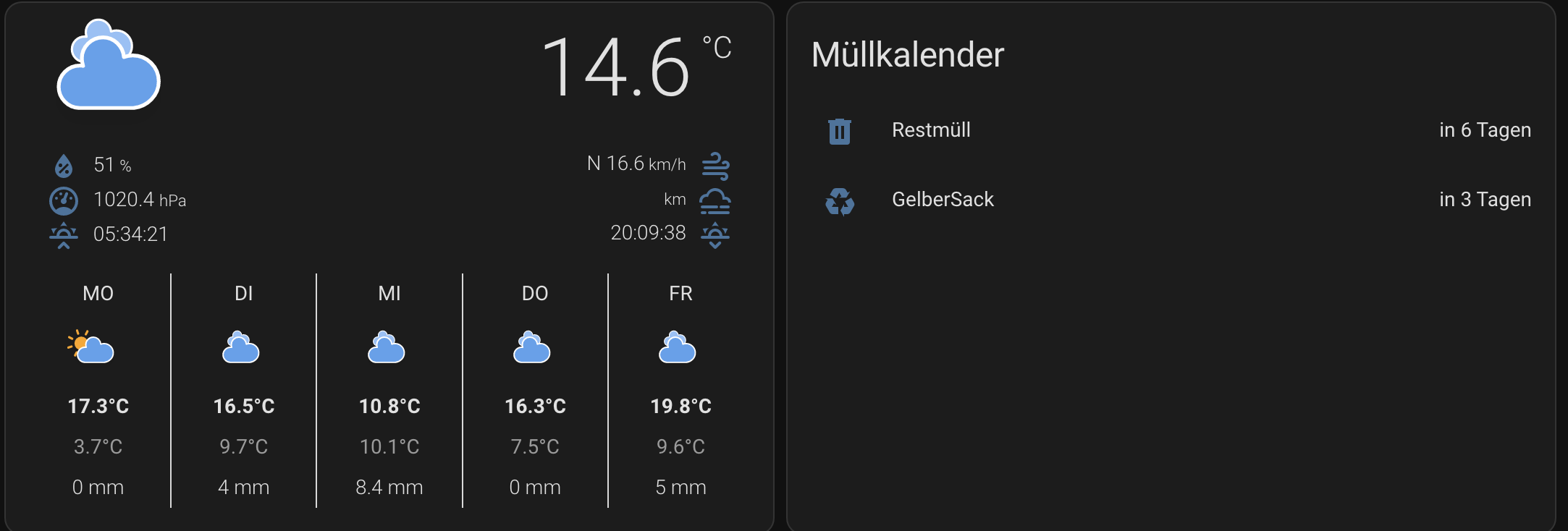
      - show_current: true
        show_forecast: true
        type: custom:weather-card
        entity: weather.forecast_wordern
        hourly_forecast: false
        number_of_forecasts: '5'
  - type: custom:auto-entities
    card:
      type: entities
    title: Müllkalender
    entities:
      - entity: sensor.restmuell
      - entity: sensor.gelbersack
    show_header_toggle: false
    auto_entities:
      sort:
        method: state
        reverse: false
        ignore_case: true
        attribute: entity_id
Hier wird nicht sortiert und auch der Titel wird nicht angezeigt?
was mache ich hier bitte falsch?
Gruß
Soul
12. Mai 2023 um 17:07
8
Mit dem Sortieren habe ich auch nicht hinbekommen. Numerisch mit zwei Stellen immer schwierig. Habe das einfach nebeneinander angeordnet.
jack
12. Mai 2023 um 17:22
9
Hallo, ich habe zwar andere Aussehen / Optik. wie bei euch, dafür kann ich es so sortieren wie ich es möchte und auch der Titel …nach oben unten oder ganz separat machen. Wenn Interesse an yaml besteht , einfach melden.
Soul
12. Mai 2023 um 17:26
10
Das Problem liegt auch an den Tagen. Nach Datum sortieren sollte eh immer gehen. Je nachdem was man will.
totow
12. Mai 2023 um 17:28
11
@jack währst du so nett und postest mal den yaml code zu deiner Karte?
LG
SvePu
12. Mai 2023 um 17:34
12
Fügt euren WCS Sensoren einfach add_days_to: true hinzu, dann könnt ihr das als Sortierungsgrundlage nutzen.
z.B.:
- platform: waste_collection_schedule
  name: wcs_restmuell
  add_days_to: true
  value_template: '{% if value.daysTo == 0 %} Heute{% elif value.daysTo == 1 %} Morgen{% else %} in {{value.daysTo}} Tagen{% endif %}'
  types:
    - "Restmüll"

- platform: waste_collection_schedule
  name: wcs_biotonne
  add_days_to: true
  value_template: '{% if value.daysTo == 0 %} Heute{% elif value.daysTo == 1 %} Morgen{% else %} in {{value.daysTo}} Tagen{% endif %}'
  types:
    - "Biotonne"

- platform: waste_collection_schedule
  name: wcs_gelbe_tonne
  add_days_to: true
  value_template: '{% if value.daysTo == 0 %} Heute{% elif value.daysTo == 1 %} Morgen{% else %} in {{value.daysTo}} Tagen{% endif %}'
  types:
    - "Gelbe Tonne"

- platform: waste_collection_schedule
  name: wcs_altpapier_formata
  add_days_to: true
  value_template: '{% if value.daysTo == 0 %} Heute{% elif value.daysTo == 1 %} Morgen{% else %} in {{value.daysTo}} Tagen{% endif %}'
  types:
    - "Altpapier (Formata)"

- platform: waste_collection_schedule
  name: wcs_naechste_abholung
  value_template: '{{value.types|join(" & ")}}{% if value.daysTo == 0 %}: Heute{% elif value.daysTo == 1 %}: Morgen{% else %}: in {{value.daysTo}} Tagen{% endif %}'
Der YAML Code der entsprechenden Lovelace Auto Entities Karte:
type: custom:auto-entities
card:
  type: entities
  title: Abfallentsorgung
filter:
  include:
    - entity_id: sensor.wcs_*
      not:
        name: /wcs_naechste_abholung/
sort:
  method: attribute
  attribute: daysTo
  numeric: true
1 „Gefällt mir“
jack
12. Mai 2023 um 17:37
13
Sehr gerne, gehe Grade nur an PC…iPad geht irgendwie nicht
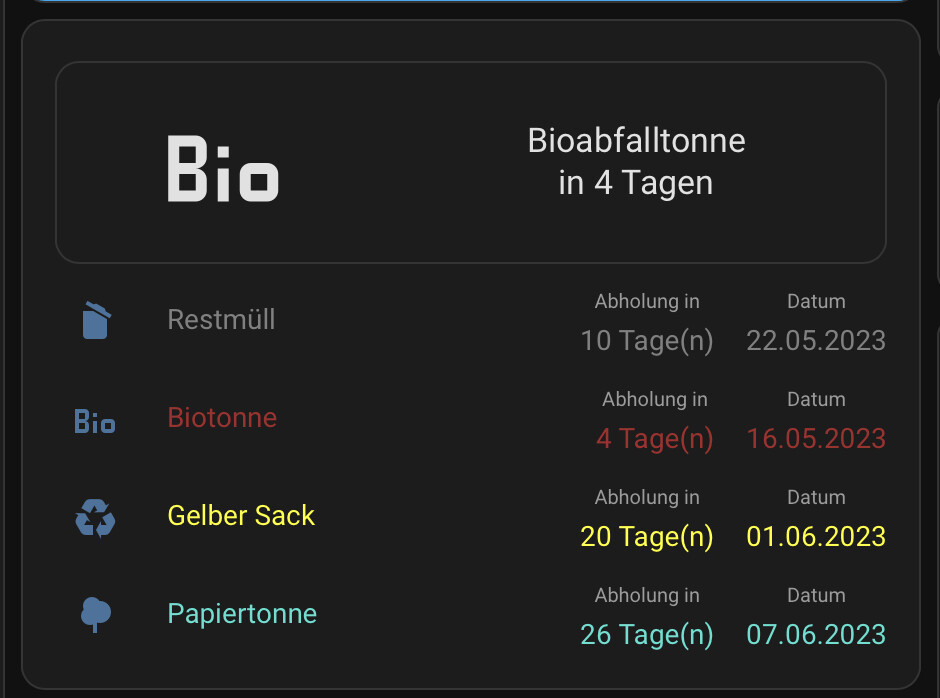
type: entities
entities:
  - entity: sensor.mybuttoncardsensor
    type: custom:button-card
    layout: icon_name_state2nd
    show_label: true
    label: |
      [[[
       var days_to = entity.state.split("|")[1]
       if (days_to == 0)
       { return "Heute" }
       else if (days_to == 1)
       { return "Morgen" }
       else
       { return "in " + days_to + " Tagen" }
      ]]]
    show_name: true
    name: |
      [[[
        return entity.state.split("|")[0]
      ]]]
    state:
      - color: red
        operator: template
        value: '[[[ return entity.state.split("|")[1] == 0 ]]]'
      - color: orange
        operator: template
        value: '[[[ return entity.state.split("|")[1] == 1 ]]]'
      - value: default
  - entity: sensor.restabfalltonne_date
    style: |
      :host {
        color: grey;
      }
    icon: mdi:delete-empty
    show_state: false
    type: custom:multiple-entity-row
    name: Restmüll
    secondary_info: false
    entities:
      - entity: sensor.restabfalltonne_collection
        name: Abholung in
        unit: Tage(n)
      - entity: sensor.restabfalltonne_date
        name: Datum
  - entity: sensor.bioabfalltonne_date
    style: |
      :host {
        color: brown;
      }
    icon: mdi:bio
    show_state: false
    type: custom:multiple-entity-row
    name: Biotonne
    secondary_info: false
    entities:
      - entity: sensor.bioabfalltonne_collection
        name: Abholung in
        unit: Tage(n)
      - entity: sensor.bioabfalltonne_date
        name: Datum
  - entity: sensor.papiertonne_date
    style: |
      :host {
        color: turquoise
      }
    icon: mdi:newspaper
    show_state: false
    type: custom:multiple-entity-row
    name: Papiertonne
    secondary_info: false
    entities:
      - entity: sensor.papiertonne_collection
        name: Abholung in
        unit: Tage(n)
      - entity: sensor.papiertonne_date
        name: Datum
  - entity: sensor.gelber_sack_date
    style: |
      :host {
        color: yellow
      }
    icon: mdi:recycle
    show_state: false
    type: custom:multiple-entity-row
    name: Gelber Sack
    secondary_info: false
    entities:
      - entity: sensor.gelber_sack_collection
        name: Abholung in
        unit: Tage(n)
      - entity: sensor.gelber_sack_date
        name: Datum
show_header_toggle: true
state_color: true
ist für Entitäten-Karten, mann kan auch Datum oder Abholtage löschen.
Nachtrag:
@Soul @totow
@jack *Bitte zukünftig für Nachträge/Korrekturen die „bearbeiten“ Funktion (geht 24h) verwenden. Danke!
2 „Gefällt mir“
djeeens
19. Februar 2024 um 15:27
17
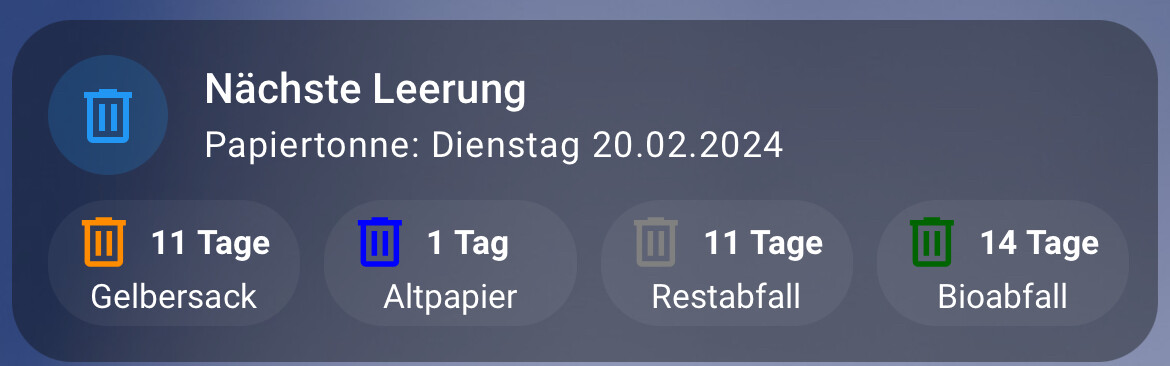
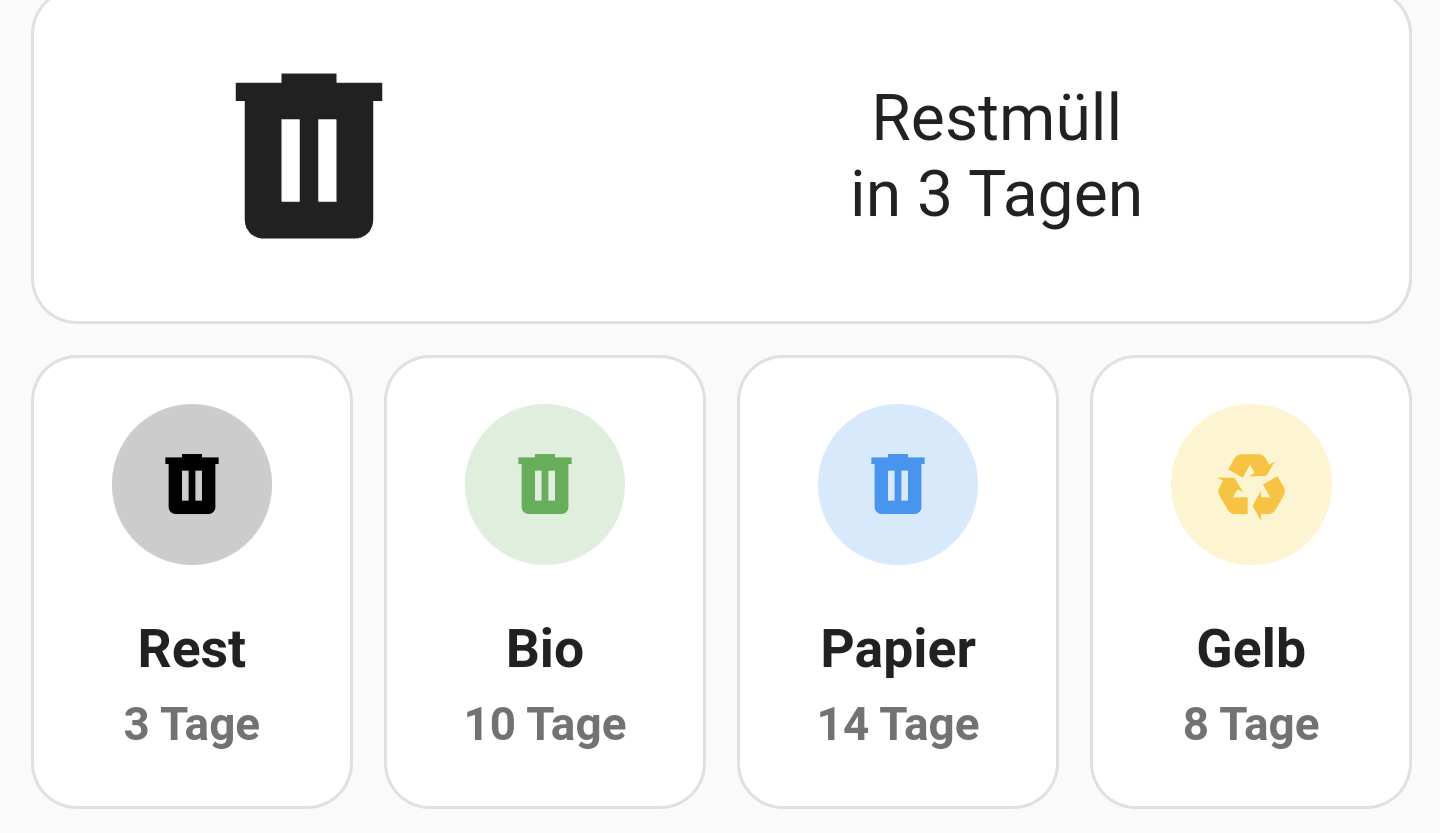
mein „first shot“
minimalistisch für‘s Handy Dashboard
type: custom:button-card
variables:
  abholung_state: sensor.abfall_termine_template
  g_state: sensor.gelbersack
  r_state: sensor.restabfall
  p_state: sensor.altpapier
  b_state: sensor.bioabfall
show_name: false
show_state: false
show_icon: false
styles:
  card:
    - padding: 9px
  grid:
    - grid-template-areas: '"oben" "unten"'
    - grid-template-columns: 99%
    - grid-template-rows: 1fr 1fr
  custom_fields:
    oben:
      - filter: opacity(100%)
      - overflow: visible
    unten:
      - filter: opacity(100%)
      - overflow: visible
custom_fields:
  oben:
    card:
      type: custom:mushroom-entity-card
      entity: '[[[ return variables.abholung_state ]]]'
      tap_action:
        action: none
      hold_action:
        action: none
      double_tap_action:
        action: none
      icon: mdi:trash-can-outline
      card_mod:
        style: |
          ha-card {
            padding: 0px !important;
            padding-bottom: 3px !important;
            padding-left: 3px !important;
            text-align: left !important;
            border: none !important;
            box-shadow: none !important;
            background: none !important;
          }
  unten:
    card:
      type: grid
      columns: 4
      square: false
      cards:
        - type: custom:button-card
          entity: '[[[ return variables.g_state ]]]'
          layout: icon_state
          size: 100%
          styles:
            icon:
              - color: darkorange
            state:
              - font-size: 0.8rem
              - font-weight: bold
              - justify-self: start
            label:
              - font-size: 0.8rem
            card:
              - background: rgba(var(--rgb-primary-text-color), 0.05)
              - height: 3rem
          show_name: false
          show_state: true
          show_label: true
          label: '[[[ return states[variables.g_state].attributes.friendly_name ]]]'
          tap_action:
            action: none
          state_display: |-
            [[[
              if (states[variables.g_state].state > 1)
              return states[variables.g_state].state + " " +
              states[variables.g_state].attributes.unit_of_measurement;
              else
              return states[variables.g_state].state + " " + "Tag";
              ]]]
          icon: mdi:trash-can-outline
          card_mod:
            style: |
              ha-card {
                padding: 3px !important;
                margin: 3px !important;
                border: none !important;
                box-shadow: none !important;
              }
        - type: custom:button-card
          entity: '[[[ return variables.p_state ]]]'
          layout: icon_state
          size: 100%
          styles:
            icon:
              - color: blue
            state:
              - font-size: 0.8rem
              - font-weight: bold
              - justify-self: start
            label:
              - font-size: 0.8rem
            card:
              - background: rgba(var(--rgb-primary-text-color), 0.05)
              - height: 3rem
          show_name: false
          show_state: true
          show_label: true
          label: '[[[ return states[variables.p_state].attributes.friendly_name ]]]'
          tap_action:
            action: none
          state_display: |-
            [[[
              if (states[variables.p_state].state > 1)
              return states[variables.p_state].state + " " +
              states[variables.p_state].attributes.unit_of_measurement;
              else
              return states[variables.p_state].state + " " + "Tag";
              ]]]
          icon: mdi:trash-can-outline
          card_mod:
            style: |
              ha-card {
                padding: 3px !important;
                margin: 3px !important;
                border: none !important;
                box-shadow: none !important;
              }
        - type: custom:button-card
          entity: '[[[ return variables.r_state ]]]'
          layout: icon_state
          size: 100%
          styles:
            icon:
              - color: grey
            state:
              - font-size: 0.8rem
              - font-weight: bold
              - justify-self: start
            label:
              - font-size: 0.8rem
            card:
              - background: rgba(var(--rgb-primary-text-color), 0.05)
              - height: 3rem
          show_name: false
          show_state: true
          show_label: true
          label: '[[[ return states[variables.r_state].attributes.friendly_name ]]]'
          tap_action:
            action: none
          state_display: |-
            [[[
              if (states[variables.r_state].state > 1)
              return states[variables.r_state].state + " " +
              states[variables.r_state].attributes.unit_of_measurement;
              else
              return states[variables.r_state].state + " " + "Tag";
              ]]]
          icon: mdi:trash-can-outline
          card_mod:
            style: |
              ha-card {
                padding: 3px !important;
                margin: 3px !important;
                border: none !important;
                box-shadow: none !important;
              }
        - type: custom:button-card
          entity: '[[[ return variables.b_state ]]]'
          layout: icon_state
          size: 100%
          styles:
            icon:
              - color: darkgreen
            state:
              - font-size: 0.8rem
              - font-weight: bold
              - justify-self: start
            label:
              - font-size: 0.8rem
            card:
              - background: rgba(var(--rgb-primary-text-color), 0.05)
              - height: 3rem
          show_name: false
          show_state: true
          show_label: true
          label: '[[[ return states[variables.b_state].attributes.friendly_name ]]]'
          tap_action:
            action: none
          state_display: |-
            [[[
              if (states[variables.b_state].state > 1)
              return states[variables.b_state].state + " " +
              states[variables.b_state].attributes.unit_of_measurement;
              else
              return states[variables.b_state].state + " " + "Tag";
              ]]]
          icon: mdi:trash-can-outline
          card_mod:
            style: |
              ha-card {
                padding: 3px !important;
                margin: 3px !important;
                border: none !important;
                box-shadow: none !important;
              }
1 „Gefällt mir“
remiku
19. Februar 2024 um 16:10
18
Sieht gut aus…optimal fürs Handy.
Auch Handy optimiert, den Code habe ich hier irgendwo geposted. Sortiert wird aber nüscht…
1 „Gefällt mir“
uh13
19. Februar 2024 um 19:32
21
Ich habe mir die Tankerkönigsortierung umgebaut. Wobei das bei mir nur auf der nächsten Ebene zum tragen kommt.
Handyansicht
und nach dem anklicken
1 „Gefällt mir“
djeeens
20. Februar 2024 um 06:51
22
1 „Gefällt mir“
Osorkon
20. Februar 2024 um 07:12
23
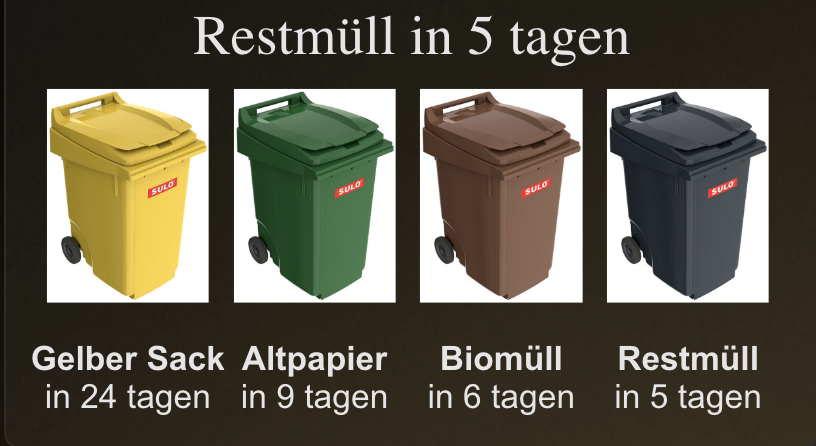
Zum sortieren, eignet sich die Markdown Karte sehr gut. Lässt sich ja mit allen anderen Karten kombinieren. Hier in der Kombination mit einer Grid Karte.
Gruß


 by HarryP: Zusammenführung Doppelpost.