Problem mit ESP-Home 2026.1.0

Hallo Zusammen,

eigentlich installiere ich kene .0 Versionen. Heute hab ich aber im Tran das Update auf ESP-Home 2026.1.0 installiert und natürlich sofort Probleme.

Meine ili9xxx-Displays sind nur noch komplett weiß.

Hab schon das Backup auf 2025.12.7 eingespielt, aber wenn ich die ESPs zurück flashen will, klappt das nicht.

========================= [SUCCESS] Took 11.09 seconds =========================
INFO Successfully compiled program.
INFO Connecting to 192.168.1.88 port 3232...
INFO Connected to 192.168.1.88
INFO Uploading /data/build/display-buro/.pioenvs/display-buro/firmware.bin (1106688 bytes)
ERROR Error receiving acknowledge auth result: [Errno 104] Connection reset by peer
WARNING Failed to upload to ['192.168.1.88']

Wenn ich ins LOG will, braucht er ewig um sich zu Verbinden, dann kommt folgendes

INFO ESPHome 2025.12.7
INFO Reading configuration /config/esphome/display-buro.yaml...
INFO Detected timezone 'Europe/Berlin'
WARNING GPIO5 is a strapping PIN and should only be used for I/O with care.
Attaching external pullup/down resistors to strapping pins can cause unexpected failures.
See https://esphome.io/guides/faq/#why-am-i-getting-a-warning-about-strapping-pins
WARNING GPIO15 is a strapping PIN and should only be used for I/O with care.
Attaching external pullup/down resistors to strapping pins can cause unexpected failures.
See https://esphome.io/guides/faq/#why-am-i-getting-a-warning-about-strapping-pins
INFO Starting log output from 192.168.1.88 using esphome API
INFO Successfully resolved display-buro @ 192.168.1.88 in 0.000s
INFO Successfully connected to display-buro @ 192.168.1.88 in 0.108s
WARNING Can't connect to ESPHome API for display-buro @ 192.168.1.88: Handshake timed out after 30.0s (TimeoutAPIError)
INFO Trying to connect to display-buro @ 192.168.1.88 in the background
INFO Successfully connected to display-buro @ 192.168.1.88 in 0.026s
INFO Successful handshake with display-buro @ 192.168.1.88 in 56.338s
[20:28:31.216][I][app:206]: ESPHome version 2026.1.0 compiled on 2026-01-21 19:13:13 +0100
[20:28:31.216][I][app:213]: ESP32 Chip: ESP32 r3.0, 2 core(s)
[20:28:31.216][W][app:222]: Set minimum_chip_revision: "3.0" to reduce binary size
[20:28:31.216][C][logger:316]: Logger:
[20:28:31.216][C][logger:316]:   Max Level: DEBUG
[20:28:31.216][C][logger:316]:   Initial Level: DEBUG
[20:28:31.217][C][logger:322]:   Log Baud Rate: 115200
[20:28:31.217][C][logger:322]:   Hardware UART: UART0
[20:28:31.217][C][logger:332]:   Task Log Buffer Size: 768 bytes
[20:28:31.236][W][spi-esp-idf:032]: SPI device not ready, cannot begin transaction
[20:28:31.250][E][spi-esp-idf:076]: Transmit failed - err 102
[20:28:31.250][W][spi-esp-idf:032]: SPI device not ready, cannot begin transaction
[20:28:31.250][E][spi-esp-idf:076]: Transmit failed - err 102
[20:28:31.250][W][spi-esp-idf:032]: SPI device not ready, cannot begin transaction
[20:28:31.265][E][spi-esp-idf:076]: Transmit failed - err 102
[20:28:31.265][W][spi-esp-idf:032]: SPI device not ready, cannot begin transaction
[20:28:31.276][E][spi-esp-idf:076]: Transmit failed - err 102
[20:28:31.289][W][spi-esp-idf:032]: SPI device not ready, cannot begin transaction
[20:28:31.289][E][spi-esp-idf:076]: Transmit failed - err 102
[20:28:31.300][W][spi-esp-idf:032]: SPI device not ready, cannot begin transaction
[20:28:31.300][E][spi-esp-idf:076]: Transmit failed - err 102
[20:28:31.309][W][spi-esp-idf:032]: SPI device not ready, cannot begin transaction
[20:28:31.324][E][spi-esp-idf:076]: Transmit failed - err 102
[20:28:31.337][W][spi-esp-idf:032]: SPI device not ready, cannot begin transaction
[20:28:31.347][E][spi-esp-idf:076]: Transmit failed - err 102
[20:28:31.348][W][spi-esp-idf:032]: SPI device not ready, cannot begin transaction
[20:28:31.356][E][spi-esp-idf:076]: Transmit failed - err 102
[20:28:31.369][W][spi-esp-idf:032]: SPI device not ready, cannot begin transaction
[20:28:31.380][E][spi-esp-idf:076]: Transmit failed - err 102
[20:28:31.386][W][spi-esp-idf:032]: SPI device not ready, cannot begin transaction
[20:28:31.386][E][spi-esp-idf:076]: Transmit failed - err 102
[20:28:31.396][W][spi-esp-idf:032]: SPI device not ready, cannot begin transaction
[20:28:31.406][E][spi-esp-idf:076]: Transmit failed - err 102
[20:28:31.421][E][spi-esp-idf:076]: Transmit failed - err 102
[20:28:31.436][E][spi-esp-idf:076]: Transmit failed - err 102
[20:28:31.450][E][spi-esp-idf:076]: Transmit failed - err 102
[20:28:31.457][E][spi-esp-idf:076]: Transmit failed - err 102

Die WARNING wegen GPIO kommt schon immer. Ist ein Board von AZ-Delivery. Kann daher die PINs nicht ändern. Hat bis jetzt trotzdem funktioniert.

Hat Jemand eine Idee?

Macht es Sinn den ESP vom Display zu trennen und dann zu versuchen zu flashen?

Spiel doch das ESP-Backup wieder ein und warte auf die nächste Version.

Scheint das auth Problem zu sein, welches in den Release notes auch steht. Glaub du musst per Kabel flashen, über Wireless geht es nicht

Per Kavel hatte ich schon versucht.

Da vat er den ESP garnicht erst gefunden.

Sowohl am Host als auch am PC von dem du flasht?

Hab es jetzt hinbekommen. Musst aber die Boot-Taste beim anschließen gedrückt halten, sonst hat er nicht geflasht.

Warte jetzt auf 2026.1.1

Muss ich dann wieder per Kabel flashen oder wird das auth-Problem gelöst?

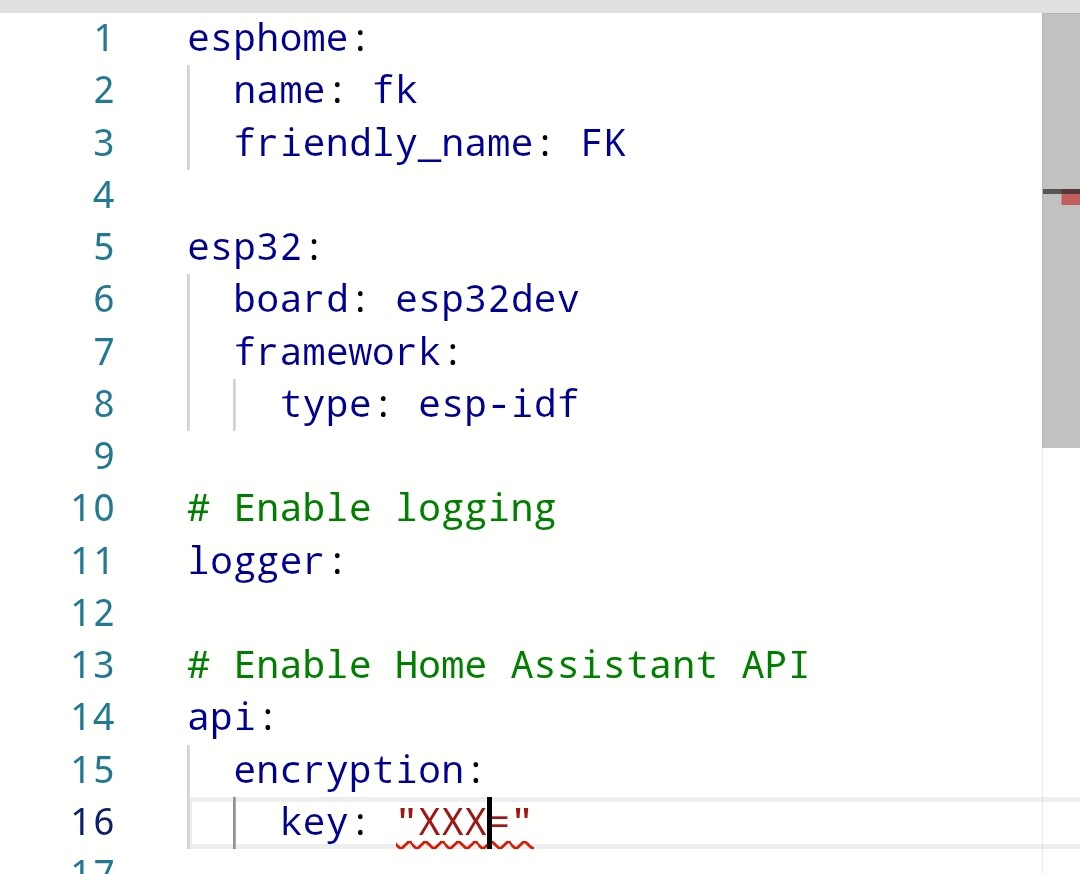
Ich habe ein ESP DEV Board installiert.

Nach Update auf ESP Home 2026.1.0 habe ich testweise den ESP OTA upgedated.

Habe im Code Arduino durch ESP-IDF ersetzt und den Zugriff über API eingestellt - war aber vorher schon so (siehe Screenshot), neu kompiliert und installiert.

Alles ohne Probleme.

Was macht das “ESP-IDF”?

Bei mir steht im Moment auch “Arduino”.

Key hab ich auch schon drin.

Das ist die original Entwicklungsumgebung vom Hersteller der ESP Chips und stets weiterentwickelt. Arduino ist … gute Frage, ein anderes Entwicklungsframework?

Hab gegoogelt…

ESP-IDF (IoT Development Framework)

  • Pros: Access to all hardware features, full FreeRTOS control, better memory management, efficient power management, and advanced debugging.
  • Cons: Steeper learning curve, more complex project setup, and longer compilation times.
  • Best For: Production-grade products, complex projects, or when maximum performance is needed.

Arduino Framework (ESP32)

  • Pros: Very easy to use, huge community support, extensive libraries, rapid development, and faster builds.
  • Cons: Higher overhead, limited access to low-level ESP32 features, less flexibility for complex threading.
  • Best For: Hobbyists, quick prototypes, and simple IoT projects.

Key Differences

  • Performance: ESP-IDF generally offers better, more efficient performance for complex tasks.
  • Development Speed: Arduino is faster for getting a prototype working quickly.
  • Debugging: ESP-IDF provides more robust, low-level debugging tools.
  • Flexibility: ESP-IDF allows deep customization of the partition table, bootloader, and peripheral configuration.

Wenn du nicht irgendwelche Spezial-Libraries einbinden musst, würde ich immer ESP-IDF nutzen, ich hab 2 Dutzend Chips im Einsatz, von Wetterstation, BLE-Proxies, Barcode-Scanner, Displays, IR Klimaanlagensteuerung bis hin zu ModBus alles mögliche im Einsatz, ich hab nie Arduino benötigt.

Ok, danke.

Aber hat jetzt nix mit dem Update auf 2026.1.x zu tun, oder?

Bin mir da nicht sicher.

Bei ESP Home mal den Change Log zu 2026.1.0 anschauen.

Da stand was drin zu den beiden Themen

  • Arduino zu ESP IDF und
  • API KEY …

Wollte das mit esp-idf jetzt mal testen (weiterhin mit 2025.12.7).

Also aus

esp32:
  board: esp32dev
  framework:
    type: arduino
esp32:
  board: esp32dev
  framework:
    type: esp-idf

gemacht.

Resultat: Display weiß

Zurück geändert, Display immer noch weiß

Der am ESP angeschlossene Sensor liefert auch keien Werte.

LOG über WLAN braucht ewig um zu verbinden. Dann kommt das:

[08:29:54.604][E][spi-esp-idf:077]: Transmit failed - err 102
[08:29:54.620][E][spi-esp-idf:077]: Transmit failed - err 102
[08:29:54.626][E][spi-esp-idf:077]: Transmit failed - err 102
[08:29:54.650][E][spi-esp-idf:077]: Transmit failed - err 102
[08:29:54.652][E][spi-esp-idf:077]: Transmit failed - err 102
[08:29:54.666][E][spi-esp-idf:077]: Transmit failed - err 102
[08:29:54.674][E][spi-esp-idf:077]: Transmit failed - err 102
[08:29:54.675][C][spi:067]: SPI bus:
[08:29:54.683][C][spi:068]:   CLK Pin: GPIO18
[08:29:54.683][C][spi:069]:   SDI Pin: GPIO19
[08:29:54.695][C][spi:070]:   SDO Pin: GPIO23
[08:29:54.704][C][spi:075]:   Using HW SPI: SPI2_HOST
[08:29:54.756][W][spi-esp-idf:033]: SPI device not ready, cannot begin transaction
[08:29:54.757][E][spi-esp-idf:077]: Transmit failed - err 102
[08:29:54.757][W][spi-esp-idf:033]: SPI device not ready, cannot begin transaction
[08:29:54.757][E][spi-esp-idf:077]: Transmit failed - err 102
[08:29:54.758][W][spi-esp-idf:033]: SPI device not ready, cannot begin transaction
[08:29:54.758][E][spi-esp-idf:077]: Transmit failed - err 102
[08:29:54.758][W][spi-esp-idf:033]: SPI device not ready, cannot begin transaction
[08:29:54.770][E][spi-esp-idf:077]: Transmit failed - err 102
[08:29:54.778][W][spi-esp-idf:033]: SPI device not ready, cannot begin transaction
[08:29:54.784][E][spi-esp-idf:077]: Transmit failed - err 102
[08:29:54.804][W][spi-esp-idf:033]: SPI device not ready, cannot begin transaction
[08:29:54.804][E][spi-esp-idf:077]: Transmit failed - err 102
[08:29:54.810][W][spi-esp-idf:033]: SPI device not ready, cannot begin transaction
[08:29:54.833][E][spi-esp-idf:077]: Transmit failed - err 102
[08:29:54.836][W][spi-esp-idf:033]: SPI device not ready, cannot begin transaction
[08:29:54.847][E][spi-esp-idf:077]: Transmit failed - err 102
[08:29:54.847][W][spi-esp-idf:033]: SPI device not ready, cannot begin transaction
[08:29:54.859][E][spi-esp-idf:077]: Transmit failed - err 102
[08:29:54.870][W][spi-esp-idf:033]: SPI device not ready, cannot begin transaction
[08:29:54.878][E][spi-esp-idf:077]: Transmit failed - err 102
[08:29:54.886][W][spi-esp-idf:033]: SPI device not ready, cannot begin transaction
[08:29:54.892][E][spi-esp-idf:077]: Transmit failed - err 102
[08:29:54.904][W][spi-esp-idf:033]: SPI device not ready, cannot begin transaction
[08:29:54.913][E][spi-esp-idf:077]: Transmit failed - err 102
[08:29:54.926][E][spi-esp-idf:077]: Transmit failed - err 102
[08:29:54.941][E][spi-esp-idf:077]: Transmit failed - err 102
[08:29:54.947][E][spi-esp-idf:077]: Transmit failed - err 102
[08:29:54.962][E][spi-esp-idf:077]: Transmit failed - err 102
[08:29:54.970][E][spi-esp-idf:077]: Transmit failed - err 102

Was ist denn jetzt passiert?

Update:

Ich habe jetzt einen anderen ESP32 genommen, und die vorher funktionierende Konfig geflasht.

Geht auch nicht.

Habe keine Idee mehr…

:crayon:by HarryP: Zusammenführung Doppelpost (bei Änderungen oder hinzufügen von Inhalten bitte die „Bearbeitungsfunktion“ anstatt „Antworten“ zu nutzen)

Habe weiter getestet.

Im ESPHome Builder ein neues Projekt (New Device) angelegt und ohne weitere Konfig installiert.

Da steht dann übrigens auch schon

esp32:
  board: esp32dev
  framework:
    type: esp-idf

drin.

Funktioniert. Log über WLAN wird angezeigt.

Dann nur den Code für den DHT-Sensor ergänzt.

Funktioniert. Log über WLAN wird angezeit.

Wenn ich aber den Code fürs Display ergänze, flasht er zwar ohne Fehlermeldung, aber dann Verbindet er nicht per WLAN.

Es scheint also mit meinem Code fürs Display zu liegen.

Kann mir bitte Jemand sagen, woran es liegen könnte? Ich hab keine Ahnung.

Hier die komplette yaml

esphome:
  name: display-buro
  friendly_name: Display Büro
esp32:
  board: esp32dev
  framework:
    type: esp-idf
    
# Enable logging
logger:

# Enable Home Assistant API
api:
  encryption:
    key: "9IRfLFXSkyF6cuzUVV6yGYV8txGWkJ6dQHudoBMBnG4="

ota:
  platform: esphome
  password: "83a6a7057dba71c972482addbcea40d7"

wifi:
  ssid: !secret wifi_ssid
  password: !secret wifi_password

  # Enable fallback hotspot (captive portal) in case wifi connection fails
  ap:
    ssid: "Display-Buro Fallback Hotspot"
    password: "j1N5zDMMrIra"

captive_portal:
    
sensor:
  - platform: dht
    pin: 32
    temperature:
      name: "temp_buero"
      id: temp_buero
      filters:
        - offset: -1.5
    humidity:
      name: "hum_buero"
      id: hum_buero
      filters:
        - offset: 10
    update_interval: 60s

  - platform: homeassistant
    id: temp_aussen
    entity_id: sensor.ws2900_outdoor_temperature

  - platform: homeassistant
    id: hum_aussen
    entity_id: sensor.ws2900_humidity

  - platform: homeassistant
    id: pres_aussen
    entity_id: sensor.ws2900_relative_pressure
 
  - platform: homeassistant
    id: ha_power
    entity_id: sensor.power_shm2

  - platform: homeassistant
    id: pv_power
    entity_id: sensor.power_pv_summe

  - platform: homeassistant
    id: pv_an_Pdc_ost
    entity_id: sensor.stp5000se_dc_leistung_b_template

  - platform: homeassistant
    id: pv_an_Pdc_west
    entity_id: sensor.stp5000se_dc_leistung_a_template

  - platform: homeassistant
    id: pv_an_tagesertrag
    entity_id: sensor.stp5000se_pv_tagesertrag

  - platform: homeassistant
    id: akku_power
    entity_id: sensor.power_batterie

  - platform: homeassistant
    id: akku_ladezustand
    entity_id: sensor.stp5000se_aktueller_batterieladezustand

  - platform: homeassistant
    id: heiz_vl
    entity_id: sensor.temperature_4

  - platform: homeassistant
    id: heiz_rl
    entity_id: sensor.temperature_5

  - platform: homeassistant
    id: ww_vl
    entity_id: sensor.temperature_2

  - platform: homeassistant
    id: ww_rl
    entity_id: sensor.temperature_3    

  - platform: homeassistant
    id: solar_vl
    entity_id: sensor.solar_vorlauf_2

  - platform: homeassistant
    id: solar_rl
    entity_id: sensor.solar_rucklauf

  - platform: homeassistant
    id: pv_alt_Pdc_ost
    entity_id: sensor.stp5000tl20_dc_leistung_b_template

  - platform: homeassistant
    id: pv_alt_Pdc_west
    entity_id: sensor.stp5000tl20_dc_leistung_a_template

  - platform: homeassistant
    id: pv_alt_tagesertrag
    entity_id: sensor.stp5000tl20_pv_tagesertrag

  - platform: homeassistant
    id: p_heiz_el
    entity_id: sensor.aktuelle_leistung_warmepumpe 

  - platform: homeassistant
    id: e_heiz_el_day
    entity_id: sensor.heizstromzahler_taglich

  - platform: homeassistant
    id: e_netz_bez_day
    entity_id: sensor.strombezug_taglich

  - platform: homeassistant
    id: e_netz_lief_day
    entity_id: sensor.stromlieferung_taglich

  - platform: homeassistant
    id: e_wb_day
    entity_id: sensor.wb_taglich       

  - platform: homeassistant
    id: e_pv_day
    entity_id: sensor.energy_pv_day 

  - platform: homeassistant
    id: co2_buro
    entity_id: sensor.co2_buro_mh_z19_co2_value

  - platform: homeassistant
    id: pv_gar_Pdc
    entity_id: sensor.sb36_1av41_dc_leistung_a_template

  - platform: homeassistant
    id: pv_gar_tagesertrag
    entity_id: sensor.sb36_1av41_pv_tagesertrag

  - platform: homeassistant
    id: pv_fas_Pdc_oben
    entity_id: sensor.wechselrichter_port_1_dc_leistung

  - platform: homeassistant
    id: pv_fas_Pdc_unten
    entity_id: sensor.wechselrichter_port_2_dc_leistung

  - platform: homeassistant
    id: pv_fas_tagesertrag
    entity_id: sensor.strom_fassade_heute_wh

time:
  - platform: homeassistant
    id: homeassistant_time   
      
font:
  - file: 'Roboto-Regular.ttf'
    id: font1
    size: 55
    glyphs:
      ['&', '@', '!', ',', '.', '?', '"', '%', '(', ')', '+', '-', '_', ':', '°', '0',
       '1', '2', '3', '4', '5', '6', '7', '8', '9', 'A', 'B', 'C', 'D', 'E',
       'F', 'G', 'H', 'I', 'J', 'K', 'L', 'M', 'N', 'O', 'P', 'Q', 'R', 'S',
       'T', 'U', 'V', 'W', 'X', 'Y', 'Z', ' ', 'a', 'b', 'c', 'd', 'e', 'f',
       'g', 'h', 'i', 'j', 'k', 'l', 'm', 'n', 'o', 'p', 'q', 'r', 's', 't',
       'u', 'v', 'w', 'x', 'y', 'z','å', 'Ä', 'ä', 'Ö', 'ö', 'Ü', 'ü', '/', 'ß']

  - file: 'Roboto-Regular.ttf'
    id: font2
    size: 35
    glyphs:
      ['&', '@', '!', ',', '.', '?', '"', '%', '(', ')', '+', '-', '_', ':', '°', '0',
       '1', '2', '3', '4', '5', '6', '7', '8', '9', 'A', 'B', 'C', 'D', 'E',
       'F', 'G', 'H', 'I', 'J', 'K', 'L', 'M', 'N', 'O', 'P', 'Q', 'R', 'S',
       'T', 'U', 'V', 'W', 'X', 'Y', 'Z', ' ', 'a', 'b', 'c', 'd', 'e', 'f',
       'g', 'h', 'i', 'j', 'k', 'l', 'm', 'n', 'o', 'p', 'q', 'r', 's', 't',
       'u', 'v', 'w', 'x', 'y', 'z','å', 'Ä', 'ä', 'Ö', 'ö', 'Ü', 'ü', '/', 'ß']

  - file: 'Roboto-Regular.ttf'
    id: font3
    size: 25
    glyphs:
      ['&', '@', '!', ',', '.', '?', '"', '%', '(', ')', '+', '-', '_', ':', '°', '0',
       '1', '2', '3', '4', '5', '6', '7', '8', '9', 'A', 'B', 'C', 'D', 'E',
       'F', 'G', 'H', 'I', 'J', 'K', 'L', 'M', 'N', 'O', 'P', 'Q', 'R', 'S',
       'T', 'U', 'V', 'W', 'X', 'Y', 'Z', ' ', 'a', 'b', 'c', 'd', 'e', 'f',
       'g', 'h', 'i', 'j', 'k', 'l', 'm', 'n', 'o', 'p', 'q', 'r', 's', 't',
       'u', 'v', 'w', 'x', 'y', 'z','å', 'Ä', 'ä', 'Ö', 'ö', 'Ü', 'ü', '/', 'ß']

color:
  - id: my_red
    red: 100%
    green: 0%
    blue: 0%
  - id: my_green
    red: 0%
    green: 100%
    blue: 0%
  - id: my_blue
    red: 0%
    green: 0%
    blue: 100%
  - id: my_turkis
    red: 5%
    green: 50%
    blue: 80%
  - id: my_yellow
    red: 100%
    green: 100%
    blue: 0%

graph:
  # Show bare-minimum auto-ranged graph
  - id: press_graph
    sensor: pres_aussen
    duration: 24h
    width: 320
    height: 80
  - id: temp_graph
    sensor: temp_aussen
    color: my_red
    duration: 24h
    width: 320
    height: 80
  - id: hum_graph
    sensor: hum_aussen
    color: my_blue
    duration: 24h
    width: 320
    height: 80

interval:
  - interval: 10000s
    then:
      - display.page.show: page1
      - component.update: my_display

display:
  - platform: ili9xxx
    model: TFT_2.4
    id: my_display
    cs_pin: 5
    dc_pin: 4
    #led_pin: 15
    reset_pin: 22
    color_palette: 8BIT
    rotation: 270
    invert_colors: false
    pages:
      - id: page1
        lambda: |-
          it.printf(2, 0, id(font3), "Innen:");
          it.strftime(250, 0, id(font3), "%H:%M", id(homeassistant_time).now());
          it.printf(2, 25, id(font1), "%5.1f°C", id(temp_buero).state);
          it.printf(185, 25, id(font1), "%4.0f%%", id(hum_buero).state);
          it.printf(2, 80, id(font3), "Außen:");
          it.printf(2, 105, id(font1), "%5.1f°C", id(temp_aussen).state);
          it.printf(185, 105, id(font1), "%4.0f%%", id(hum_aussen).state);
          it.printf(2, 160, id(font3), "CO2:");           
          if (id(co2_buro).state > 1500) {
          it.printf(300, 180, id(font1), my_red, TextAlign::TOP_RIGHT, "%.0fppm", (id(co2_buro).state));
          }  
          if ((id(co2_buro).state < 1500) && (id(co2_buro).state > 800)) {
          it.printf(300, 180, id(font1), my_yellow, TextAlign::TOP_RIGHT, "%.0fppm", (id(co2_buro).state));
          }  
          if (id(co2_buro).state < 800) {
          it.printf(300, 180, id(font1), my_green, TextAlign::TOP_RIGHT, "%.0fppm", (id(co2_buro).state));
          }   
      - id: page2
        lambda: |-
          it.printf(20, 0, id(font3), "Strom");       
          it.strftime(250, 0, id(font3), "%H:%M", id(homeassistant_time).now()); 
          it.printf(2, 30, id(font3), "Panschluss:");
          it.printf(300, 30, id(font3), TextAlign::TOP_RIGHT, "%.0f W", id(ha_power).state);
          it.printf(2, 60, id(font3), "Ppv:");
          it.printf(300, 60, id(font3), TextAlign::TOP_RIGHT, "%.0f W", id(pv_power).state);
          it.printf(2, 90, id(font3), "Pakku:");
          it.printf(300, 90, id(font3), TextAlign::TOP_RIGHT, "%.0f W", id(akku_power).state);
          it.printf(2, 120, id(font3), "SOC Akku:");
          it.printf(300, 120, id(font3), TextAlign::TOP_RIGHT, "%.0f %%", id(akku_ladezustand).state);
          it.printf(2, 150, id(font3), "Eel in:");
          it.printf(300, 150, id(font3), TextAlign::TOP_RIGHT, "%.1f kWh", id(e_netz_bez_day).state);
          it.printf(2, 180, id(font3), "Eel out:");
          it.printf(300, 180, id(font3), TextAlign::TOP_RIGHT, "%.1f kWh", id(e_netz_lief_day).state);      
          it.printf(2, 210, id(font3), "Epv:");
          it.printf(300, 210, id(font3), TextAlign::TOP_RIGHT, "%.1f kWh", id(e_pv_day).state);                

      - id: page3
        lambda: |-
          it.printf(20, 0, id(font3), "PV Altbau");        
          it.strftime(250, 0, id(font3), "%H:%M", id(homeassistant_time).now());
          it.printf(2, 30, id(font3), "Pdc String Ost:");
          it.printf(300, 30, id(font3), TextAlign::TOP_RIGHT, "%.0f W", id(pv_alt_Pdc_ost).state);
          it.printf(2, 60, id(font3), "Pdc String West:");
          it.printf(300, 60, id(font3), TextAlign::TOP_RIGHT, "%.0f W", id(pv_alt_Pdc_west).state);
          it.printf(2, 90, id(font3), "Tagesertrag:");
          it.printf(315, 90, id(font3), TextAlign::TOP_RIGHT, "%.0f Wh", id(pv_alt_tagesertrag).state);
          it.printf(20, 120, id(font3), "PV Anbau");
          it.printf(2, 150, id(font3), "Pdc String Ost:");
          it.printf(300, 150, id(font3), TextAlign::TOP_RIGHT, "%.0f W", id(pv_an_Pdc_ost).state);
          it.printf(2, 180, id(font3), "Pdc String West:");
          it.printf(300, 180, id(font3), TextAlign::TOP_RIGHT, "%.0f W", id(pv_an_Pdc_west).state);
          it.printf(2, 210, id(font3), "Tagesertrag:");
          it.printf(315, 210, id(font3), TextAlign::TOP_RIGHT, "%.0f Wh", id(pv_an_tagesertrag).state);

      - id: page4
        lambda: |-
          it.printf(20, 0, id(font3), "PV Garage");        
          it.strftime(250, 0, id(font3), "%H:%M", id(homeassistant_time).now());
          it.printf(2, 30, id(font3), "Pdc:");
          it.printf(300, 30, id(font3), TextAlign::TOP_RIGHT, "%.0f W", id(pv_gar_Pdc).state);
          it.printf(2, 60, id(font3), "Tagesertrag:");
          it.printf(315, 60, id(font3), TextAlign::TOP_RIGHT, "%.0f Wh", id(pv_gar_tagesertrag).state);
          it.printf(20, 120, id(font3), "PV Fassade");
          it.printf(2, 150, id(font3), "Pdc Oben:");
          it.printf(300, 150, id(font3), TextAlign::TOP_RIGHT, "%.0f W", id(pv_fas_Pdc_oben).state);
          it.printf(2, 180, id(font3), "Pdc Unten:");
          it.printf(300, 180, id(font3), TextAlign::TOP_RIGHT, "%.0f W", id(pv_fas_Pdc_unten).state);
          it.printf(2, 210, id(font3), "Tagesertrag:");
          it.printf(315, 210, id(font3), TextAlign::TOP_RIGHT, "%.0f Wh", id(pv_fas_tagesertrag).state);

      - id: page5
        lambda: |-
          it.printf(20, 0, id(font3), "Heizung");       
          it.strftime(250, 0, id(font3), "%H:%M", id(homeassistant_time).now()); 
          it.printf(2, 30, id(font3), "Heizkreis Vorlauf:");
          it.printf(220, 30, id(font3), "%2.1f °C", id(heiz_vl).state);
          it.printf(2, 60, id(font3), "Heizkreis Rücklauf:");
          it.printf(220, 60, id(font3), "%2.1f °C", id(heiz_rl).state);
          it.printf(2, 90, id(font3), "Solar Vorlauf:");
          it.printf(220, 90, id(font3), "%2.1f °C", id(solar_vl).state);
          it.printf(2, 120, id(font3), "Solar Rücklauf:");
          it.printf(220, 120, id(font3), "%2.1f °C", id(solar_rl).state);
          it.printf(2, 180, id(font3), "Leistung el:");
          it.printf(301, 180, id(font3),  TextAlign::TOP_RIGHT, "%2.2f kW", id(p_heiz_el).state);    
          it.printf(2, 210, id(font3), "Energie el Tag:");
          it.printf(315, 210, id(font3),  TextAlign::TOP_RIGHT, "%2.2f kWh", id(e_heiz_el_day).state);  
spi:
 clk_pin: 18 
 mosi_pin: 23
 miso_pin: 19

touchscreen:
  platform: xpt2046
  id: my_touchscreen
  cs_pin: 14
  interrupt_pin: 27
  calibration:
    x_min: 280
    x_max: 3860
    y_min: 340
    y_max: 3860
  on_touch:
    then: 
      - display.page.show_next: my_display
      - component.update: my_display

output:
  - platform: ledc
    pin: 15
    id: gpio_15_backlight_pwm
    inverted: True
    
light:
  - platform: monochromatic
    output: gpio_15_backlight_pwm
    name: "Touchdisplay Licht"
    id: back_light
    restore_mode: ALWAYS_ON
Ich hatte auch Probleme mit einem ESP32 und einem LD2450 - Anwesenheitssensor mit Lichtsteuerung. Nach dem Update war der ESP stäntig nicht verfügbar und die Lichtsteuerung machte Probleme. Hatte schon das WiFi im Verdacht. Nach Restore der letzten ESPHome Version von 2025 läuft jetzt wieder alles normal und wie gewohnt.

Gemini hat da eine lange Meinung dazu. Erstmal gutes Netzteil, da Display stromhungrig ist. Dann die ganzen Schriftarten Mal probeweise deaktivieren und dann auch Mal andere Pins verwenden für cs_pin, da Pin 5 ein Pin zum booten ist. gpio 17 oder 21 wäre dafür besser

Schon mal mit dem hier versucht?

esp32:
  board: az-delivery-devkit-v4
  framework:
    type: esp-idf

Danke für Eure Antworten!

Wer ist Gemini?

Netzteil hat die letzten ca. 1,5 Jahre funktioniert. Warum soll es jetzt nicht mehr reichen?

Schriftarten werde ich testen.

Andere PINs gehen nicht, da wie oben geschrieben fertige Platine.

esp32:
  board: az-delivery-devkit-v4
  framework:
    type: esp-idf

Werde ich auch testen.

Komme aber in den nächsten Tagen nicht dazu. Ich berichte, sobald ich neue Erkenntnisse hab.

Gemini ist die KI von Google

Inzwischen ist ja 2026.1.2 raus.

Hast Du mal “clean build files” versucht?