Hallo,
ausgehend vom Dashboard-Beispiel von @malte-wessel versuche ich gerade ein analoges Layout hinzubekommen. Dieser Dashboard-Abschnitt funktioniert wie er soll:
type: grid
column_span: 1
cards:
  - type: heading
    heading: Steuerung
    icon: mdi:tune
  - type: custom:layout-card-pro
    columns: 1
    breakpoints:
      '2':
        columns: 4
    cards:
      - type: custom:entity-group-card-pro
        layout: grid
        columns: 2
        entities:
          - entity: switch.opensprinkler_gesamtsystem
            tap_action: toggle
          - entity: update.opensprinkler_integration_for_home_assistant_update
            name: Integration
          - entity: binary_sensor.opensprinkler_sensor_1_regensensor_active
          - entity: binary_sensor.opensprinkler_sensor_2_durchflusssensor_active
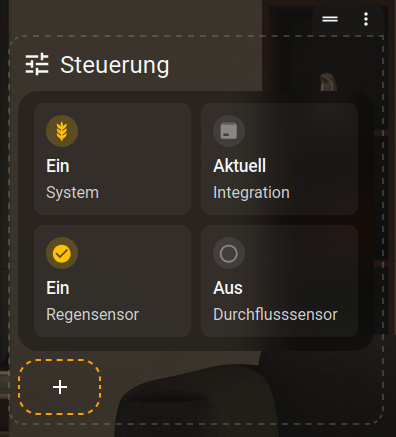
Versuche ich den Abschnitt aber analog zu diesem Beispiel:
column_span: 2
cards:
  - type: heading
    heading: Lights
    icon: mdi:lightbulb-group
  - type: custom:layout-card-pro
    columns: 2
    breakpoints:
      '2':
        columns: 4
    cards:
      - type: custom:entity-card-pro
        entity: light.living_room
        control: auto
        view_layout:
          span: 2
      - type: custom:entity-card-pro
        entity: light.kitchen
        control: auto
        view_layout:
          span: 2
      - type: custom:entity-card-pro
        entity: light.dining_table
      - type: custom:entity-card-pro
        entity: light.office
      - type: custom:entity-card-pro
        entity: light.desk_lamp
      - type: custom:entity-card-pro
        entity: light.bedroom
      - type: custom:entity-card-pro
        entity: light.hallway
      - type: custom:entity-card-pro
        entity: light.garden
doppelt so breit zu machen, damit alle 4 Karten in 1 Reihe passen, dann sieht das Ergebnis so aus:
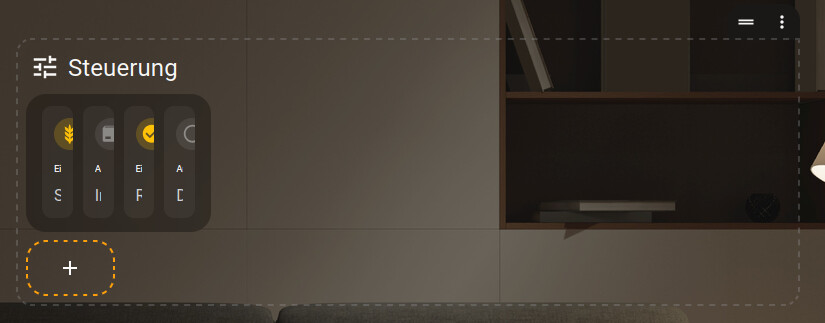
Der Code für den Abschnitt:
column_span: 2
cards:
  - type: heading
    heading: Steuerung
    icon: mdi:tune
  - type: custom:layout-card-pro
    columns: 2
    breakpoints:
      '2':
        columns: 4
    cards:
      - type: custom:entity-group-card-pro
        layout: grid
        columns: 4
        entities:
          - entity: switch.opensprinkler_gesamtsystem
            tap_action: toggle
          - entity: update.opensprinkler_integration_for_home_assistant_update
            name: Integration
          - entity: binary_sensor.opensprinkler_sensor_1_regensensor_active
          - entity: binary_sensor.opensprinkler_sensor_2_durchflusssensor_active
Die Layout-Card-Pro wird also nicht breiter, wie es im Bsp von @malte-wessel der Fall ist, sondern sogar schmaler. Imho ist der Code aber identisch mit dem Bsp, außer dass ich innerhalb der Layout-Card pro nicht die custom:entity-card-pro, sondern die custom:entity-group-card-pro nutze.
Geht das nicht in Kombination mit der custom:entity-group-card-pro, oder wo ist mein Fehler?
