Sargon
13. Oktober 2024 um 18:37
1
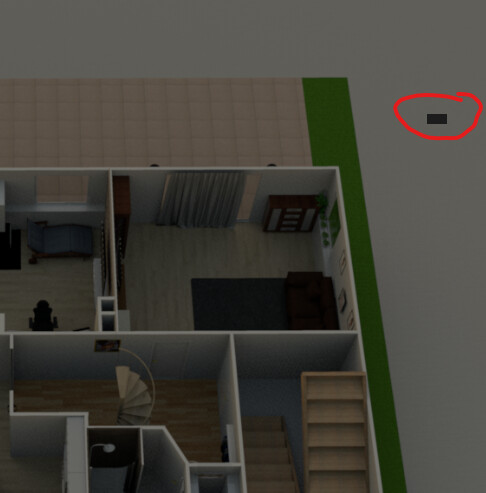
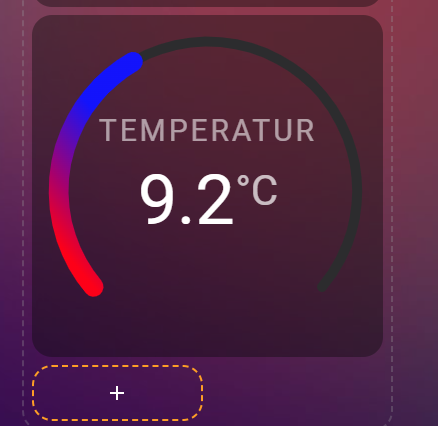
Ich würde gern eine horseshoe-card auf einer Picture Elements Card anzeigen. Allerdings wird nur ein Minimaler “Streifen” der Karte angezeigt.
Die horseshoe-card funktioniert wenn ich sie auf einem Sektor Dashboard anzeige.
Hat schon jemand die horseshoe-card auf einer Picture Element Card eingebunden? Es gibt auch eine entsprechende Frage im Internationalen Forum aber ich verstehe die Lösung nicht.
Hier der Code der Picture Elements Card:
type: picture-elements
elements:
  - type: state-badge
    entity: sensor.mullabholung_heute
    style:
      top: 32%
      left: 40%
  - type: custom:flex-horseshoe-card
    style:
      left: 75%
      top: 25%
    entities:
      - entity: weather.openweathermap
        attribute: temperature
        decimals: 1
        unit: °C
        area: Temperatur
    show:
      horseshoe_style: lineargradient
    layout:
      states:
        - id: 0
          entity_index: 0
          xpos: 50
          ypos: 60
          styles:
            - font-size: 3.5em;
      areas:
        - id: 0
          entity_index: 0
          xpos: 50
          ypos: 35
          styles:
            - font-size: 1.5em;
            - opacity: 0.8;
    horseshoe_scale:
      min: -10
      max: 40
    color_stops:
      "10": red
      "18": blue
image: /local/floorplan/EG/EG_Floorplan.png
Ich hatte es auch bereits mit einer Conditional Card und als Elements dann die Horeshoe Karte versucht aber hat nichts geholfen.
Sargon
15. Oktober 2024 um 12:51
2
Gibt es niemand der die Horseshoe Karte auf einem Floorplan anzeigt? Oder mir bei der Lösung meines Problems helfen kann?
Sargon
19. Oktober 2024 um 11:19
3
Ich habe es inzwischen hin bekommen die Größe der Karte muss hier noch mit angegeben werden.
      - type: custom:flex-horseshoe-card
        style:
          left: 84%
          top: 23%
          width: 18em
          height: 18em
          transform: none
        entities:
          - entity: sensor.alpha_ess_soc_battery
            decimals: 0
            icon: mdi:battery
            name: Solar Akku
            area: Ladestand
          - entity: sensor.alpha_ess_battery_load
            decimals: 0
            name: Laden
          - entity: sensor.alpha_ess_battery_unload
            decimals: 0
            name: Entladen
        show:
          scale_tickmarks: true
          horseshoe_style: lineargradient
        layout:
          hlines:
            - id: 0
              xpos: 50
              ypos: 41
              length: 70
              styles:
                - stroke: var(--primary-text-color);
                - stroke-width: 2;
                - opacity: 0.5;
                - stroke-linecap: round;
              color: "#FFF6E3"
          vlines:
            - id: 0
              xpos: 50
              ypos: 56
              length: 20
              styles:
                - stroke: var(--primary-text-color);
                - opacity: 0.5;
                - stroke-width: 2;
                - stroke-linecap: round;
          states:
            - id: 0
              entity_index: 0
              xpos: 50
              ypos: 36
              styles:
                - font-size: 2.8em;
            - id: 1
              entity_index: 1
              xpos: 48
              ypos: 56
              styles:
                - font-size: 1.8em;
                - text-anchor: end;
                - font-style: normal;
                - opacity: 0.7;
            - id: 2
              entity_index: 2
              xpos: 52
              ypos: 56
              styles:
                - font-size: 1.8em;
                - text-anchor: start;
                - font-style: normal;
                - opacity: 0.7;
          names:
            - id: 0
              entity_index: 0
              xpos: 50
              ypos: 83
              styles:
                - font-size: 1.5em;
                - text-transform: capitalize;
            - id: 1
              entity_index: 1
              xpos: 46
              ypos: 62
              styles:
                - font-size: 0.6em;
                - text-anchor: end;
                - opacity: 0.5;
                - text-transform: capitalize;
            - id: 2
              entity_index: 2
              xpos: 54
              ypos: 62
              styles:
                - font-size: 0.6em;
                - text-anchor: start;
                - opacity: 0.5;
                - text-transform: capitalize;
          areas:
            - id: 0
              entity_index: 0
              xpos: 50
              ypos: 20
              align: centre
              styles:
                - font-size: 0.8em;
                - opacity: 0.4;
          icons:
            - id: 0
              entity_index: 0
              xpos: 31
              ypos: 32
              align: centre
              size: 0.5
        horseshoe_state:
          color: "#43a047"
        horseshoe_scale:
          min: 0
          max: 100
          color: "#2e7031"
          width: 2
        color_stops:
          "0": "#43a047"
          "50": "#32CD32"
          "100": "#ADFF2F"
Wow, hast Du Dir Arbeit gemacht…
Sargon
19. Oktober 2024 um 13:21
5
Ja da ist schon etwas Zeit reingeflossen.
Ich habe folgende Color Stops definiert.
color_stops:
  "0": red
  "50": yellow
  "100": green
Aber egal welchen “horseshoe_style” ich auswähle ich habe nicht diese Farbübergänge. Kann mir jemand ein Beispiel geben wie das geht?
Hier meine aktuelle Karte (nicht auf der Picture Elements Card):
type: custom:flex-horseshoe-card
entities:
  - entity: sensor.alpha_ess_soc_battery
    decimals: 0
    icon: mdi:battery
    name: Solar Akku
    area: Ladestand
  - entity: sensor.alpha_ess_battery_load
    decimals: 0
    name: Laden
  - entity: sensor.alpha_ess_battery_unload
    decimals: 0
    name: Entladen
show:
  scale_tickmarks: true
  horseshoe_style: lineargradient
layout:
  hlines:
    - id: 0
      xpos: 50
      ypos: 41
      length: 70
      styles:
        - stroke: var(--primary-text-color);
        - stroke-width: 2;
        - opacity: 0.5;
        - stroke-linecap: round;
      color: "#FFF6E3"
  vlines:
    - id: 0
      xpos: 50
      ypos: 56
      length: 20
      styles:
        - stroke: var(--primary-text-color);
        - opacity: 0.5;
        - stroke-width: 2;
        - stroke-linecap: round;
  states:
    - id: 0
      entity_index: 0
      xpos: 50
      ypos: 36
      styles:
        - font-size: 2.8em;
    - id: 1
      entity_index: 1
      xpos: 48
      ypos: 56
      styles:
        - font-size: 1.8em;
        - text-anchor: end;
        - font-style: normal;
        - opacity: 0.7;
    - id: 2
      entity_index: 2
      xpos: 52
      ypos: 56
      styles:
        - font-size: 1.8em;
        - text-anchor: start;
        - font-style: normal;
        - opacity: 0.7;
  names:
    - id: 0
      entity_index: 0
      xpos: 50
      ypos: 83
      styles:
        - font-size: 1.5em;
        - text-transform: capitalize;
    - id: 1
      entity_index: 1
      xpos: 46
      ypos: 62
      styles:
        - font-size: 0.6em;
        - text-anchor: end;
        - opacity: 0.5;
        - text-transform: capitalize;
    - id: 2
      entity_index: 2
      xpos: 54
      ypos: 62
      styles:
        - font-size: 0.6em;
        - text-anchor: start;
        - opacity: 0.5;
        - text-transform: capitalize;
  areas:
    - id: 0
      entity_index: 0
      xpos: 50
      ypos: 20
      align: centre
      styles:
        - font-size: 0.8em;
        - opacity: 0.4;
  icons:
    - id: 0
      entity_index: 0
      xpos: 31
      ypos: 32
      align: centre
      size: 0.5
horseshoe_state:
  color: "#43a047"
horseshoe_scale:
  min: 0
  max: 100
  color: "#2e7031"
  width: 2
color_stops:
  "0": red
  "50": yellow
  "100": green