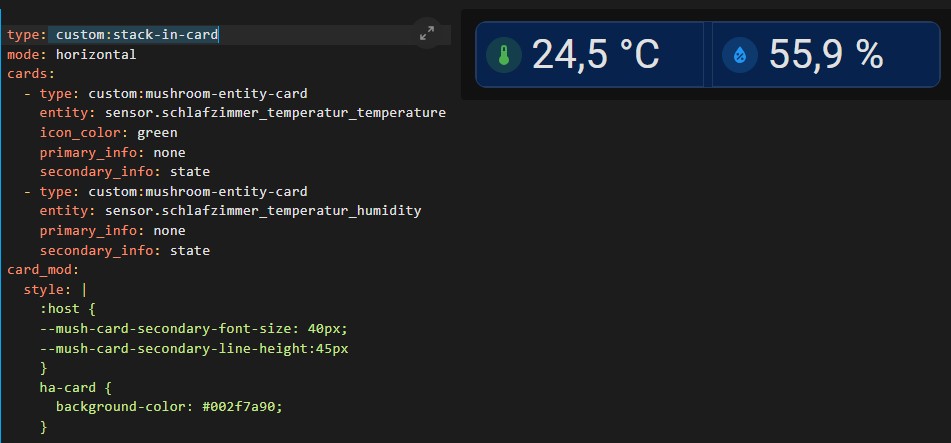
Hallo, ich hab mir eine Stack-in-Card erstellt für Temperatur un Luftfeuchte. Die angezeigte Luftfeuchte würde ich gerne etwas kleiner gestalten als die Temperatur. Ich hab in den letzten Tagen alles mögliche ausprobiert, aber keine Lösung gefunden.
für Tipps wäre ich Dankbar.
Stack-in-card.txt (569 Bytes)
</>
type: custom:stack-in-card
mode: horizontal
cards:
  - type: custom:mushroom-entity-card
    entity: sensor.schlafzimmer_temperatur_temperature
    icon_color: green
    primary_info: none
    secondary_info: state
  - type: custom:mushroom-entity-card
    entity: sensor.schlafzimmer_temperatur_humidity
    primary_info: none
    secondary_info: state
card_mod:
  style: |
    :host {
    --mush-card-secondary-font-size: 40px;
    --mush-card-secondary-line-height:45px
    }
    ha-card {
      background-color: #002f7a90;
    }
Mein Tipp:
sorry, habs geändert.
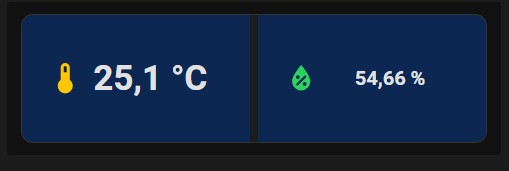
bei einem weiteren Versuch siet es schon besser aus, nur bekomme ich dort die Karte nicht schmaler und die trennung ist sichtbar.
type: custom:stack-in-card
mode: horizontal
keep:
  box_shadow: false
  margin: false
  border_radius: false
  background: true
  outer_padding: false
cards:
  - type: horizontal-stack
    title: null
    cards:
      - type: custom:button-card
        entity: sensor.wohnzimmer_temperatur_temperature
        layout: icon_state
        aspect_ratio: 1.8/1
        color: SeaGreen
        show_icon: true
        show_state: true
        show_name: false
        styles:
          card:
            - border-radius: 0
          state:
            - font-size: 35px
            - font-weight: bold
            - margin-left: "-20px"
            - justify-self: start
            - white-space: normal
          icon:
            - left: 25px
            - color: |
                [[[
                  if (entity.state < 0) return 'Purple';
                  if (entity.state >= 0 && entity.state < 15) return 'rgb(255,64,56)';
                  if (entity.state >= 15 && entity.state < 30) return 'rgb(253,199,5)';
                  if (entity.state >= 30 && entity.state < 65) return 'rgb(45,209,96)';
                  if (entity.state >= 65 && entity.state < 75) return 'rgb(253,199,5)';
                  if (entity.state >= 75 && entity.state < 100) return 'rgb(255,64,56)';
                  else return 'Black';
                ]]]
        card_mod:
          style: |
            ha-card {
              border: none;
              background-color: #002f7a90;
            }
      - type: custom:button-card
        entity: sensor.wohnzimmer_temperatur_humidity
        name: Humidité
        layout: icon_state
        aspect_ratio: 1.8/1
        color: SeaGreen
        show_icon: true
        show_state: true
        show_name: false
        styles:
          card:
            - border-radius: 0
          name:
            - font-size: 40px
            - margin-left: "-50px"
            - white-space: normal
          state:
            - font-size: 20px
            - margin-left: "-55px"
            - font-weight: bold
            - white-space: normal
          icon:
            - left: 25px
            - color: |
                [[[
                  if (entity.state < 0) return 'Purple';
                  if (entity.state >= 0 && entity.state < 15) return 'rgb(255,64,56)';
                  if (entity.state >= 15 && entity.state < 30) return 'rgb(253,199,5)';
                  if (entity.state >= 30 && entity.state < 65) return 'rgb(45,209,96)';
                  if (entity.state >= 65 && entity.state < 75) return 'rgb(253,199,5)';
                  if (entity.state >= 75 && entity.state < 100) return 'rgb(255,64,56)';
                  else return 'Black';
                ]]]
        card_mod:
          style: |
            ha-card {
              border: none;
              background-color: #002f7a90;
            }
maxe
24. Juli 2025 um 19:33
5
Warum hast du den eine horizontal-stack in die stack-in-card gepackt?
Hobbyklaus:
type: horizontal-stack
das sind Codes die ich zu diesem Thema gefunden habe und versucht diese für meine Bedürfnisse anzupassen. Wie ich gerade ausprobiert habe, könnte dieser Abschnit enfernt werden, ändert aber nichts ersichtliches.
cards:
  - type: horizontal-stack
    title: null
 by HarryP: Zusammenführung Doppelpost (bei Änderungen oder hinzufügen von Inhalten bitte die „Bearbeitungsfunktion“ anstatt „Antworten“ zu nutzen)