Guten Abend.
bin jetzt schon länger am tüfteln, bekomme es aber nicht hin.
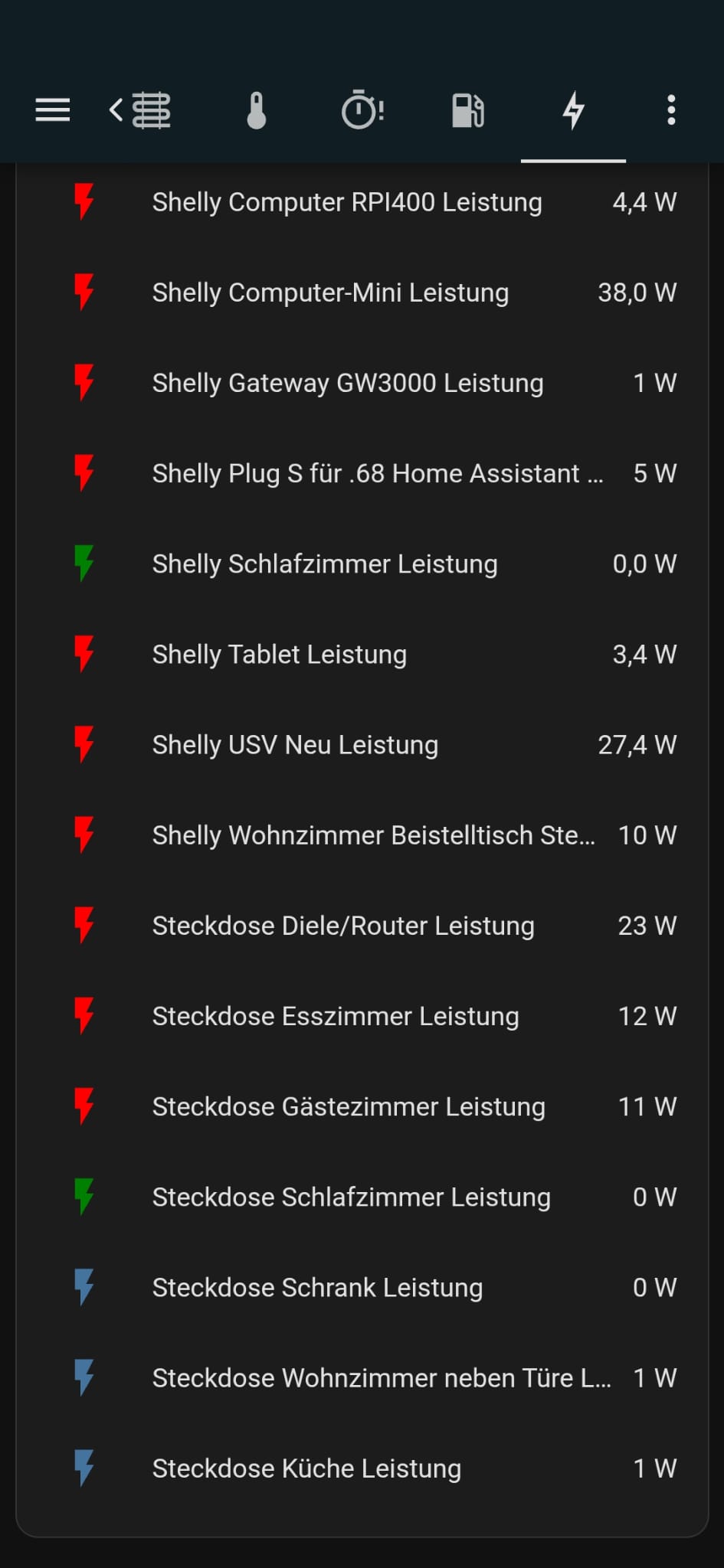
Ab einem Verbrauch > 1 Watt soll das Icon von Grün auf Rot wechseln.
Das setze ich mit dem card_mod um, klappt auch sehr gut, nur bei den letzten drei Sensoren beiß ich mir die Zähne aus. es will einfach nicht funktionieren.
Vielleicht hat einer einen Tipp?
type: entities
entities:
  - entity: sensor.boiler_power
    card_mod:
      style: |
        :host {
          {% if ( states.sensor.boiler_power.state | float == 0.0 ) %}
          --card-mod-icon-color: green;
          {% else %}
          --card-mod-icon-color: red;
          {% endif %}
          }
  - entity: sensor.shellyplug_eb77f1_waschmaschine_power
    card_mod:
      style: |
        :host {
          {% if ( states.sensor.shellyplug_eb77f1_waschmaschine_power.state | float == 0.0 ) %}
          --card-mod-icon-color: green;
          {% else %}
          --card-mod-icon-color: red;
          {% endif %}
          }
  - entity: sensor.trockner_power
    card_mod:
      style: |
        :host {
          {% if ( states.sensor.trockner_power.state | float == 0.0 ) %}
          --card-mod-icon-color: green;
          {% else %}
          --card-mod-icon-color: red;
          {% endif %}
          }
  - entity: sensor.kuhlschrank_power
    card_mod:
      style: |
        :host {
          {% if ( states.sensor.kuhlschrank_power.state | float == 0.0 ) %}
          --card-mod-icon-color: green;
          {% else %}
          --card-mod-icon-color: red;
          {% endif %}
          }
  - entity: sensor.steckdose_fernseher_leistung
    card_mod:
      style: |
        :host {
          {% if ( states.sensor.steckdose_fernseher_leistung.state | float == 0.0 ) %}
          --card-mod-icon-color: green;
          {% else %}
          --card-mod-icon-color: red;
          {% endif %}
          }
  - entity: sensor.steckdose_media_leistung
    card_mod:
      style: |
        :host {
          {% if ( states.sensor.steckdose_media_leistung.state | float == 0.0 ) %}
          --card-mod-icon-color: green;
          {% else %}
          --card-mod-icon-color: red;
          {% endif %}
          }
  - entity: sensor.steckdose_ladestation_leistung
    card_mod:
      style: |
        :host {
          {% if ( states.sensor.steckdose_ladestation_leistung.state | float == 0.0 ) %}
          --card-mod-icon-color: green;
          {% else %}
          --card-mod-icon-color: red;
          {% endif %}
          }
  - entity: sensor.plusplugs_pi5_power
    card_mod:
      style: |
        :host {
          {% if ( states.sensor.plusplugs_pi5_power.state | float == 0.0 ) %}
          --card-mod-icon-color: green;
          {% else %}
          --card-mod-icon-color: red;
          {% endif %}
          }
  - entity: sensor.computer_rpi400_power
    card_mod:
      style: |
        :host {
          {% if ( states.sensor.computer_rpi400_power.state | float == 0.0 ) %}
          --card-mod-icon-color: green;
          {% else %}
          --card-mod-icon-color: red;
          {% endif %}
          }
  - entity: sensor.computer_mini_power
    card_mod:
      style: |
        :host {
          {% if ( states.sensor.computer_mini_power.state | float == 0.0 ) %}
          --card-mod-icon-color: green;
          {% else %}
          --card-mod-icon-color: red;
          {% endif %}
          }
  - entity: sensor.plusplugs_gateway_power
    card_mod:
      style: |
        :host {
          {% if ( states.sensor.plusplugs_gateway_power.state | float == 0.0 ) %}
          --card-mod-icon-color: green;
          {% else %}
          --card-mod-icon-color: red;
          {% endif %}
          }
  - entity: sensor.shelly_plug_s_fur_68_home_assistant_shelly_plug_s_fur_68_power
    card_mod:
      style: |
        :host {
          {% if ( states.sensor.shelly_plug_s_fur_68_home_assistant_shelly_plug_s_fur_68_power.state | float == 0.0 ) %}
          --card-mod-icon-color: green;
          {% else %}
          --card-mod-icon-color: red;
          {% endif %}
          }
  - entity: sensor.shellyplug_560005_power
    card_mod:
      style: |
        :host {
          {% if ( states.sensor.shellyplug_560005_power.state | float == 0.0 ) %}
          --card-mod-icon-color: green;
          {% else %}
          --card-mod-icon-color: red;
          {% endif %}
          }
  - entity: sensor.tablet_power
    card_mod:
      style: |
        :host {
          {% if ( states.sensor.tablet_power.state | float == 0.0 ) %}
          --card-mod-icon-color: green;
          {% else %}
          --card-mod-icon-color: red;
          {% endif %}
          }
  - entity: sensor.computer_usv_neu_power
    card_mod:
      style: |
        :host {
          {% if ( states.sensor.computer_usv_neu_power.state | float == 0.0 ) %}
          --card-mod-icon-color: green;
          {% else %}
          --card-mod-icon-color: red;
          {% endif %}
          }
  - entity: >-
      sensor.shellyplusplugs_08f9e0fcfddc_wohnzimmer_steckleiste_wohnzimmer_power
    card_mod:
      style: |
        :host {
          {% if ( states.sensor.shellyplusplugs_08f9e0fcfddc_wohnzimmer_steckleiste_wohnzimmer_power.state | float == 0.0 ) %}
          --card-mod-icon-color: green;
          {% else %}
          --card-mod-icon-color: red;
          {% endif %}
          }
  - entity: sensor.steckdose_diele_router_power
    card_mod:
      style: |
        :host {
          {% if ( states.sensor.steckdose_diele_router_power.state | float == 0.0 ) %}
          --card-mod-icon-color: green;
          {% else %}
          --card-mod-icon-color: red;
          {% endif %}
          }
  - entity: sensor.steckdose_esszimmer_power
    card_mod:
      style: |
        :host {
          {% if ( states.sensor.steckdose_esszimmer_power.state | float == 0.0 ) %}
          --card-mod-icon-color: green;
          {% else %}
          --card-mod-icon-color: red;
          {% endif %}
          }
  - entity: sensor.steckdose_gastezimmer_power
    card_mod:
      style: |
        :host {
          {% if ( states.sensor.steckdose_gastezimmer_power.state | float == 0.0 ) %}
          --card-mod-icon-color: green;
          {% else %}
          --card-mod-icon-color: red;
          {% endif %}
          }
  - entity: sensor.steckdose_schlafzimmer_power
    card_mod:
      style: |
        :host {
          {% if ( states.sensor.steckdose_schlafzimmer_power.state | float == 0.0 ) %}
          --card-mod-icon-color: green;
          {% else %}
          --card-mod-icon-color: red;
          {% endif %}
          }
  - entity: sensor.0xa4c138af1da30e9a_power
    card_mod:
      style: |
        :host {
          {% if ( states.sensor.0xa4c138af1da30e9a_power.state | float == 0.0 ) %}
          --card-mod-icon-color: green;
          {% else %}
          --card-mod-icon-color: red;
          {% endif %}
          }
  - entity: sensor.0xa4c1388c3bc85219_power
    card_mod:
      style: |
        :host {
          {% if ( states.sensor.0xa4c1388c3bc85219_power.state | float == 0.0 ) %}
          --card-mod-icon-color: green;
          {% else %}
          --card-mod-icon-color: red;
          {% endif %}
          }
  - entity: sensor.0xa4c13845a7ae6716_power
    card_mod:
      style: |
        :host {
          {% if ( states.sensor.0xa4c13845a7ae6716_power.state | float == 0 ) %}
          --card-mod-icon-color: red;
          {% else %}
          --card-mod-icon-color: red;
          {% endif %}
          }
title: Ernergieverbrauch
state_color: false
show_header_toggle: true
