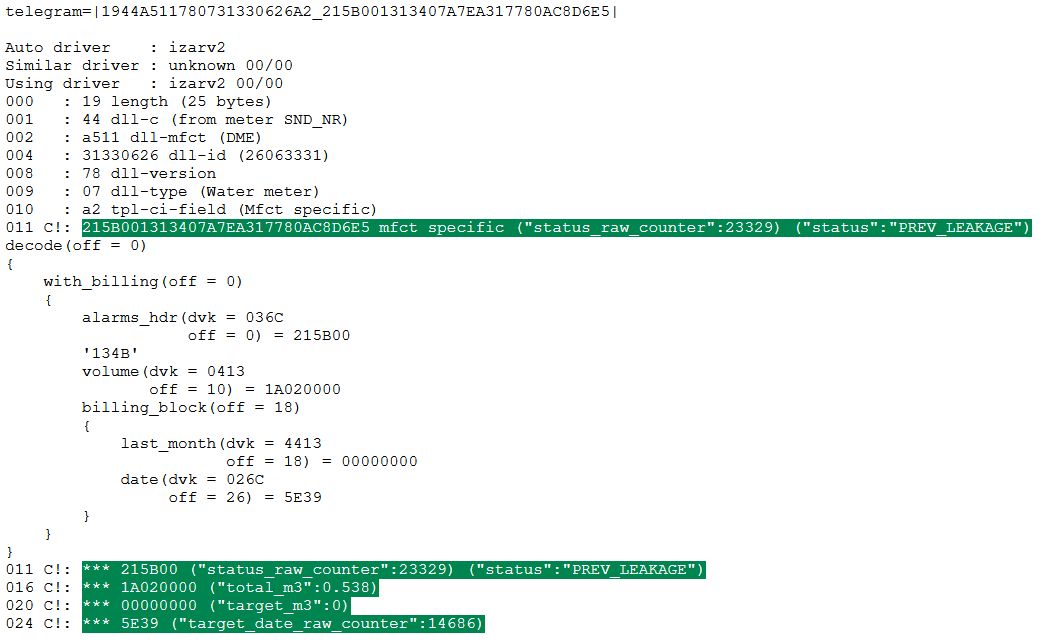
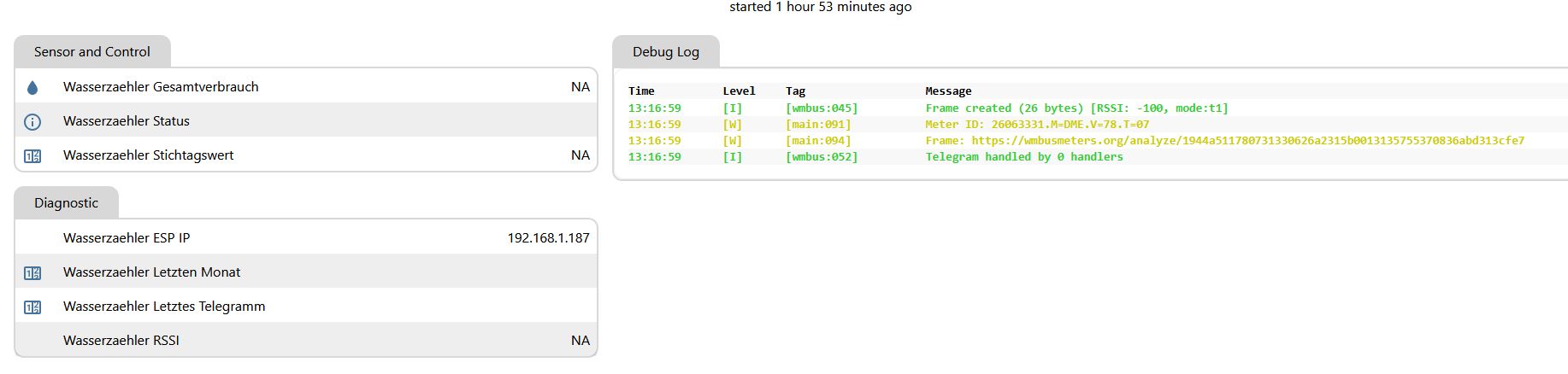
So jetzt hab ich das ganze endlich wieder am laufen. Nach ein paar Tagen und viel probieren hab ich das Modul wieder zum laufen gebracht. Wichtig ist das man Edge verwendet und dann bei HA ESPHome das Modul anlernt. Da ist dann die Erstkonfiguration zu sehen, die aber uninteressant wird. Anschliessend kann man die Yaml einfügen, dabei die erst-Yaml überschreiben. Hier mal die Datei die ich angepasst hab. Sind zwar nur ein paar kleine Änderungen aber die waren wichtig damit ohne Key vom Wasserversorger die Daten ausgelesen werden können.
substitutions:
  hostname: "wm5-izar-test"
  friendly_name: "Wasserzähler"
  dashbordtitle: "HELTEC Wasserzähler Izar Wifi Lora 32"
  device_description: Production 2025 WMBUS Meter Izar Heltec Wifi Lora 32 V2"

  # The format of the name should be author_name.project_name.
  projectname: "Peter Siebler.Izar HELTEC Watermeter"
  device_area: "Keller"
  appversion: "1.0.1"

  watermeter_installed: "2024-03-01 14:00:00"
  ota_key: "7dx2b69d42dd94f4fed3e99eab8f1e26"
  ha_key: "inH49O9jBeK5yTGb1X2g4WV/1aS6YKUpu3Vu277fDgw="

  log_level: "DEBUG"
  log_baudrate: "115200"

  esphome_min: "2026.6.4"

## ----------------------------------------------------------------
## APPLICATION ESPHOME
## ----------------------------------------------------------------
esphome:
  name: ${hostname}
  friendly_name: ${dashbordtitle}
  comment: ${device_description}
  build_path: ./build/${hostname}
  project:
    name: ${projectname}
    version: ${appversion}
  area: ${device_area}
  min_version: ${esphome_min}
  name_add_mac_suffix: false
  platformio_options:
    upload_speed: 921600

## ------------------------------------------------------------------
## Preferences Component
## https://esphome.io/components/esphome.html#preferences-component
## ------------------------------------------------------------------
preferences:
  flash_write_interval: 10min

## ------------------------------------------------------------------
## EXTERNAL COMPONENTS
## https://esphome.io/components/external_components.html
## ------------------------------------------------------------------
external_components:
  - source: github://SzczepanLeon/esphome-components@main
    components: [ wmbus_common, wmbus_radio, wmbus_meter ]

## ----------------------------------------------------------------
## Board Heltec wifi lora 32 V2
## ----------------------------------------------------------------
esp32:
  board: heltec_wifi_lora_32_V2
  flash_size: 8MB
  framework:
    type: esp-idf
    version: recommended

## ------------------------------------------------------------------
## COMPONENT LOGGER
## https://esphome.io/components/logger.html
## ------------------------------------------------------------------
logger:
  level: DEBUG
  logs:
    wmbusmeters: INFO
    cc1101: ERROR

## ------------------------------------------------------------------
## Global variables
## https://esphome.io/components/globals.html
## ------------------------------------------------------------------
globals:
  - id: last_value
    type: float
    restore_value: yes
    initial_value: "0.00"

  - id: current_value
    type: float
    restore_value: yes
    initial_value: "0.00"

  - id: hour_value
    type: float
    restore_value: yes
    initial_value: "0.00"

  - id: daily_value
    type: float
    restore_value: yes
    initial_value: "0.00"

  - id: yesterday_value
    type: float
    restore_value: yes
    initial_value: "0.00"

  - id: week_value
    type: float
    restore_value: yes
    initial_value: "0.00"

  - id: lastmonth_value
    type: float
    restore_value: yes
    initial_value: "0.00"

  - id: year_value
    type: float
    restore_value: yes
    initial_value: "0.00"

  - id: send_millisecond
    type: int
    restore_value: no
    initial_value: "0"

  - id: wm_state
    type: int
    restore_value: no
    initial_value: "0"

## ------------------------------------------------------------------
## COMPONENT WIFI
## https://esphome.io/components/wifi.html
## ------------------------------------------------------------------

wifi:
  ssid: !secret wifi_ssid
  password: !secret wifi_password


  reboot_timeout: 0s
  enable_on_boot: true
  power_save_mode: NONE
  # Enable fallback hotspot (captive portal) in case wifi connection fails
  ap:
    ssid: "Wasseruhr Fallback Hotspot"
    password: "iB1aPRN6O8zj"

# ------------------------------------------------------------------
## COMPONENT Captive Portal
## ------------------------------------------------------------------
## The captive portal component in ESPHome is a fallback mechanism
## for when connecting to the configured WiFi fails.
## https://esphome.io/components/captive_portal.html
captive_portal:

## ---------------------------------------------------
## mDNS Component
## https://esphome.io/components/mdns.html
## ---------------------------------------------------
mdns:
  # Both Home Assistant and the ESPHome dashboard use mDNS to identify the IP address
  # of all ESPHome nodes on the network. If mDNS is disabled, they will no longer
  # be able to automatically find your devices.
  disabled: false

## ---------------------------------------------------
## COMPONENT Home Assistant API
## https://esphome.io/components/api.html
## Homeassistant service call (all values in liter):
## ---------------------------------------------------
api:
  id: espapi_wmbus_esp32
  port: 6053
  reboot_timeout: 0s
  encryption:
    key: ${ha_key}

  # service call from homeassistant to set the data
  actions:
    - action: set_watermeter_esp_data
      variables:
        water_val_hour: float
        water_val_day: float
        water_val_yesterday: float
        water_val_week: float
        water_val_lastmonth: float
        water_val_year: float
      then:
        - logger.log:
            tag: "service"
            format: "Try to set new values: hour: %.3f, day: %.3f, yesterday: %.3f, week: %.3f, last month: %.3f, year: %.3f"
            level: INFO
            args:
              [
                "water_val_hour",
                "water_val_day",
                "water_val_yesterday",
                "water_val_week",
                "water_val_lastmonth",
                "water_val_year",
              ]
        # new value for water hourly
        - globals.set:
            id: hour_value
            value: !lambda |-
              if((water_val_hour) and (water_val_hour)>0.001){
                ESP_LOGD("service", "Set hourly value to: %f", water_val_hour);
                return (water_val_hour);
              }else{
                ESP_LOGD("service", "Skip setting hourly value");
                return id(hour_value);
              };
              id(waterhour).publish_state(id(hour_value));
        - component.update: waterhour
        # new value for water daily
        - globals.set:
            id: daily_value
            value: !lambda |-
              if((water_val_day) and (water_val_day)>0.001){
                ESP_LOGD("service", "Set daily value to: %f", water_val_day);
                return (water_val_day);
              }else{
                ESP_LOGD("service", "Skip setting hourly value");
                return id(daily_value);
              };
              id(waterday).publish_state(id(daily_value));
        - component.update: waterday
        # new value for water yesterday
        - globals.set:
            id: yesterday_value
            value: !lambda |-
              if((water_val_yesterday) and (water_val_yesterday)>0.001){
                ESP_LOGD("service", "Set yesterday value to: %f", water_val_yesterday);
                return (water_val_yesterday);
              }else{
                ESP_LOGD("service", "Skip setting yesterday value");
                return id(yesterday_value);
              };
              id(wateryesterday).publish_state(id(yesterday_value));
        - component.update: wateryesterday
        # new value for water weekly
        - globals.set:
            id: week_value
            value: !lambda |-
              if((water_val_week) and (water_val_week)>0.001){
                ESP_LOGD("service", "Set weekly value to: %f", water_val_week);
                return (water_val_week);
              }else{
                ESP_LOGD("service", "Skip setting weekly value");
                return id(week_value);
              };
              id(waterweek).publish_state(id(week_value));
        - component.update: waterweek
          # new value for water weekly
        - globals.set:
            id: lastmonth_value
            value: !lambda |-
              if((water_val_lastmonth) and (water_val_lastmonth)>0.001){
                ESP_LOGD("service", "Set last month value to: %f", water_val_lastmonth);
                return (water_val_lastmonth);
              }else{
                ESP_LOGD("service", "Skip setting last month value");
                return id(lastmonth_value);
              };
              id(waterlastmonth).publish_state(id(lastmonth_value));
        - component.update: waterlastmonth
        # new value for water yearly
        - globals.set:
            id: year_value
            value: !lambda |-
              if((water_val_year) and (water_val_year)>0.001){
                ESP_LOGD("service", "Set last yearly value to: %f", water_val_year);
                return (water_val_year);
              }else{
                ESP_LOGD("service", "Skip setting last yearly value");
                return id(year_value);
              };
              id(wateryear).publish_state(id(year_value));
        - component.update: wateryear
        - logger.log:
            tag: "service"
            format: "All new Values set: hour: %.3f, day: %.3f, yesterday: %.3f, week: %.3f, last month: %.3f, year: %.3f"
            level: INFO
            args:
              [
                "id(hour_value)",
                "id(daily_value)",
                "id(yesterday_value)",
                "id(week_value)",
                "id(lastmonth_value)",
                "id(year_value)",
              ]
## ------------------------------------------------------------------
## COMPONENT WEBSERVER
## The web_server component creates a simple web server on the node
## that can be accessed through any browser and a simple REST API.
## https://esphome.io/components/web_server.html
## ------------------------------------------------------------------
web_server:
  port: 80
  version: 3
  local: true

## ------------------------------------------------------------------
## COMPONENT Over-the-Air Updates
## https://esphome.io/components/ota
## ------------------------------------------------------------------
ota:
  platform: esphome
  encryption:

## ---------------------------------------------------
## SNTP Time server
## https://esphome.io/components/time/sntp.html
## ---------------------------------------------------
time:
  - platform: sntp
    id: time_sntp
    timezone: Europe/Berlin
    servers:
      - 0.at.pool.ntp.org
      - 0.pool.ntp.org
      - 1.pool.ntp.org

    on_time_sync:
      # Components should trigger on_time_sync when they update the system clock.
      then:
        - component.update: systime
        - component.update: watermeter_lastupdate
        - logger.log:
            level: DEBUG
            tag: "timeserver"
            format: "Synchronized sntp clock"

    on_time:
      # reset hourly value
      - seconds: 0
        minutes: 0
        then:
          - globals.set:
              id: hour_value
              value: "0.00"
          - lambda: id(waterhour).publish_state(id(hour_value));
          - logger.log:
              tag: "timeserver"
              level: INFO
              format: "Reset value hour, starting next hour"
          - component.update: waterhour

      # reset daily value and set yesterday value
      - seconds: 0
        minutes: 0
        hours: 0
        then:
          - lambda: |-
              id(yesterday_value)=id(daily_value);
              id(wateryesterday).publish_state(id(yesterday_value));
              id(daily_value)=0.00;
              id(waterday).publish_state(id(daily_value));
          - logger.log:
              tag: "timeserver"
              level: INFO
              format: "Set yesterday value and reset value daily, starting new day"
          - component.update: waterday

      # reset weekly value, start new week
      - seconds: 0
        minutes: 0
        hours: 0
        days_of_week: MON
        then:
          - globals.set:
              id: week_value
              value: "0.00"
          - lambda: id(waterweek).publish_state(id(week_value));
          - logger.log:
              tag: "timeserver"
              level: INFO
              format: "Reset value weekly, starting new week"
          - component.update: waterweek

      # new month, set last month value watermonth
      - seconds: 0
        minutes: 0
        hours: 0
        days_of_month: 1
        then:
          - globals.set:
              id: lastmonth_value
              value: !lambda "return id(watermonth).state;"
          - lambda: id(waterlastmonth).publish_state(id(lastmonth_value));
          - logger.log:
              tag: "timeserver"
              level: INFO
              format: "update last month, starting new month"
          - component.update: waterlastmonth

      # new year, reset yearly value
      - seconds: 0
        minutes: 0
        hours: 0
        days_of_month: 1
        months: JAN
        then:
          - globals.set:
              id: year_value
              value: "0.00"
          - lambda: id(wateryear).publish_state(id(year_value));
          - logger.log:
              tag: "timeserver"
              level: INFO
              format: "Reset value yearly, starting new year"
          - component.update: wateryear

## ---------------------------------------------------
## SPI Bus Component
## https://esphome.io/components/spi.html
## ---------------------------------------------------
spi:
  clk_pin:
    number: GPIO5
    ignore_strapping_warning: true
  mosi_pin: GPIO27
  miso_pin: GPIO19

## ---------------------------------------------------
## I2C Component
## https://esphome.io/components/i2c.html
## ---------------------------------------------------
i2c:
  - id: bus_a
    sda: 4 # oled_sdl
    scl: 15 # oled_sda
    frequency: 400kHz

## ---------------------------------------------------
## DISPLAY Component
## https://esphome.io/components/display.html
##
## TODO: how to find the reset_pin ??
## ---------------------------------------------------
display:
  - platform: ssd1306_i2c
    model: "SSD1306 128x64"
    id: screen
    # reset_pin: 16
    i2c_id: bus_a
    address: 0x3C
    contrast: 50%
    update_interval: 8s
    #rotation: 180°
    lambda: |-
      it.printf(4, 4, id(font1), "Wasseruhr: %.3f m3", id(waterdisplay).state);
      it.printf(4, 16, id(font1), "Verbrauch heute: %.1f L", id(waterday).state);
      it.printf(4, 28, id(font1), "Verbrauch Monat: %.1f L", id(watermonth).state);
      it.print(4, 42, id(font1),  id(watimestamp).state.c_str());

## ---------------------------------------------------
## FONT Component
## https://esphome.io/components/font.html
## ---------------------------------------------------
font:
  - file: "gfonts://Roboto"
    id: font1
    size: 10

## ---------------------------------------------------
## WMBUS RADIO Component
## https://github.com/SzczepanLeon/esphome-components
## ---------------------------------------------------
wmbus_radio:
  radio_type: SX1276
  cs_pin: GPIO18
  reset_pin: GPIO14
  irq_pin: GPIO35
  on_frame:
    - then:
        - logger.log:
            tag: "wmbus_radio"
            format: "RSSI: %ddBm T: %s (%d)"
            level: "DEBUG"
            args: [frame->rssi(), frame->as_hex().c_str(), frame->data().size()]
    - then:
        - repeat:
            count: 3
            then:
              - output.turn_on: status_led
              - delay: 100ms
              - output.turn_off: status_led
              - delay: 100ms

## ---------------------------------------------------
## WMBUS METER Component
## https://github.com/SzczepanLeon/esphome-components
## ---------------------------------------------------
wmbus_meter:
  - id: wa_meter
    meter_id: "0xxxxxxxx"  #Die ID muss mit 0x anfangen und dann die ID die auf dem Zähler steht
    type: izar
    mode:
      - T1
      - C1

## ---------------------------------------------------
## Output Component
## https://esphome.io/components/output/
## ---------------------------------------------------
output:
  - platform: gpio
    id: vext_output
    pin: GPIO21
  - platform: gpio
    id: oled_reset
    pin: GPIO16
    inverted: True
  - platform: gpio
    id: status_led
    pin: GPIO25

## ---------------------------------------------------
## Button Component
## https://esphome.io/components/button/
## ---------------------------------------------------
button:
  # reset all global vars
  - platform: template
    name: "${friendly_name} Reset values"
    icon: mdi:lock-reset
    entity_category: config
    on_press:
      then:
        - lambda: |-
            id(last_value) = 0.00;
            id(current_value) = 0.00;
            id(watercurrent).publish_state(id(current_value));
            id(hour_value) = 0.00;
            id(waterhour).publish_state(id(hour_value));
            id(daily_value) = 0.00;
            id(waterday).publish_state(id(daily_value));
            id(yesterday_value) = 0.00;
            id(wateryesterday).publish_state(id(yesterday_value));
            id(week_value) = 0.00;
            id(waterweek).publish_state(id(week_value));
            id(lastmonth_value) = 0.00;
            id(waterlastmonth).publish_state(id(lastmonth_value));
            id(year_value) = 0.00;
            id(wateryear).publish_state(id(year_value));
        - logger.log:
            level: INFO
            tag: "service"
            format: "all values reset!"

# ----------------------------------------------------------------
# BINARY SENSOR
# https://esphome.io/components/binary_sensor/
# ----------------------------------------------------------------
binary_sensor:
  # The Status Binary Sensor exposes the node state
  # (if it's connected to via MQTT/native API) for Home Assistant.
  # https://esphome.io/components/binary_sensor/status.html
  - platform: status
    name: ${friendly_name} API Status
    id: device_api_status
    disabled_by_default: true
    icon: mdi:state-machine
    entity_category: diagnostic

## ---------------------------------------------------
## SENSOREN
## https://esphome.io/components/sensor/
## ---------------------------------------------------
sensor:
  # wnbus_meter
  - platform: wmbus_meter
    parent_id: wa_meter
    field: total_m3
    id: "waterdisplay"
    name: ${friendly_name} Anzeige
    unit_of_measurement: "m³"
    state_class: total_increasing
    device_class: "water"
    accuracy_decimals: 3
    icon: mdi:counter
    on_value:
      then:
        - lambda: |-
            if ((id(last_value) > 0.00) and (id(waterdisplay).state)>(id(last_value)) ) {
              id(wm_state) = 2;
              ESP_LOGD("wmbus_meter", "Water Display value: %.3f, last value: %.3f", id(waterdisplay).state, id(last_value));
              id(current_value) = float(id(waterdisplay).state-id(last_value)) * 1000.00;
              id(watercurrent).publish_state(id(current_value));
              id(hour_value)+=id(current_value);
              id(waterhour).publish_state(id(hour_value));
              id(daily_value)+=id(current_value);
              id(waterday).publish_state(id(daily_value));
              id(week_value)+=id(current_value);
              id(waterweek).publish_state(id(week_value));
              id(year_value)+=id(current_value);
              id(wateryear).publish_state(id(year_value));
              id(watermeter_lastupdate).publish_state(id(time_sntp).now().strftime("%Y-%m-%dT%H:%M:%S %Z"));
              ESP_LOGD("wmbus_meter", "Set current value to %.3f litre and publish the data", id(current_value));
            }else{
              id(current_value) = 0.00;
              id(wm_state) = 1;
              id(watercurrent).publish_state(id(current_value));
              ESP_LOGD("wmbus_meter", "Reset current value to: %.3f, Waterdisplay value: %.3f, last value: %.3f", id(current_value), id(waterdisplay).state, id(last_value));
            }
            id(last_value)=id(waterdisplay).state;

        # update watermeter_read_timeout the reading timeout for the watermeter display
        - sensor.template.publish:
            id: watermeter_read_timeout
            state: !lambda |-
              int time_used = ( millis() - id(send_millisecond) );
              ESP_LOGD("wmbus_meter", "Diff millisecond is: %d", time_used);
              id(send_millisecond) = millis();
              return float(time_used)/1000;

  - platform: wmbus_meter
    parent_id: wa_meter
    field: last_month_total_m3
    id: "waterdisplaylastmonth"
    name: ${friendly_name} Anzeige Vormonat
    unit_of_measurement: "m³"
    state_class: total_increasing
    device_class: "water"
    accuracy_decimals: 3
    icon: mdi:counter

  - platform: wmbus_meter
    parent_id: wa_meter
    field: remaining_battery_life_y
    name: "${friendly_name} Batterielebensdauer"
    id: "watermeter_batterie"
    accuracy_decimals: 2
    unit_of_measurement: "Jahre"
    state_class: "measurement"
    entity_category: "diagnostic"
    icon: mdi:battery

  - platform: wmbus_meter
    parent_id: wa_meter
    field: rssi_dbm
    name: ${friendly_name} RSS
    unit_of_measurement: "dbm"
    entity_category: "diagnostic"
    state_class: "measurement"
    icon: mdi:rss

  - platform: wmbus_meter
    parent_id: wa_meter
    field: transmit_period_s
    name: "${friendly_name} Update Intervall"
    id: "watermeter_transmit_periode"
    unit_of_measurement: "sec"
    state_class: "measurement"
    accuracy_decimals: 2
    entity_category: "diagnostic"
    icon: mdi:timelapse

  # sensor templates updated by id: "waterdisplay"
  - platform: template
    name: Wasser Aktuell
    id: "watercurrent"
    accuracy_decimals: 2
    unit_of_measurement: "L"
    icon: mdi:water-circle
    device_class: "water"
    state_class: total_increasing
    lambda: return (id(current_value));

  - platform: template
    name: Wasser Stunde
    id: "waterhour"
    accuracy_decimals: 2
    unit_of_measurement: "L"
    icon: mdi:water-circle
    state_class: total_increasing
    device_class: "water"
    lambda: return (id(hour_value));

  - platform: template
    name: Wasser Tag
    id: "waterday"
    accuracy_decimals: 2
    unit_of_measurement: "L"
    icon: mdi:water-circle
    device_class: "water"
    state_class: total_increasing
    lambda: return (id(daily_value));

  - platform: template
    name: Wasser Gestern
    id: "wateryesterday"
    accuracy_decimals: 2
    unit_of_measurement: "L"
    icon: mdi:water-circle
    device_class: "water"
    state_class: total_increasing
    lambda: return (id(yesterday_value));

  - platform: template
    name: Wasser Woche
    id: "waterweek"
    accuracy_decimals: 2
    unit_of_measurement: "L"
    icon: mdi:water-circle
    device_class: "water"
    state_class: total_increasing
    lambda: return (id(week_value));

  - platform: template
    name: Wasser Monat
    id: "watermonth"
    accuracy_decimals: 2
    unit_of_measurement: "L"
    icon: mdi:water-circle
    device_class: "water"
    state_class: total_increasing
    lambda: return ( (id(waterdisplay).state - id(waterdisplaylastmonth).state) * 1000.00 );

  - platform: template
    name: Wasser Vormonat
    id: "waterlastmonth"
    accuracy_decimals: 2
    unit_of_measurement: "L"
    icon: mdi:water-circle
    device_class: "water"
    state_class: total_increasing
    lambda: return (id(lastmonth_value));

  - platform: template
    name: Wasser Jahr
    id: "wateryear"
    icon: mdi:water-outline
    accuracy_decimals: 2
    unit_of_measurement: "L"
    state_class: total_increasing
    device_class: "water"
    lambda: return (id(year_value));

  - platform: template
    name: Wasser Verbrauch
    id: water_consumption
    unit_of_measurement: "%"
    state_class: measurement
    icon: "mdi:percent"
    accuracy_decimals: 2
    filters:
      - filter_out: nan
    lambda: |-
      if(id(waterlastmonth).state > 0.00){
       return ( (id(watermonth).state  / id(waterlastmonth).state) * 100.00 );
      }else{
       return 0.00;
      }

  - platform: template
    name: ${friendly_name} Daten Intervall
    id: watermeter_read_timeout
    icon: mdi:clock-start
    accuracy_decimals: 2
    unit_of_measurement: "sec"
    state_class: "measurement"
    entity_category: "diagnostic"


    # get the wifi signal from the esp device
  - platform: wifi_signal
    id: wifisignal
    name: ${friendly_name} WiFi Signal
    icon: mdi:wifi-strength-1
    update_interval: 60s
    entity_category: diagnostic
    disabled_by_default: true
    unit_of_measurement: dBm
    accuracy_decimals: 0
    device_class: signal_strength
    state_class: measurement


  # calulcate the wifi signal quality
  - platform: copy # wifi signal in %
    source_id: wifisignal
    id: sensor_wifi_signal_percentage
    name: ${friendly_name} WiFi Qualität
    icon: mdi:wifi-strength-1
    unit_of_measurement: "%"
    state_class: "measurement"
    device_class: ""
    entity_category: diagnostic
    filters:
      - lambda: return min(max(2 * (x + 100.0), 0.0), 100.0);
    accuracy_decimals: 2


  # Uptime device in hours
  - platform: uptime
    name: "${friendly_name} Online seit"
    id: uptime_human
    icon: mdi:clock-start
    filters:
      - filter_out: nan
      - lambda: return x / 3600;
    unit_of_measurement: "h"
    entity_category: "diagnostic"
    state_class: "measurement"
    accuracy_decimals: 2


## ---------------------------------------------------------
## Template Datetime
## https://esphome.io/components/datetime/template.html
## ---------------------------------------------------------
datetime:
  - platform: template
    id: wm_installed
    name: "${friendly_name} installiert"
    type: datetime
    optimistic: yes
    initial_value: ${watermeter_installed}
    restore_value: true
    disabled_by_default: true
    entity_category: "diagnostic"
    icon: mdi:clock-start

## ---------------------------------------------------
## TEXT SENSOR
## https://esphome.io/components/text_sensor.html
## ---------------------------------------------------
text_sensor:
  - platform: wmbus_meter
    parent_id: wa_meter
    field: timestamp
    name: ${friendly_name} Uhrzeit
    id: watimestamp
    icon: mdi:clock-start
    entity_category: "diagnostic"

  - platform: wmbus_meter
    parent_id: wa_meter
    field: last_month_measure_date
    name: ${friendly_name} Ablesedatum
    id: walastmeda
    icon: mdi:clock-start
    entity_category: "diagnostic"

  - platform: wmbus_meter
    parent_id: wa_meter
    field: current_alarms
    name: ${friendly_name} Alarm
    entity_category: "diagnostic"
    icon: mdi:message-alert-outline

  - platform: wmbus_meter
    parent_id: wa_meter
    field: previous_alarms
    name: ${friendly_name} Alarm voriger
    entity_category: "diagnostic"
    icon: mdi:message-alert-outline

  # optional device version
  - platform: version
    name: "${friendly_name} ESPHome Version"
    icon: mdi:information-box-outline
    id: appver
    entity_category: "diagnostic"
    hide_timestamp: true
    hide_hash: true
    disabled_by_default: true

  # waterdisplay timestamp last update (updated by id: "waterdisplay")
  - platform: template
    name: "${friendly_name} Daten vom"
    id: watermeter_lastupdate
    icon: mdi:clock-start

  # optional device timestamp
  - platform: template
    id: systime
    name: "${friendly_name} Device Uhrzeit"
    disabled_by_default: true
    entity_category: "diagnostic"
    icon: mdi:clock-start
    lambda: return id(time_sntp).now().strftime("%Y-%m-%dT%H:%M:%S %Z");

  # Wifi Info (parts only on webserver)
  # https://esphome.io/components/text_sensor/wifi_info.html
  - platform: wifi_info

    # get the current ssid from the wifi card
    ssid:
      name: ${friendly_name} WIFI SSID
      id: wlan_ssid
      icon: mdi:wifi-settings
      entity_category: "diagnostic"

    # get the current used ip address from the wifi card
    ip_address:
      name: ${friendly_name} WIFI IP Address
      icon: mdi:ip
      disabled_by_default: true
      entity_category: "diagnostic"

# e.o.f configuration
Die Datei ist im Ursprung auf Github zu finden. Einfach mal durchgehen was für Deinen Zähler geändert werden muss.