2 questions for SFML

Hi,

Sorry for the message in English but I don’t speak German.

I have two issues with my SFML installation and need help.

First, I started in May and was messing with the settings when I started now there are some strange values which I tried to delete using the edit function but it says they are gone but they didn’t. There still showing in the graphics and csv export. Therefore I’d like to delete everything before June. How?

Secondly, I still can’t find the dashboard cards when searching for SFML, Forecast or Solar. I just installed version 52.0.0 so should be good IMO.

Any help please,

Regards,

Jasper

Hi Jasper, the values you are seeing don’t come from Home Assistant’s statistics, so the edit function there can’t remove them — SFML builds its graphs and the CSV export from its own history files in the sfml folder of your config directory. You can delete those files (or just the rows before June in the CSVs) and restart Home Assistant so the integration records a clean history again. The dashboard cards ship in a separate HACS frontend repository, so add that repo under HACS → Frontend as a custom repository and the cards will show up in the card picker.

Hi,

Thanks for the quick response, the editor function I meant was from the sfml page not from HA. I’m not sure how to upload a image here so tried to explain it with words.

I’ll try to add the repository with frontend as well, I probably misread the description it was already there without any other actions needed.

Regards,

Jasper

Edit, when going to hacs, add custom repository (with correct link, I had te edit this because it keeps turning into a link) https: // github com/Zara-Toorox/Solar-Forecast-ML and select dashboard it says Repository ‘zara-toorox/solar-forecast-ml’ exists in the store.

Hi Jasper,

(translated GER / ENG with GROK basic)

First a correction to the previous answer, so nobody loses data:
SFML doesn’t keep CSV history files in an sfml folder. Its history lives in a database at /config/solar_forecast_ml/solar_forecast.db, and that database also holds everything the AI has learned about your system. Please don’t delete it or any files in that folder. That would wipe the training history and the forecast would start from scratch.

1. Old values from May

The editor on the SFML page is the corrections editor. It doesn’t delete anything. It stores a correction on top of the original value, and graphs and the CSV export then show the corrected value. It covers the daily kWh values of completed days: home consumption, grid import/export, solar yield and the energy flows. There’s currently no function to remove all history before a certain date.

To see why the old values still show up, I need a bit more detail:

  • Which graph or page are you looking at, and which values look wrong (e.g. solar yield, consumption, forecast, hourly values)?
  • Which days?
  • Which values did you correct in the editor, and does the correction show up in its history list?
  • Is the CSV export a daily export or an hourly export?

2. Dashboard cards

The cards don’t come from a separate repository. They’re part of SFML Stats, which comes bundled with SFML. Adding the GitHub link again in HACS isn’t needed, which is why HACS said it already exists. You can remove that custom repository entry again.

When SFML Stats is set up, it registers the cards in Home Assistant by itself. After installing 52.0.0:

  1. Restart Home Assistant.
  2. Reload the browser with the cache cleared (Ctrl+F5, or clear the cache in the companion app).
  3. Edit a dashboard → Add card and search for “Solar Forecast ML”. The cards are called e.g. “Solar Forecast ML – Solar Forecast”, “– Energy Flow”, “– Solar Weather”, “– Power Price & Charging”.

If they still don’t show up, check Settings → Dashboards → ⋮ → Resources for entries starting with /api/sfml_stats/static/. If your dashboards are in YAML mode, Home Assistant won’t let integrations add resources automatically. In that case add them yourself as type module:

/api/sfml_stats/static/sfml-card.js
/api/sfml_stats/static/stats-flow-card.js
/api/sfml_stats/static/sfml-weather-card.js
/api/sfml_stats/static/sfml-warning-card.js
/api/sfml_stats/static/sfml-price-card.js
/api/sfml_stats/static/sfml-heating-card.js
/api/sfml_stats/static/sfml-shadow-card.js
/api/sfml_stats/static/sfml-trust-card.js

If none of this helps, please let me know whether SFML Stats appears under Settings → Devices & Services.

Zara

Hi Zara,

I’m not at home now but I did check settings > Dashboard > Resources and after searching for SFML I have these:
/api/sfml_stats/static/sfml-card.js
JavaScript module
/api/sfml_stats/static/sfml-heating-card.js
JavaScript module
/api/sfml_stats/static/sfml-price-card.js
JavaScript module
/api/sfml_stats/static/sfml-shadow-card.js
JavaScript module
/api/sfml_stats/static/sfml-trust-card.js
JavaScript module
/api/sfml_stats/static/sfml-warning-card.js
JavaScript module
/api/sfml_stats/static/sfml-weather-card.js
JavaScript module
/api/sfml_stats/static/stats-flow-card.js
JavaScript module
Though when I edit a dashboard I don’t see anything by Card SFML.
Will check your first point when back home because I don’t want to mess with that on my phone.

Update:
Hi,

For solar I’m watching here http:// my.ha.ip/api/sfml_stats/dashboard#solar
Monthly solar yield (kWh)
In csv I’m seeing values like this
'15-5-2026 11 2026-05-15T11:00:00 1.171 73848.08 75.0 physics 0 1 1 0 1 0
15-5-2026 12 2026-05-15T12:00:00 1.547 37296.3 75.0 physics 0 1 1 0 1 0 ’
Also dashboard is fixed, because from browser it works now, HA app probably needs another cache refresh.

Regards,

Jasper

Another update,

Regarding the dashboard cards, when I’m using https://ipadress:8123 they work and when using https://mycloudflare.page it doesn’t work regardless of app or browser.

Diese Nachricht wurde mit Copilot aus dem Niederländischen ins Deutsche übersetzt, weil Englisch hier anscheinend auch nicht erlaubt ist! :wink:

Hi Zara,

auf der Seite 123.456.789.0:8123/api/sfml_stats/dashboard#solar sehe ich für Mai einen Spitzenwert von 119.704 kWh. Dieser falsche Wert ist entstanden, weil mir am Anfang ein Fehler bei einem Sensor unterlaufen ist. Dadurch wurden mehrere Tage im Mai nicht korrekt erfasst.

Unter „Corrections“ sehe ich einige der Tage, bei denen ich versucht habe, die Werte auf 0 zu korrigieren. Ich vermute jedoch, dass nicht alle Korrekturen in der Historie angezeigt werden, da ich für mehrere Tage versucht habe, die Werte auf 0 zurückzusetzen.

Im Moment weiß ich leider nicht, wie ich die Daten vollständig korrigieren kann. Kannst du mir dabei helfen?

Viele Grüße
Jasper

Hi Zara,

noch eine Ergänzung zu meiner vorherigen Nachricht:

Ich habe die Datenbank heruntergeladen und mir die Daten genauer angesehen. Dabei ist mir aufgefallen, dass am 15. Mai unter „Daily Summaries“, in Zeile 1 bei actual_total_kwh, ein sehr hoher Wert von 111222,87 kWh eingetragen ist.

Die betreffende Zeile sieht so aus:

1 | 4 | 135 | 5 | spring | 20 | 10.45 | 111222.87 | 10 | 3.52 | 90 | 8

Ich vermute, dass dieser Wert die Ursache für den extrem hohen Wert im Mai ist.

Viele Grüße
Jasper

noch ein kurzes Update:

Ich habe über Samba Share auf die Datenbank zugegriffen und die betreffende Zeile dort gelöscht. Jetzt sieht meiner Meinung nach alles wieder richtig aus.

Vielen Dank für die ganze Entwicklung und deine Unterstützung!

Viele Grüße
Jasper
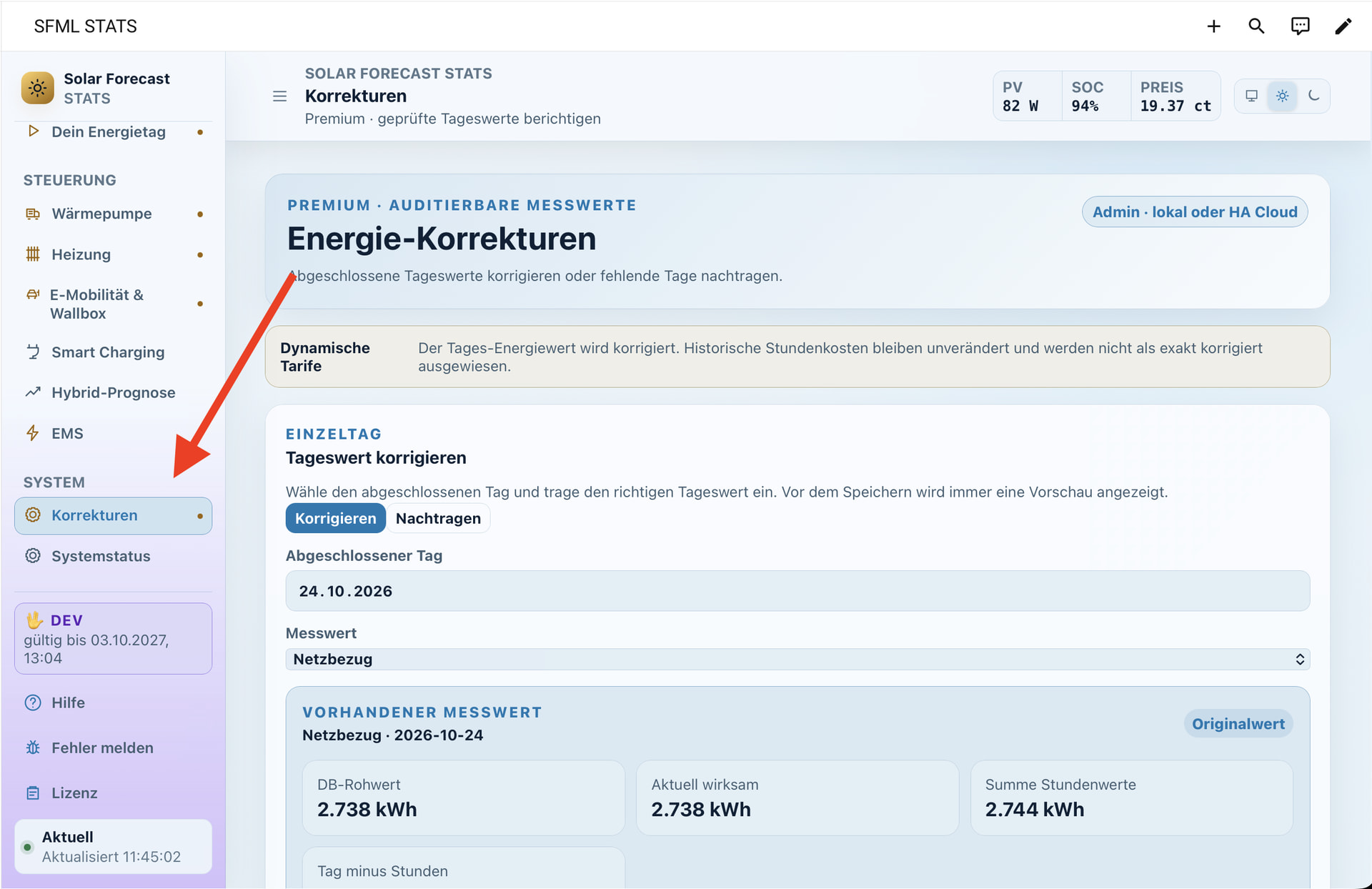
Hallo Jasper,

ich besitze keine KI daher würde ich dich bitten meine “Deutsche” Antwort mit deiner KI in deine Muttersprache zu übersetzen, da es sehr wichtig ist was ich zu sagen habe.

Bitte niemals und unter keinen Umständen Werte in der SFML-DB ändern! Das hat fatale Folgen! Man darf die Werte in der DB nicht isoliert betrachten, sie werden an vielen Stellen verarbeitet (einmalig) und / oder archiviert.
Der Stack verfügt über eine Schutzfunktion der unplausible Werte nicht für kritische Operationen heranzieht. ABER: Entscheidet sind u.A. die Time-Stamps. Eine Bearbeitung, Kopie ect verändert z.B. genau diese.
In deinem Fall kannst Du Glück haben da der Wert lange in der Vergangenheit und auch in einer anderen Jahreszeit liegt. Im kommenden Jahr / selben Jahreszeit kann er aber wieder voll durchschlagen.

Für Korrekturen gibt es extra den Punkt “Korrekturen”

Das ist der einzige und sichere Weg um Werte zu korrigieren. Da direkt eine Prüfung und Berechnung durchgeführt wird und die Werte an allen Stellen geändert werden.

Dir noch viel Spaß und danke für Dein Feedback!

Zara

Hallo,

​über Corrections hat das leider nicht funktioniert, da habe ich für den gesamten Monat Mai bereits alles auf 0 gesetzt.

​Ich könnte eventuell die Zeile aus meinem Backup wiederherstellen, aber wie kriege ich es dann richtig hin? Die Jahresansicht ist im Moment nämlich korrekt.

​Vielen Dank,

​Jasper

​PS: Die Dashboard-Karten funktionieren nur, wenn ich über die lokale IP-Adresse zugreife und nicht über die Internetadresse.

Hallo Jasper

Korrekturen und auch Dashboard-Karten funktionieren aus dem Heimischen LAN. Das ist so gewollt und eine Vorgabe der Sicherheitsrichtlinien von HA-DEV.

Bitte nicht noch einmal in der DB “rumschreiben” lass es bitte so wie es ist! - Das ist sicherer.